|
Ultimate Tutorials |
|
|
|
FTP stands for file transfer protocol and using ftps you can easily share your stuff with friends and download things from other people.
Before we begin you will need flash FXP. You can get it from the downloads section.
Your FTP should look something like this:
ftp://download.ragnarok.nefficient.co.kr/
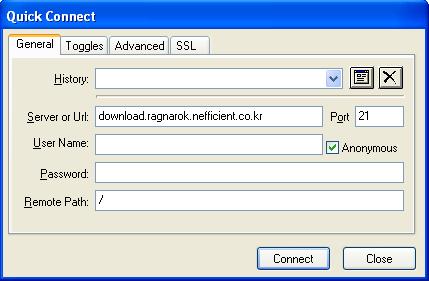
After you have the link you must paste it into flash fxp. To do this open up flash fxp then click the lightning bolt symbol up the top. You should then get the following screen appear.
Paste the link into the Server or Url area and all the other fields will automatically fill out if needed. Then click connect.
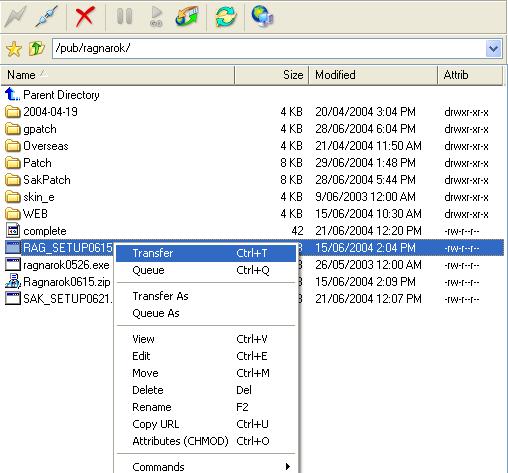
Once you have connected to the ftp you select the file you want, right click, then choose transfer.
Congratulations, you should now be downloading from an ftp. You can also upload by clicking transfer on a file in the local window. |
|
|
|
|
Copyright 2004 Ultimate Tutorials. All Rights Reserved. |