For FFX, Square has decided to return simultaneously to have only three party members in the battle. However,you still can change to the members of the group in the battlefield...
The Summons :
The summons in FFX is pretty similiar like FF8.They will have their own HP and MP.The summon monsters also have spells, the special attacks and normal attacks.
Order Player :
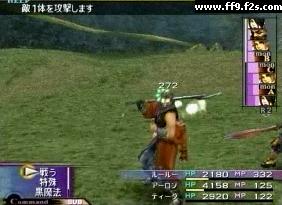
One of the great changes in FFX in the battle system is that the ATB system has been replaced. In his place there is a bar in the superior right corner that shows the order of turns. The turns will happen in regular intervals, means that if for example Tidus in the middle of a well fought battle to until the Monster To, then he will remain after the Monster To for the rest of the battle.
There are ways to change this. For example, using the spell quickly, you will have more turns added to the bar. Also, if you use the Slow spell, the turns will seem less frequent.
In the bar, there are small graphs to represent who is who. In order to represent the monsters it will put " MON " and a letter identifying to him, to represent the invocations will put " a S ", and drawings of the your characters, will represent the character.
Pressing the button of R2 it will allow you to watch the list of turns downwards.
Change Member :
During battle, the switch window will appear if you press the L1 button,
and you can change your current member with one waiting in the wings. The
member you switched in can act immediately.
Trigger Command :
During battle, you can sometimes use a special command called "Trigger
Command". When it's time, please press the left directional key, select an
option in the command window, and proceed to use it.
Overdrive :
During battle, once your character fulfills requirements for the type of
overdrive set for that character (see below), the overdrive gauge will increase
and eventually fill up. When that happens, the overdrive label will appear,
and you can use special attacks. Use it by pressing the left directional key,
choosing a command in the command window, and implement it.
Overdrive Type :
The criteria for increasing the overdrive gauge is known as "overdrive
type". Overdrive type can change depending on the "overdrive type" you set on
the menu screen. The variety of "overdrive type" increases as you fulfill
requirements during battle.
Type: Criteria for increases in overdrive gauge.
Fighting Spirit: Give damage to enemy HP.
Training: Your own HP receives damage.
Affection: Make an ally character recover HP.
Splendor: Dodge enemy's attack
*There are other various forms of overdrive type. Try various actions during
battle.
|