HTML stands for : Hyper Text Markup Language, it tells the browser what to do. A page is build up quite simple. First you have the "head" part, in which you'll find information about the site. Best way to get to know what's inside there, is to check out the source of different sites. |
Second part of the page is called "body". |
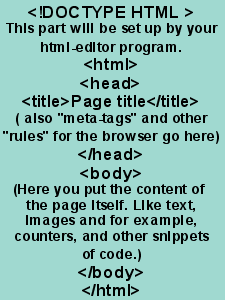 |
Here you see what the basic setup is for a HTML page. What also might come in use is a program to help you write your html. There are a lot of programs, ones you have to buy, and the free ones. Personally I like to work with HTML-kit This link will take you to the download-page for the program (its free). |