|
|
|
|
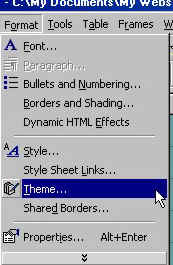
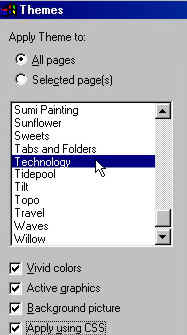
Lets add a "Theme" to your web site. A Theme is exactly what you are looking at on this page. A Theme automatically formats the background, any shared borders, navigation buttons and all of your text so all of your pages look uniform. From the tool bar at the top of the screen click on "FORMAT" and then click on "THEME."
Another box will open with many themes to try. Click on the name of a theme and you will see a preview of the theme to the right. You can apply the theme to just the page opened or to all of your web site by choosing the appropriate button in the top of the opened box. This makes changing your sites look at any time a snap. You can also choose to apply this theme with vivid colors, active graphics, a background picture and CSS. Pick them all. Give your visitors a great place to visit.
Here I picked Technology, the theme of this site, you can choose your favorite one or customize one of your own. they all work the same.
|
| ||||||||