|
|
|
|
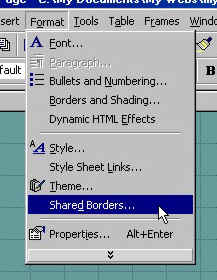
Shared borders are borders on your page that are the same or "shared" on all or some of your web pages. They give continuity to your site and ease of building your pages. On this page and all of the pages in this tutorial, the bottom, left and top borders are shared. To specify shared borders, from the tool bar at the top of the screen click on "FORMAT" then click on "Shared Borders."
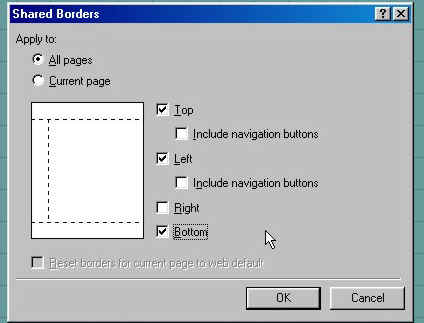
A new box will appear to let you specify what borders will be shared. Here I chose top, left and bottom as the illustration shows with dotted lines. Everything you put inside of the dotted lines will show on all pages specified by your choice of borders. To specify which pages contain these borders, simply check the "ALL PAGES" box or the "CURRENT PAGE" box.
Your page now has dotted lines like in the illustration above indicating the borders that will appear the same on all pages with the text "Comment: This border appears in all pages in your web. Replace this comment with your own content." For now, keep any content you add outside of the top, left and bottom borders as they will be automatically setup later.
|
| ||||||||