


VizPaint2D excels at making two-color blended fills. By using different composition modes, you can use the grade tool not only for backgrounds, but also to fill text and shapes.
The grade tool is displayed and an outline tool appears on the canvas. 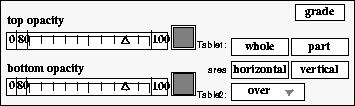
Figure 85 Using the grade tool
The grade you are creating will fill the entire canvas, extending from top to bottom.
This color will be in the upper or top section of the canvas.
The bottom color selector is highlighted. The top color selector is no longer active.
This color will be in the lower or bottom section of the canvas.
The gradient background will be painted under the camera and drop shadow.
Starting from the bottom, VizPaint2D creates a gradient background using the colors you selected.