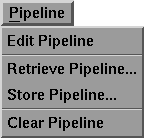
The Pipeline menu appears as follows:
The menu options are selected by dragging down until the option you want is highlighted. The option functions are as follows:
Selecting Edit Pipeline opens the Pipeline Editor mode of MotionSampler.
The Pipeline Editor mode can also be opened by clicking the following button below the shuttle bank:
Selecting Retrieve Pipeline... is the same as selecting File  Retrieve Pipeline....
Selecting Store Pipeline is the same as selecting File Store Pipeline....
Selecting Clear Pipeline opens a message box:
If you click the Clear button, MotionSampler clears the entire pipeline including all connections, modules, module settings, and module scene tools.
| You can delete individual modules and connections in the Pipeline Editor. For further information, see the Pipeline Editor section below. |