|
The Resize filter change the dimensions of an image file (or a series of image files).
To use the Resize filter:
-
1
-
Select Render > Filter > Resize. The File Requestor appears and prompts you to enter the source file name.
-
2
-
Type the name of the source file in the File Requestor, or click Show List and select the source file using the File Lister, and then click Resize Input.
-
The File Requestor appears again and prompts you to enter
the destination file name.
-
3
-
Type the name of the destination file in the File Requestor, or click Show List and select the destination file using the File Lister, and then click Resize Output.
-
The source file is converted.
To open the Image File Resize Parameters window:
- Select Render > Filter > Resize
 . .
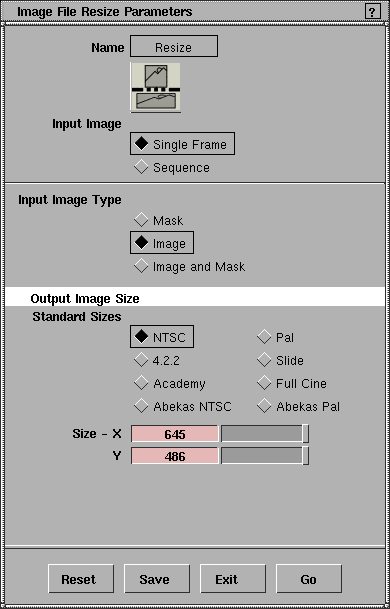
Image File Resize Parameters
Input Image
-
- Determines whether a single frame is converted (Single Frame), or an entire animation is converted (Sequence). If Input Image is Sequence, then the From, To, and By parameters become available. The default setting is Single Frame.
Input Image Type
-
- The format of the source image file: Mask, Image, or Image and Mask. The default setting is Image.
Output Image Size
-
- The size of the output image file. You can specify the Output Image Size using either Standard Sizes or a custom size (Size - X, Y).
Standard Sizes
-
- Lets you specify the size of the output image file by selecting one of eight predefined formats: NTSC, Pal, 4:2:2, Slide, Academy, Full Cine, Abekas NTSC, or Abekas Pal. The default setting is NTSC.
Size - X, Y
-
- Lets you specify the size of the output image file by entering X and Y values (see Predefined Resolutions on page 416 for a list of common image resolutions). The slider range is 1 to 100. The default value is 645 for X and 486 for Y (NTSC resolution).
From Frame, To Frame, By Frame
-
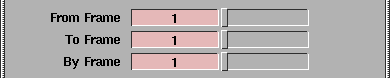
- The first frame (From Frame), last frame (To Frame), and frame increment (By Frame) of the animation to be converted. The frame number is appended to each file name. These parameters are only available if Input Image is Sequence. For example, if the From Frame value is 1, the To Frame value is 20, the By Frame value is 1, and the output file name is pixfile, then the actual output file names will be pixfile.1, pixfile.2, ..., pixfile.20. The slider range is 0 to 100 for From Frame, and 1 to 100 for To Frame and By Frame. The default value is 1.
|
Tip:
|
The By Frame value is usually 1, unless you want to convert
a sample of the animation.
|
|


