|

|
When you select
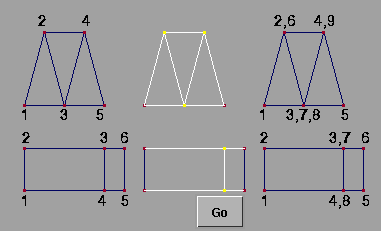
Split, each active vertex that is shared by two or more polygons is made into multiple vertices, one for each of the polygons that shared the original. Each new vertex created acquires the same position and texture coordinate information as the original shared vertex.
>
|
Note:
|
Any active vertices that are not shared are simply ignored.
|
How to Use
-
1
-
Select Polygon Edit > Vertex > Split or click this icon.
-
The system prompts:
-
Select vertices to split.
|
|
The selection and de-
selection of vertices is the
same as the Pick Vertex tool.
See Polygon Edit palette > Pick
> Pick Vertex on page 51 for
more information.
|
-
2
-
Click the left or middle mouse button and drag a pick box to select or deselect vertices. Within the pick box, any vertices that are active become inactive and any that are inactive become active.
-
3
-
Once vertices have been selected, a Go button is displayed. You can continue to select or deselect vertices until you want to perform the split. When ready, click Go. The following are examples of using Split.
|


