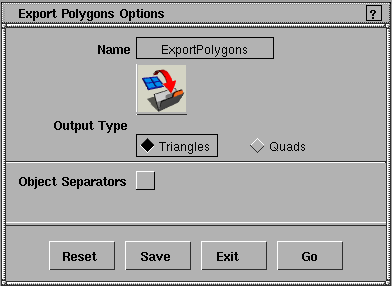
|
See Windows > Render stats
or Render > Globals
for
more information.
|
The file is triangulated according to the subdivision values specified in Windows > Render stats, unless the Quality
Type
is set to GLOBAL in the Render Globals Quality Parameters
window (Render > Globals).
>
|
Note:
|
The Triangles
format can be used with the sla and surfmate
standalones.
|
Object Separators
-
- Outputs additional information, such as hierarchy, per-vertex normals, and texture subsamples. This option is useful with the alias_to_wave and alias_to_sgo (as well as custom written) conversion programs.
Quadrilateral Output
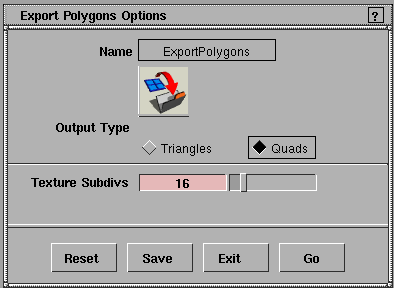
The Quads option is useful if you need to output quadrilateral geometry with texture maps attached.
Texture Subdivs
-
- The number of U and V texture samples per polygon.
Naming Textures
Due to the object-oriented approach to Alias shaders, the filename used for a texture map is not available to print out, so it is important that you name the texture the same name as the file from which the texture comes. This can easily be done in the Multi-lister by double-clicking on the texture's name and replacing it with the name of the file it represents.
Example
After applying a file texture to a shader, the default name of the texture appears just below the texture icon in the Multi-lister (for example, File#13).
-
1
-
Type the name of the file texture you are going to use for this shader in File#13's editor (for instance, cloth).
-
So that the object knows the name of the image file, name
the texture the same as the image file.
-
2
-
Double-click on the name File#13 in the Multi-lister and type the name cloth,
-
or
-
Type cloth in the Name field of File#13's editor.
-
Now when the triangle file is written, the object will
indicate that the texture assigned to it is named cloth.
Object Separated Triangle Output File Format
The following definitions are used to delineate objects.
#define		FLOAT_START		99999.0

#define		FLOAT_END		-FLOAT_START
Each triangle file is composed of lists of numbers output in machine format. A triangle is made up of three normals, vertices, colors, and parametric coordinates. Objects are delineated by two arbitrary floating point values, which are too large to be valid surface normal values.
The starting floating point value marking an object is followed by a null terminated string (the object's name), a single integer representing a count of the number of triangles in this object, and finally, the name of the texture applied to this object (if any).
Object Separated Triangle Format
The object separated triangle format is illustrated by the following example:
FLOAT_START		/* Marks start of an object (float) */

name		/* A NULL-terminated string (chars) */

count		/* No.of triangles to follow (int) */

texture_name		/* A NULL-terminated string (chars) */

nx ny nz		/* Normal,   vertex 1 (floats)*/

fx fy fz		/* Vertex 1, triangle 1 (floats)*/

cr cg cb		/* Color of vertex 1.0-255 (floats) */

u v		/* U,V of vertex 1 (floats) */

nx ny nz		/* Normal,vertex 2 */

fx fy fz		/* Vertex 2, triangle 1 */

cr cg cb		/* The color of vertex 2. 0-255 */

u v		/* U,V of vertex 2 */

nx ny nz		/* Normal,   vertex 3 */

fx fy fz		/* Vertex 3, triangle 1 */

cr cg cb		/* The color of vertex 3. 0-255 */

u v		/* U,V of vertex 3 */

etc...

FLOAT_END		/* Marks the end of an object */

name		/* - name of object just terminated */

FLOAT_START

etc....
Zero Count Objects
If the number of triangles for a given object is zero (0), then the object is a collection of other objects that may or may not contain triangles, or other sub-groups of objects. In other words, zero count objects describe the hierarchy or DAG associated with the model.
For example, a model of an arm might look something like the following (if translated into plain text and formatted):
FLOAT_START

arm

0

	FLOAT_START

	hand

	0

	FLOAT_START

	thumb

	567

	(567 triangles here)

	FLOAT_END

		thumb


		FLOAT_START

		finger

		2143

		(2143 triangles here)

		FLOAT_END

		finger


		(3 other fingers here)


	FLOAT_END

	hand

	FLOAT_START

	elbow


	345


	(345 triangles here)


	FLOAT_END

	elbow

	(some other arm-related objects here)

FLOAT_END

arm
For an example of how to read a triangle file, see the sample file /usr/aw/alias/Gifts/src/reader/reader.c
Object-Separated Quadrilateral Output File Format
The quadrilateral output file format allows tessellated output in a form other than triangles, and outputs texture information if it exists.
|
|
For information on Windows
> Information > Render
stats, see Rendering in Alias.
|
Each quadrilateral corresponds to the subdivided approximations to the surface created during the Alias triangle tessellation phase of rendering. The higher the surface subdivisions set in the Render Stats spreadsheet editor, the more quadrilaterals are produced for that surface.
If the object is textured on the color channel, each quadrilateral can have a texture swatch on it. The swatch is created by a uniform parametric sampling of the texture across the quadrilateral. In addition to the texture swatch, the name of the texture assigned is included at the head of each object, and the hierarchy of the model is maintained.
Access this feature by setting a shell ENVIRONMENT variable from a UNIX shell window, and then running Alias from that window. The command to set this variable is as follows:
setenv QUAD_OUTPUT 16
If the QUAD_OUTPUT environment variable is set to any positive integer, excluding zero (0), then quadrilaterals are output into the file instead of triangles when you select the Object Separators option of the triangle output menu. The number that QUAD_OUTPUT
is set to controls the resolution of the texture swatch created in the file. For example, using the above setting of 16, the texture swatches produced in the quad file would be of 16 by 16 pixels.
The following definitions are used to delineate objects.
#define		FLOAT_START		99999.0

#define		FLOAT_END		-FLOAT_START
A quadrilateral is made up of four normals, vertices, and parametric coordinates. Objects are delineated by two arbitrarily large floating point values, which are too large to be valid surface normal values. You cannot read quadrilateral files, because they are composed of lists of numbers output in binary format.
The starting floating point value marking an object is followed by a null terminated string (the object's name), a single integer representing a count of the number of quadrilaterals in this object, and then if the number of quadrilaterals is non-zero, the name of the texture applied to the object (if any). If there is no texture applied to the object, a single, null character is printed.
>
|
Note:
|
In some cases, Alias is forced to write triangles instead of
quadrilaterals- near the edge of trim curves, some faces,
triangle polysets, and so on. In such a case, a quadrilateral is
printed for every field in the last vertex that is set to 111.3,
and the texture array is always 1 by 1. (The number 111.3
was chosen because it is a floating point number that gets
written exactly with fprintf. Not all floating point numbers
have this property).
|
Object Separated Quadrilateral Format
The following example illustrates the quadrilateral format.
FLOAT_START		/* Marks start of an object (float) */

name		/* A NULL terminated string (chars) */

count		/* Number of quads to follow. (int) */

texture_name		/* A NULL terminated string (chars) */

nx ny nz		/* Normal, vertex 1 (floats)*/

fx fy fz		/* Vertex 1, quad 1 (floats)*/

u v		/* U,V of vertex 1 (floats) */

nx ny nz		/* Normal,   vertex 2 */

fx fy fz		/* Vertex 2, quadrilateral 1 */

u v		/* U,V of vertex 2 */

nx ny nz		/* Normal,   vertex 3 */

fx fy fz		/* Vertex 3, quadrilateral 1 */

u v		/* U,V of vertex 3 */

nx ny nz		/* Normal,   vertex 4 */

fx fy fz		/* Vertex 4, quadrilateral 1 */

u v		/* U,V of vertex 4 */

s t		/* Ints. for resolving text. swatch */

texture_swatch		/* s times t Rgba structures. */

etc...

FLOAT_END		/* Marks the end of an object */

name		/* Name of object just terminated */

FLOAT_START

etc....
If the number of quadrilaterals for a given object is zero (0), then the object is a collection of other objects that may or may not contain quadrilaterals, or other sub-groups of objects. In other words, the zero count objects describe the hierarchy or DAG associated with the model.
For example, a model of an arm might look something like the following (if translated into plain text and formatted).
FLOAT_START

arm

0

	FLOAT_START

	hand

	0

	FLOAT_START

	thumb

	567

	(567 quadrilaterals here)

	FLOAT_END

	thumb

	FLOAT_START

	finger

	2143

	(2143 quadrilaterals here)

	FLOAT_END

	finger

	(3 other fingers here)

	FLOAT_END

	hand

	FLOAT_START

	elbow

	345

	(345 quadrilaterals here)

	FLOAT_END

	elbow

	(some other arm-related objects here)

FLOAT_END

arm
For an example of how to read a quad file, see /usr/aw/alias/Gifts/src/reader/qreader.c
>
|
Note:
|
Polysets are written out in this format. However, if you have
already converted your object to a triangular polyset and
then choose quad output, only triangles are printed-
triangles are not welded back into quads.You can preview
the kind of triangles that will be output by using the convert
to polygons feature in the Alias interactive package.
|
|


 . The Polygon File Output Options box appears. This option box appears differently, depending on if you want output in triangles or quadrangles.