File > Exit
Exiting from Your Alias Session
Purpose
Closes all Alias windows.
How to Use
Select
File > Exit
.
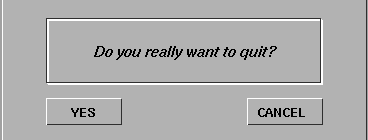
A confirmation box is displayed.
To exit, click
YES
or type the letter
y
to exit.
To cancel and return to your Alias windows, click
CANCEL
or type the letter
c
.
Copyright © 1998, Alias|Wavefront, a division of Silicon Graphics Limited. All rights reserved.
Please send questions or comments regarding the documentation to:
[email protected]