|
|
Edit > Ungroup
|
Ungrouping Objects
|
|
|
|
|
Purpose
To separate parts of a group and to remove nodes from a hierarchy.
How to Use
-
1
-
Select Pick > Component or Pick > Object.
|
|
Intermediate levels of
groups can only be
ungrouped using the SBD
window; they cannot be
picked from the other
windows.
|
-
2
-
Pick the parts of an object you want to ungroup, either from the modeling window or from the SBD window.
-
3
-
Select Edit > Ungroup. The selected components are removed from the group.
The ungrouped parts become top-level blocks in the SBD window.
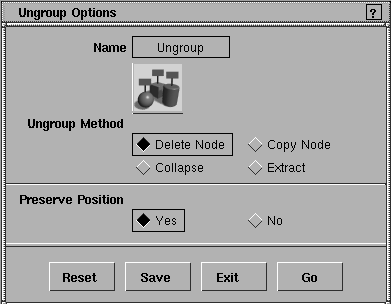
Ungroup Options
Select Edit > Ungroup- to display the Ungroup Options window. to display the Ungroup Options window.
|
|
|
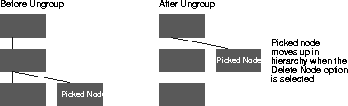
Delete Node
-
- The picked node and all its descendants are ungrouped from its parent DAG node.
-
If the node picked is a root node, the node is deleted and
all its children are now root nodes.
- If the node is an only child, the parent is deleted.
- If the node has siblings, the node gets adopted by its grandparent (that is, it moves up one level in the hierarchy).
|
|
|
Copy Node
-
The picked node and all its descendants are ungrouped
from its parent DAG node.
-
The parent DAG node and all its transformations are
copied, and the copy becomes the new parent DAG node
for the picked node.
- The picked node must have a sibling for this method to work.
- If the node is an instance, an error message will appear on the information line.
- If the parent node is an instance, nothing happens.
- Copy Node makes the current node have its own parent, if it doesn't have one already.
- Transformations are copied.
- A new parent is grouped under the parent's parent.
- If the parent has no parent, a new group is formed.
Collapse
-
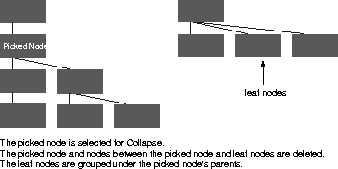
- Simplifies complicated hierarchies of curves or surfaces by collapsing all the nodes below a given DAG node into a single level.
|
|
|
|
|
Collapse is especially useful
for ungrouping objects while
keeping transformations on.
It can also be used to apply a
set of transformations
directly from a DAG node to
the CVs that make up the
geometry underneath.
|
- If the picked node is an instance, an error message is displayed on the information line.
- If there is an instance in the group, the collapse is only performed below the lowest instance.
- All nodes from the picked node to, but not including, the leaf nodes are deleted. The accumulated transformations are then applied to the geometry of the leaf node. The transformations of the leaf nodes are reset, and the pivots are set to zero. The leaf nodes are then grouped under the picked node's parent. If there is no parent, the leaf nodes become root nodes.
- Depending on the node you picked, there may be some collapsing, but no ungrouping. When collapse occurs, all the branches under the picked nodes, including the picked node itself, are collapsed.
- If an instance is picked, the following message appears: Cannot ungroup INSTANCE nodes with DELETE NODE or COLLAPSE.
- If a node with geometry right below it but nothing above it (root component) is picked, nothing can be ungrouped but collapsing still occurs. The following message appears: Root component collapsed but not ungrouped; node transformations were applied to CVs.
- If CVs or edit points are picked, no collapsing occurs. To warn you that this is happening, the following message appears: No DAG compression was done.
Extract
-
- The picked nodes and all their descendants are ungrouped from the parent DAG node. The picked nodes become root nodes.
Preserve Position
These check boxes are only valid when the Method is either Delete Node
or Extract.
Yes
|
|
You cannot ungroup
hierarchies that contain
instances if you have
Preserve Position set to Yes.
|
-
- The world space positions of all objects are preserved after ungrouping. A transformation is applied to the CVs of the objects being ungrouped.
No
-
- The ungrouped objects lose the transformations of their old parent hierarchy.
|


