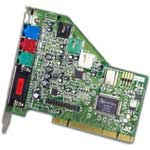
 The first step is to determine if any of these components were integrated into your motherboard. If any of these components did come bundled into your motherboard you obviously don't have to worry about installing those components.
Installation of accessory cards is alot like playing with Lego. You find an open slot and plug it in. This is the easiest and least time consuming step in the computer building process. That being said there are a few things to be aware of.
The first step, determining the format of the card actually took place (or at least should have) when you purchased the card. Sound and Modem cards should both be in PCI form . Video Cards are sold in PCI and AGP configurations. This Bus was created specifically for graphics cards and we recommend the use of it whenever possible.
First the Video Card. Install the video card into the appropriate slot (hopefully an AGP) by pressing down firmly (but not too firm) till it is well seated. Secure the Card to the computer case by fastening a screw to the case through the top of the card.
The sound card and modem are installed in the same manner in (hopefully) the motherboards PCI slots.
Your computer is now just about built!!! Now you need to double-check your work to make sure it was all done properly.