
 |
 |
 |
 |
 |
Methods of Control |
|
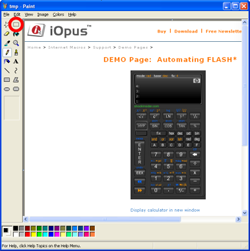
While we can only conclude authenticity does not seem to be an absolute ideal, image creators or copyright owners can attempt to maintain the relative authenticity of their images, by preventing other people from editing their images or displaying them without the appropriate credit. And of course, there are also ways to circumvent such methods of control. All of the control methods, however, require medium to strong familiarity with how websites are created. The most common way that people take images from the web and download them to their computers is to right-click the image and choose “Save As” from the menu. The easiest way to discourage this is to add a small piece of JavaScript when creating your website. Simply copy and paste the following code after your <head> tag: This script will work only for Netscape or Internet Explorer, which are used by about 75% of people on the web, and can be circumvented by disabling JavaScript (which most people wouldn't know to do, or how to do it). Other methods of discouraging downloading, which usually require special software or advanced coding skills, include creating decoy images (i.e., when you right-click and choose “Save As,” the image that you save is different than the one you thought you were getting. This is the method used by Flickr), turning the images into Flash objects, or adding a watermark to the image (so that people can still download your images, but your name or website remains visible). The easiest way to get around all these techniques is simply to use the Print Screen function; make sure the whole image is visible on your monitor, then press Shift + Print Screen. Open Paint or a similar drawing program and choose Paste, then save it to your computer. This method will work no matter what as long as you don't need an exceptionally high-quality version of the image. Watermarks can be removed (effectively) by editing them in Photoshop, usually using the Clone tool. This is a little more difficult. Naturally, you should only be using these workarounds if you intend to follow the guidelines for fair use of copyrighted material, and you should only use copy prevention methods (aka digital rights management systems) if they allow for fair use. |
 |
| An example of an image with the "iStockphoto" watermark. If you are using Internet Explorer, try to right-click it and see what happens. | |
 |
|
| This website with a Flash object (the calculator) inside it has been copied (via Print Screen) into Microsoft Paint, where it can be saved as an image file. | |