Google Adwords
Google AdWords ads connect you with new customers at the precise moment when
they're looking for your products or services. With Google AdWords you create
your own ads, choose keywords to help Google match your ads to your audience and
pay only when someone clicks on them.
Now if you are thinking that simply signing up and creating a adword ad will make you money ,then forget it !! You have to know something special to earn money with adwords. If you follow these formulas and rules , nobody can hold back you .
In this chapter i'll teach you every steps .
step-1:
Signing Up With Google :
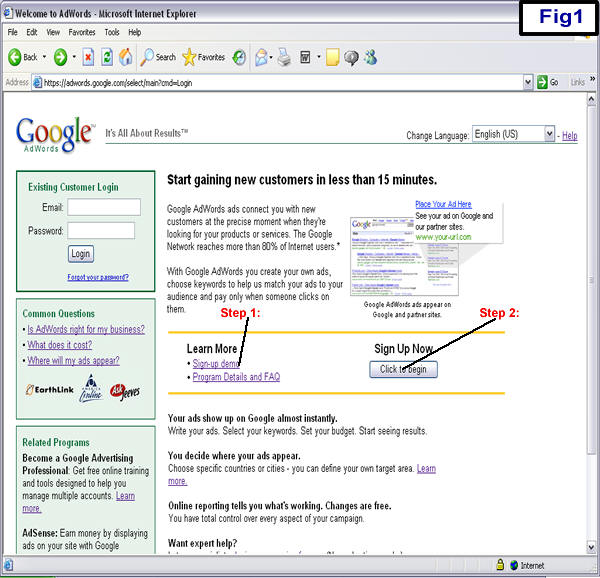
First thing you need to do is set up your account. to start now. You'll come to this screen. (see Fig1 below)
In step 1 from Fig1 above, I recommend clicking the "Sign-up demo" link to get a
feel for what you will be doing. After you have watched the demo hit the "Click
to begin" link, shown in step 2 from Fig1 above. You will see this screen. (see
Fig2 below)
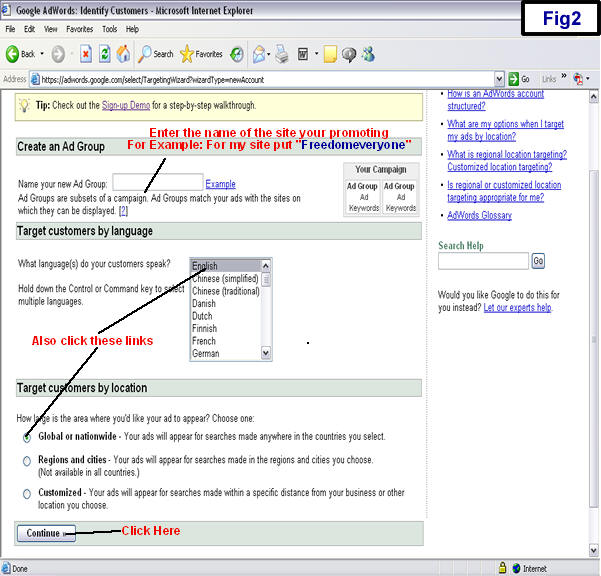
In Fig2 above, make sure you have the "English" language highlighted and also
the "Global or nationwide" button clicked, then hit the "Save & Continue"
button. You will see this screen. (Fig3 below)
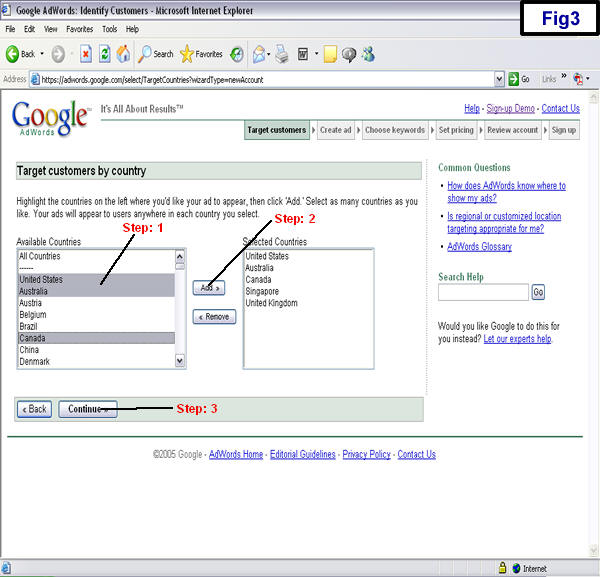
In step 1 from Fig3 above, I recommend adding the following countries:
U.S., U.K., Canada, Australia, Singapore. You can add others, but these are the
one's I have the greatest success with. To do this you need to highlight all of
the countries by holding done the Control (Ctrl) key on the bottom left
hand corner of your keyboard and clicking the countries you wish to use.
In step 2 from Fig3 above, hit the "Add" link to add your countries.
In
step 3 from Fig3 above, hit the "Save & Continue" button. You will see this
screen. (Fig4 below)
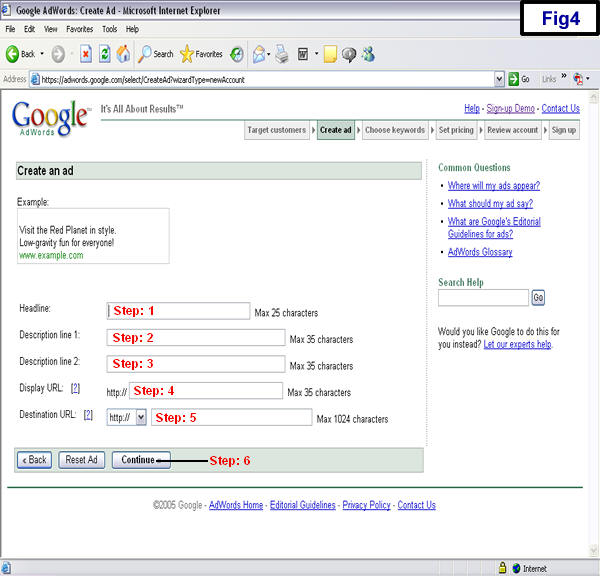
In step 1 from Fig4 above, enter the headline for this Ad.
In step 2&3 from Fig4 above, enter the description for this Ad.
In step 4 from Fig4 above, enter the display URL. This is what the customer will see on the Ad. I recommend putting the actual URL of the site you are promoting. This is just what the customer sees, not where they are taken when they hit the link.
In step 5 from Fig4 above, enter your hoplink for the site you are promoting. This is where the customer will be brought when they click your Ad. For instance, if you are promoting Adwordsmiracle.com site, you should put hop.clickbank.net/?YOURNICKNAME/richjerk. Remember to put your ClickBank nickname in where it says YOURNICKNAME.
In step 6 from Fig4 above, click the "Continue" button and you will see this screen. (Fig5 below)
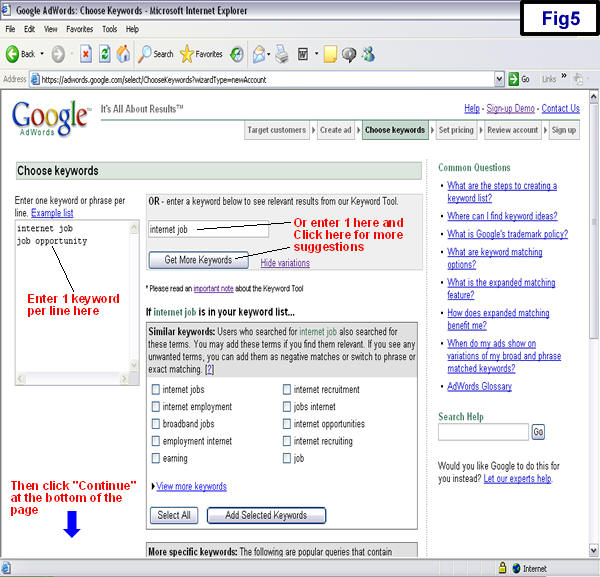
Enter the keywords you want to bid on for this ad.
After you have entered the keywords you wish to use, click the "Continue" link and you will see this screen. (see Fig6 below)
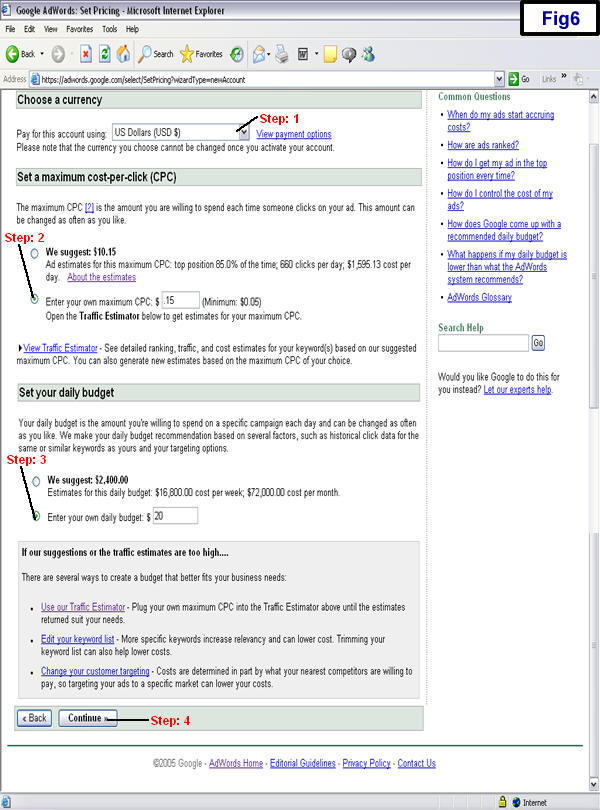
In step 1 from Fig6 above, you need to enter your payment type. Next, in Step 2,
you will enter your own maximum cost per click. I recommend starting with 25
cents. Next, Step 3, you will enter your daily budget. This is the
amount you wish to spend in one day. You can start with as little as $5 dollars.
I
recommend setting this at $10 for now. You can always change this later. But if
you want to start at $5, go right ahead.
In step 4 from Fig6 above, click the "Continue" link. You will see this screen. (Fig7 below)
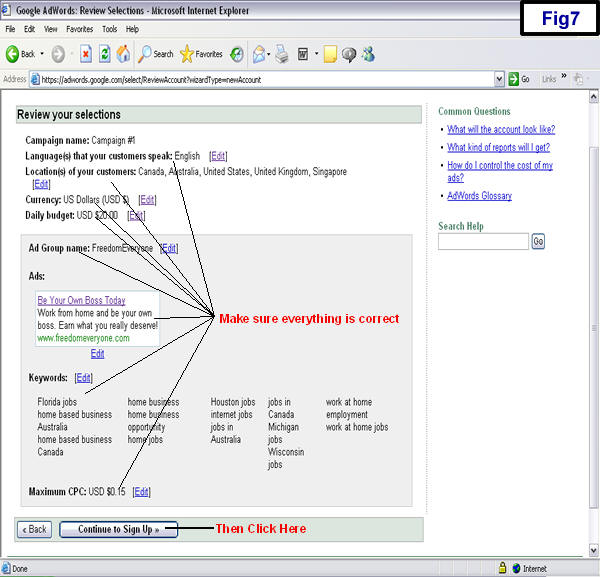
Make sure everything is correct and hit the "Continue to Sign Up" link. You will see this screen. (Fig8 below)
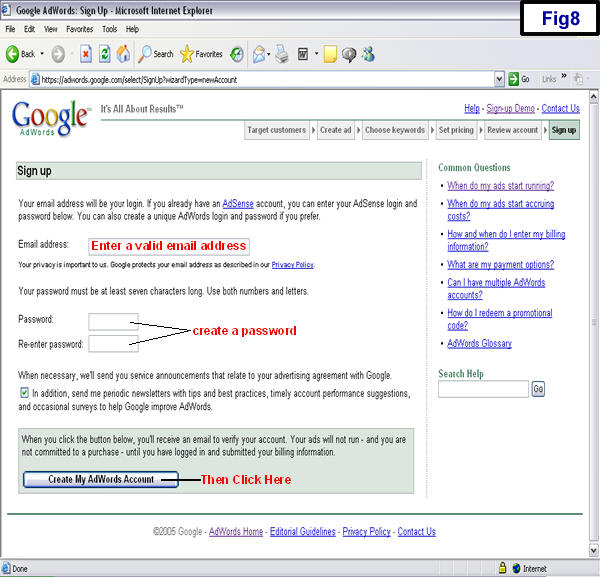
Fill in your information and click the "Create my AdWords account" link. You
will be sent a confirmation email from Google with a link to their verification
program. Click the link in the email and you will have to login with you Email
address and your password. You will be ask to supply your billing information.
Once your billing information is accepted, your ads will start running on Google
immediately.
While you're in your account, take a look around and get a feel for the features they offer.
Here are some helpful Tutorials presented by Google:
Google Keyword Matching Options
Understanding Conversion Tracking
Step -2: Writing An Ad Title That Sells Like Crazy.
Step -3: Writing An Ad Body That Sells Like Crazy.
Step -4: The Ranking Algorithm -CTR & QS.
Step -5:Selecting Keywords And Number Of Keywords.
Step -6: Number Of Ad Groups W.R.T Tightly Closed Keywords.[coming soon]
Step -8: Determining Daily Budget.
Step -9:The Problem Of Inactive Keywords.
Step -11: Optimizing With Ad Variations. [coming soon]
Click Here to go back to the main menu!