

Fleet Management:
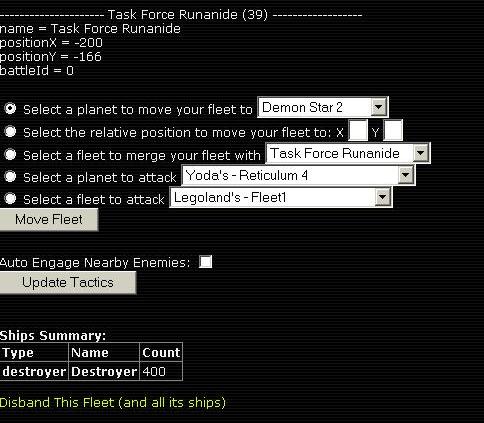
From this page a quick summary of the different types of ships built can be seen. The amount of ships of each category is listed after the category itself. Also Friggates are not displayed, which is why the total ship count is slightly off. This link will open a page where each separate fleet can be given its orders, from where to move to who to fight. A sample fleet option is show below.
Secondly the fleet is given several options for tasks to perform. The first is to move to planet, the planets available are all colonies of the empire. In order to move to a non-empire planet one much move the fleet according to the X:Y coordinate system the governs the galaxy locations. More about this coordinate system is explained in the Star Map section of the guide.
If the fleets become unmanagable in number then it is possible to merge. However be warned, there is no way to split a current fleet so be careful how much merging is done so that one does not have too few fleets to adaquately protect the planets of the empire.
Fleets can also be ordered to attack enemy planets and any fleets that are visible by radar. These options are rather self explainatory. A feature for any fleet is the "Auto Engage Nearby Enemies" option, this will allow the fleet in question to automatically engage any fleet not belonging to the empire when they come within range. This allows one to protect the space of the empire without having to be online 24/7. However such fleets will also chase anything that is nearby and could end up become scattered when one logs in, so use this feature with caution.

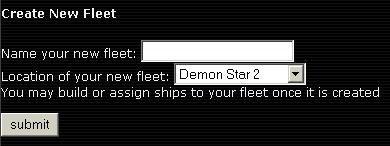
Create New Fleet:
A very simple function. One must decide on only a few things, first what to call the fleet, anything will do as long as it is not offensive. Secondly fleets can only be created at existing colonies, one cannot create a fleet in the middle of empty space. Once created ships can be merged into or built for this fleet.
Build Ships:
Building ships requires several decisons. First is which ship type to build, these must be pre-existing ship types (whose creation is described later). Then the location of the planet where the fleets will be built is choosen, such planets must have some Production Facilities present to allow for the creation of these ships. Lastly choose which fleet to place the newly produced ships into, or if those ships will simply orbit the planet that produced them in separate fleets. I advise against separate fleets and strongly urge one to always choose an existing fleet to place the ships into. Not doing so can cause problems later of having too many fleets to be able to manage them all effectively.
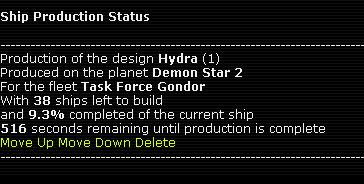
Ship Production Status:
This page is used to view the current status of all ship production orders that have been placed but not comletely fulfilled yet. The jobs are done in the order they are placed, however it is possible to rearrange this order. The "Move Up" and "Move Down" links will move the selected job up or down the job order so that one can get a batch of destroyers ready for an incoming fleet or move a colonizer up the ladder to be done before a fleet of fighters. There is also a "Delete" option, but it is advisable to never use this feature unless absolutely necessary. If used the selected job will delete the ship order, but all of the turns used to create this order will be lost and cannot be recovered.
This menu will allow the creation of designs that are used to produce the warships, colonizers and scouts of the empire's fleet. The initial summary screen will display how many different designs are currently in use by the empire. They will be displayed after the type of ship in question, for example "Destroyer 4" instead of "4 Destoyer". As with Fleet Management, the Friggates designs are not displayed correctly. However since only one such design is necessary this is not a problem.

Designs:
This is the page that initially appears when the Ship Design Management screen appears. It will list all current designs along with information about each, including the components that are used on the ship, its build time, hit points, speed and upkeep. A few notes about the currently available ships. Colonizers are completely unarmed and only one such design is needed at a time. Fighters and Destroyers are the two ships of war that are currently available. Fighters have twice the hull as Destroyers but more then half the firepower, so in a fight a Destroyer will beat a fighter one-on-one. Also Fighters lack a radar to detect passing ships and planets as well as will run out of fuel in a long battle.
Add Design:
From here one can create the ship designs that are key to the defense of the empire. First the ship type must be choosen, for example Colonizer, Fighter or Destroyer.
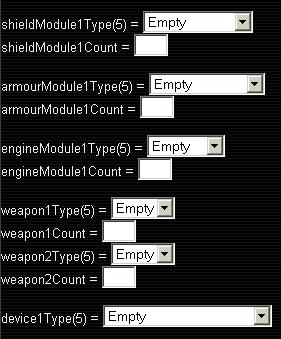
From the drop-down menus choose from the devices that are available from research, as long as the size of each device is equal to or less than the available space in the slot, as shown by the parantheses (X). Once the component is choosen then the amount of this component must be decided. In the example to the right the weapons slots are size 5, while a basic gun is only of size 2. This means that two such guns can occupy each weapon slot. Sometimes one will not perfectly fill the ship, and this is fine as everyone else has the same limitations. When more research is available then this will become less and less likely.
This feature is used to save fleet designs from game to game, or send them to a friend. Simply copy the string of text information that is the ship design and then use the Import Design feature to recreate the same fleet design in another colony or a new game.
Import Design:
As described above, used to recreate designs from past galaxies or other players. Make sure to change absolutely nothing in the text string and paste it in exactly as shown in the Archive Design screen, otherwise the feature will not function correctly and the design will be lost.
Disband Design:
Just as the name states, used to disband a design that is no longer in use or are cluttering up the design screen. Doing so will not disband all ships that are currently active and using this design, as this feature cannot be used if such ships exist. It may only be used to delete unused designs