Search:
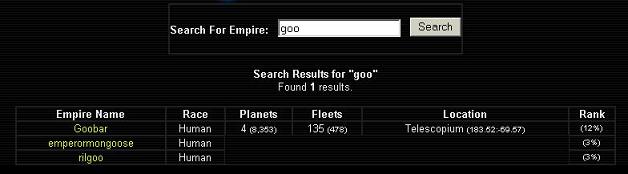
A very simple feature, allows a seach under a particular set of characters for all empire names containing those characters. Doing so will display some information about each empire. For example the below search is on "goo" and three matches are found. Each entry will display the empire's full name in the first column and the race of the empire in the second column. The third column will display the amount of planets that the particular empire has, along with the amount of total usable planet space the empire has at its disposable in this manner, "Planets (Space)". The fourth column will display the fleet power of the empire in the following manner, "Total Fleets (Total Ships)". The Fifth column will display the location of one of the planets in the empire, giving its X,Y coordinates. The last column will then display the percentage of power the empire has in comparision with the searching empire.
Currently under development
Ranking:
Will display the same information that an empire search provided, but will do so for all empires of about the same power as the searching empire.. The top ten are always displayed, regardless of the searching empire's size. Everything about the empire contributes to the ranking, from materials stored, ships build, planets colonized and population, among many other things. However at this time materials stored count more towards rank than any other factor.
Discovered Planets:
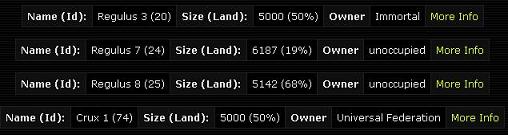
As planets are colonized and fleets move around the galaxy other planets will be discovered, some colonized by others and some unoccupied. As this is done a list of these planets is kept for reference. It can be used to pick a target for conquest, choose a potential ally or to decide which planet to colonize next. The list can get quite long and is not searchable with a Ctrl-F keyboard function. Instead one must scroll through the planet names to find what is desired, the saving grace of this feature is that the planets are grouped according to name and are not completely random. An example of what is displayed in this page is below. The name and planet ID of the planet are displayed first. This is followed by the size of the planet, with the land area being displayed as "Size (Usable Land)". Finally the owner of the planet is displayed, which can be researched in the search feature of the Diplomacy screen. However if this planet changes hands this information will only be updated if the planet is scouted again. The More Info link will display a bit more specific information about the planet itself and will be useful once some of these features are implemented, such as temperature. An example is shown below, it is very much the same information that one can see from the Civilian Department screen.