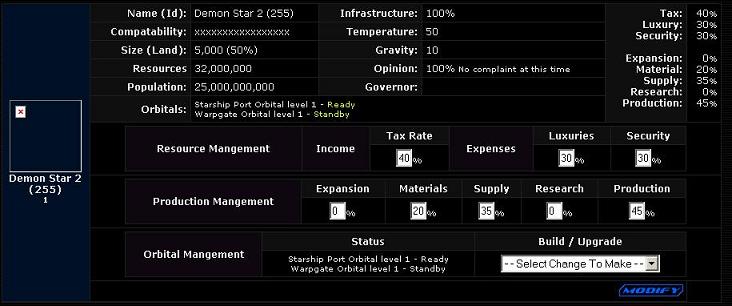
Size (Land): Displays two parts, the first number is the total land of the planet, the number in paranthesis is the percentage of buildable land. Therefore for the planet above, which is a uniform homeworld, the amount of available land is 2,500 spaces.
Population: This is the total population that the planet can sustain. This number can be calculated with the following equation when the infastructure is at 100%:
(Available planet spaces) * 10,000,000 = (Total Population)
This population is what generates the empire's Credits to allow for the colonization of unclaimed worlds.
Orbitals: Currently there are two orbitals available: Starhip Ports and Warpgates. Warpgates allow for ships to move instantly from one planet with a functioning warpgate to another such planet, regardless of where it is in the galaxy. Once the orders to move the fleet are given the next game tick the fleet will be transported to the target planet. Starship Ports are the second orbital and they provide a planet with an additional 500 Production facilities to speed the building of ships and orbitals. Each orbital requires a certain amount of resources to maintain an active status, therefore when not in use it is best to keep the orbital in "Standby" status. This can be done from the Orbital Management section of the screen.
Infastructure: This represents how much of the available land is ready to be built upon. The higher the infastructure the greater the population available to work and the higher the output for this planet's buildings.
Opinion: This represents the planet population's view of the ruler (you). This value is altered by changing the Tax, Security and Luxury rates from the Resource Management screen. Below this is decribed in greater detail.
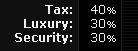
Tax: This is the rate from which credits are generated. Any tax rate from 38% and below and the message "We are enjoying the low taxes" is displayed. During this time the opinion of the masses will increase until it reaches 100%, which is when the population is happiest. If the tax rate is from 39-40% then the message is "No complaint at this time" and the opinion will not change. Any tax rate above 40% will result in the message "Taxes too high" and a drop in the tax rate. However regardless of the rate, the opinion will decrease/increase in a uniform manner.
Luxury: This is the rate in which entertainment is provided to the masses, the higher the rate the happier the population. Anything lower than 25% results in the message "Not enough luxuries" and a decrease in the population. To affect an increase of the opinion the luxury rate must be 25% or higher, although no change in the message will appear until the 31% rate is reached the opinion will still increase. This rate will increase/decrease faster the farther off the median the rate.
Security: This is the rate in which the planet is protected from foriegn agents and spy attacks. At a rate of 26% the message "Not enough security" will appear but the population opinion will not decrease. This is true all the way down to 0% security, therefore security does not affect general opinion at this time.
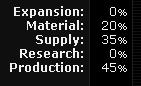
Expansion: This rate determines the speed in which the planet's infastructure is increased. The higher the rate the faster the infastructure increases, until it reaches it's maximum of 100%. At this point Expansion can be returned to zero as it is no longer contributing to the planet's development and is using valuable space that has better uses.
Material: As suggested this rate determines how much of the planet is devoted to increasing the Material income. The higher this rate the more Materials are generated per tick.
Supply: As suggested this rate determines how much of the planet is devoted to increasing the Supply income. The higher this rate the more Supply is generated per tick. Supply is generated at a slower rate than Material so an equal amount of the planet devoted to each will provide a higher Material income than Supply income per tick.
Research: This rate determines how much of the planet is devoted to Research facilities and the increase of the empire's knowledge. The higher this rate the faster topics are researched. This value is controlled at the Research department's screen.
Production: This rate determines how much of the planet is devoted to production facilities and the building of ships and orbitals. The more production facilities present the faster ships and orbitals are produced.