Network Technology Foundations
Chapter 5 - Network Security and IT Career Opportunities
Hacker attacks
It is important that all employees who have access to sensitive information are aware of possible attacks to their computer systems and are kept up to date about new attacks.
- Spoofing - A hacker uses software to send altered or wrongly-formed packets to a system to fool it into thinking that they originate from a trusted source.
- Man-in-the-middle attacks - A hacker intercepts packets sent across a network to discover sensitive information such as passwords (packet sniffing). Such attacks can be defeated by using strong encryption.
- Denial of Service Attacks (DOS) - A web site is bombarded with incessant, rapid requests for a web page or some other service, to the point where the server is overwhelmed and cannot deliver any pages to legitimate requests.
- Distributed Denial of Service - Similar to DOS attacks, but the tidal wave of requests originate from many machines. Often the hacker uses a virus to deliver the DOS software to the computers of unsuspecting innocent users, programmed to attack the target site at a predetermined moment.
- Guessing passwords through brute force - Software exists that will generate passwords by trying all possible combinations of upper and lower case letters, digits and punctuation symbols. A hacker may also use a dictionary containing a long list of commonly used passwords. Defeat dictionary programs using a strong password consisting of letters, digits and punctuation symbols.
- Back door - When a developer creates a computer system, (s)he often leaves a secret method of logging on to the system (such as a secret username and password) that by-passes any security that the system's owner may add.
- Trojan horse - A program that pretends to serve one function (such as a spam E-mail blocker) but actually performs some other secret function, such as allowing a hacker to view everything that you type at the keyboard or even take control of your computer!
- Social engineering - Obtaining passwords by non-technical means such as rummaging around builder's skips (dumpsters) for computer printouts, ringing the company secretary masquerading as the technical engineer who needs the password etc. It is vital that all employees take care of sensitive information: use a shredder, don't reveal the password to anyone who asks etc.
For details on Authentication, Encryption and Malware (viruses etc.), see General Topics - Security and Malware
Virtual Private Network (VPN)
Uses encryption to extend a company intranet across the Internet to remote sites (an extranet). Data packets are encrypted and enclosed within other packets before being transmitted (done using tunnelling protocols). Also used to transmit packets between IPX/SPX networks over the TCP/IP. Internet standard tunnelling protocols:
- Point-to-point Tunnelling Protocol (PPTP)
- Layer 2 Tunnelling Protocol (L2TP)
- IP Security (IPsec)
Remote Access Server (RAS): Similar to VPN but allows employees to gain access to the company network and resources through a remote dial-up. RAS uses callback: after connecting remotely, the user is disconnected and the RAS calls the user back to ensure the remote computer is authorised.
For a guide to digital certificates, see General Topics - Security.
Intranets and Extranets
An intranet is a private company network isolated from the Internet by a secure gateway. It enables private traffic and equipment that doesn't necessarily meet Internet standards. An extranet is an intranet extended over the Internet (possibly via tunnelling protocols) to allow trusted parties to log on to the extranet
- via accounts and passwords,
- possibly at specific times,
- possibly from specific trusted computers.
Firewalls
Controls access to a private network from the Internet, to certain sensitive systems within a network (internal firewall), or to individual computers (personal firewall). Allows legitimate traffic but blocks malicious attacks.
- Packet filtering - checks source and destination IP address and TCP/UDP port for each packet at the data link (level 2) and transport (level 3) layers of the OSI-RM. One weakness is that packet filtering does not examine the bytes of the packet itself.
- Provides encryption for VPN.
- Authenticates passwords.
- Creates logs of passwords and traffic.
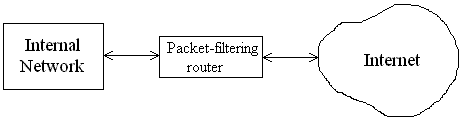
Packet-filter topology. Router contains a packet-filtering firewall:
Dual-homed bastion host. This is a firewall connected via an NIC to the internet network and via another to the Internet:
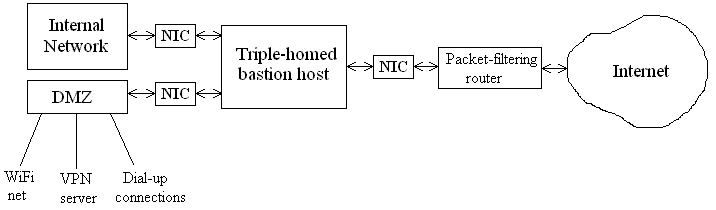
Triple-homed bastion host. This topology is a dual-homed bastion host with an additional connection to a Demilitarised Zone (DMZ) - a network connected between the internal network and the Internet, which give access to the Internet from trusted users but maintains isolation from the internal net (perhaps the users aren't trusted that much!) The DMZ can give access to possibly insecure connections such as WiFi and dial-up modems.
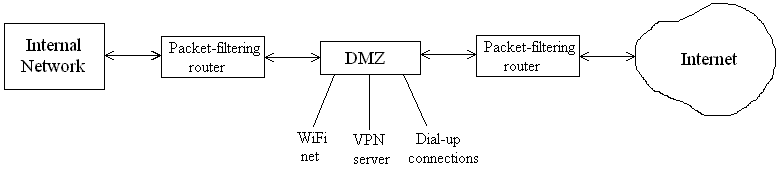
Screened subnet (back-to-back firewalls). The DMZ sits between the Internet and the internal net connected to both through packet-filtering routers. Acts as an additional buffer between the networks.
Troubleshooting firewalls
- Firstly, check the IP address and subnet mask of the destination (beyond the firewall).
- Does the firewall allow access to the correct port? Some services use unusual ports which the firewall may not be expecting. Check various services to see which ports the firewall allows and which it blocks.
- Does the firewall allow you to access a particular IP address?
- Check the DNS resolution.
- Use a ping 127.0.0.1 to check the connectivity of the local computer. Perhaps it isn't a firewall problem at all!
- The firewall may cause a bottleneck, slowing all traffic through it.
Proxy servers - explained in IBF Chapter 2.
Circuit-level gateway: A proxy server together with a firewall between an internal network and the Internet. Provides Network Address Translation (NAT), altering reserved IP addresses in packets set by hosts on the internal network so they can be transmitted across the Internet.
Application-level gateway: Like a circuit-level gateway but operating at the application level (level 7) of the OSI-RM.
Uninterruptible Power Supply supplies power to equipment even if the mains power fails. Be careful of its power rating (Watts).
Security Audit - An independent person examines the state of a network to make sure hardware and software are running correctly. Also includes a risk analysis.
I.T. Industry Career Opportunities
See IBF Chapter 1 for types of job. To find out about job opportunities, be pro-active:
- Attend job fairs, campus interviews
- Visit job agencies
- Mail your C.V (resumé) prospective employees.
- Visit job sites such as Guardian Jobs.
- Submit your C.V. to online recruitment agencies such as Monster.co.uk.
Writing a Curriculum Vitae (Resumé)
If E-mailed, beware that it may appear differently on the recipient's screen. Make sure that the recipient has suitable software for viewing the C.V. Consider the following format:
- Plain text. Visually dull but not subject to viruses (in E-mail attachments). Also they can be searched electronically by automated systems.
- Rich Text Format (RTF). Widely used format that gives full formatting e.g. bold, italic, underline, including images. Best choice for E-mail attachments.
- Portable Document Format (PDF). PDF documents appear identically on all platforms. They need software such as Adobe Acrobat to view them. Quite a common format for web documents. Has powerful formatting facilities (such as mathematical equations).
- HTML. C.V.s cast in the form of web pages. Can include animations, links to other pages/documents. Must have a .htm or .html extension.