Network Technology Foundations
Chapter 1 - Introduction to Networking
Mainframe model |
Client-Server model |
|
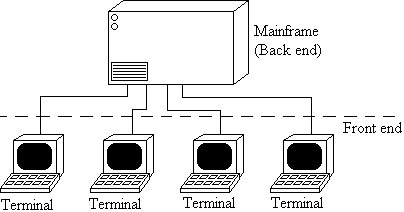
All users work on terminals which are connected to the mainframe - they are the front end. The mainframe computer does all the processing - it is the back end.
|
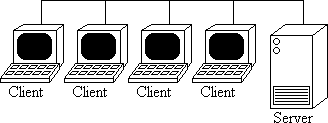
Unlike mainframes, adding extra users does not slow performance for each one. Resources such as databases can be distributed over several servers.
|
|
|
Requesting data from an SQL server.
- The user makes the request.
- The user's computer (the client computer) translates this into SQL and sends it to the server.
- The server processes the request. It may have to communicate with a database server (3-tier model).
- The server passes the data to the client computer which displays it.
The simple client-server model is a 2-tier model. Separating the web server from the database server gives a 3-tier model:
Application Service Provider (ASP) - Provides services over the Internet to those who would otherwise need to provide them on their own servers.
Network Operations Centre (NOC) - The physical location from which a network is managed.
Segment - A section of a network.
Network components:
- Protocols, communication rules.
- Transmission media, cables, optical fibres.
- Network resources such as printers, shared with all users.
- Network components such as hubs, repeaters, routers
Network components
Network Interface Card (NIC) - the card connecting a computer to a network. Contains a transceiver to send/receive digital or analogue data. NIC card may be attached to a computer
- "slotting" it into an empty socket in the machine as a Peripheral Component Interconnect (PCI) card.
- USB socket (Universal Serial Bus)
- IEEE Fire Wire device
- Industry Standard Architecture Card
All NICs have a MAC (Media Access Control) address unique in the world, a 6-byte value usually quoted in hex. The first three bytes are a vendor code, specifying which company made the board, the last three specify the actual board.
Repeater: Amplifies attenuating signals on long cables.
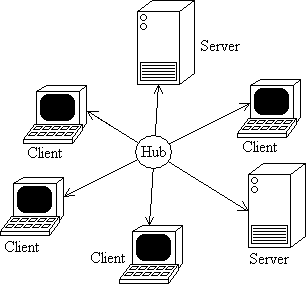
Hub: Central connection for a star network. Has a socket for each client. Active hubs regenerate the signal to overcome attenuation.
Bridge: Connects segments of networks. Decides whether packets belong on a local net or on a more distant net, by examining the MAC (hardware) addresses of packets. Works at Level 2 of the OSI/RM.
Router: Similar to a bridge, but compares IP addresses (Level 3 of the OSI/RM) using IP or IPX. Redirect packets between networks dynamically, using the most efficient paths. Routers use routing tables to keep track of files - communicate with each other via routing protocols.
Routers direct packets between networks ("indirect routing"). They are not needed to direct packets within a network ("direct routing"). Each stage between two routers is a hop. Routers maintain routing information tables listing the numbers of hops between routers - used to optimise the routes for each packet. These tables can be constructed manually ("static routing") or through routers communication ("dynamic routing" using Open Shortest Path First).
Switch: Direct information from one node to another. Often used to replace hubs, bridges, routers. Benefits for network:
- Operate at various levels of OSI/RM
- Virtual groupings of computers into "subnets" (Virtual LANs)
- Simple to install
- Faster than traditional equipment (hubs etc.)
- Can decide how much bandwidth to allocate to any communication (some, all?)
- Better security - it is possible to put up barriers between systems if necessary
Gateway - Connection between networks running different protocols (e.g. TCP/IP to SPX/IPX).
Modem - Translates one signal format to another, usually (but not always!) between analogue and digital signals. For modems that connect to WANs, consider
- Serial port interrupt request (IRQ). Interrupts request processor attention.
- Input/Output memory addresses. Peripheral ports such as COM1 and COM2 are mapped to certain memory addresses.
- Maximum port speed.
Channel Service Unit/Data Service Unit (CSU/DSU) - A type of modem that translates from one digital format to another digital format, e.g. cable modem (or broadband modem) translates from one digital to the digital format used by the phone network.
Firewall - Secure computer system, acts as a barrier to prevent incoming attacks to a network. Filters all communications between local systems (computer or networks) and the wider world.
Peer-to-peer networks (P2P)
- All computers are equal (no dedicated servers).
- Microsoft peer-to-peer network is a legacy model - no more than 10 computers.
- P2P network can have many thousands of users e.g. Gnutella, KaZaA, WinMX, pre-court case version of Napster.
- In centralised P2P, a central database maintains a list of attached clients and all users log on to the central computer maintaining the P2P e.g. Napster.
- In decentralised P2P there is no central control or database e.g. Gnutella.
Server-based network
- Computers are hosts or nodes.
- Server nodes include print servers, file servers, mail servers, web servers and database servers.
- Authentication:
- Centralised - users present usernames and passwords to a particular server.
- Decentralised - users authenticate with servers as and when they need to.
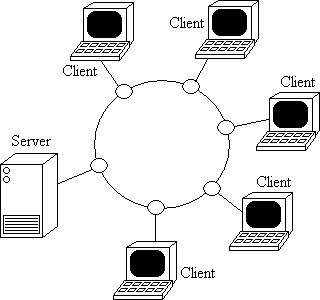
Network Topologies
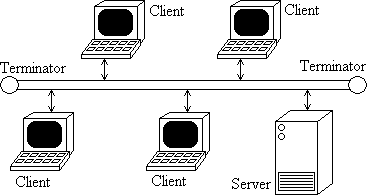
Bus Topology
Suitable for small networks. The bus must have a terminator at each end to prevent signal reflection.
 Simple, cheap, reliable, efficient use of cable. Simple, cheap, reliable, efficient use of cable.
 Isolating problems is hard. One error can halt the system. Isolating problems is hard. One error can halt the system.
|
 |
 |
Hybrid Topology
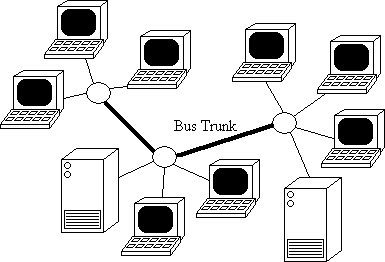
A series of star topologies with the hubs connected by a bus trunk (the backbone of the network).
Network expansion is simple. If one client fails, the entire network does not fail.
If one hub fails, all connections to that hub fail, although other hubs continue to function.
|
Mesh Topology
Mesh topologies are networks in which many paths connect computers.
This redundancy allows the system to continue if some connections fail.
However, multiple connections are expensive.
|
 |
Network Operating System (NOS)
Controls traffic and resources on a network. They can generally work with other network operating systems (termed interoperability).
Versions of Microsoft Windows NOS: NT3.1, NT3.5, NT3.51, NT4.0, Windows 2000, Windows 2003.
Versions of UNIX: System V, Berkeley Systems Distribution (BSD), Open Software Foundation, Linux (the freeware version of UNIX developed by Linus Torvalds), Sun Solaris, X Windows (a GUI version of UNIX).
Kernel: Central part of the operating system that provides the most basic operations.
Shell: An interface to a program that allows the user to type in commands directly.
OSI Reference Model (OSI/RM)
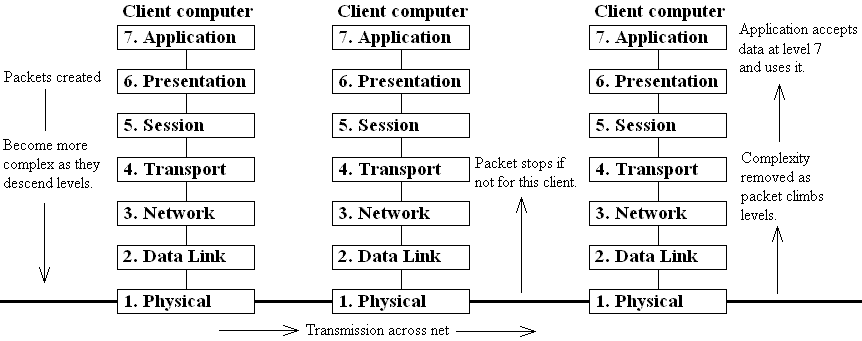
This gives a standard way of describing the logical structure of a network and the way in which data from an application moves through a network to an application in aother computer. Developers can create protocols that interface with its 7 levels. The data to be transmitted is split into packets before transmission.
A packet = A header + A section of data + A trailer
Data is passed down the levels, turned into packets and transmitted at level 1. Each layer adds its own extra header and trailer, so the packet increases in size. When a packet is received, these extras are stripped away and the complete data reassembled from the packets.
Each layer performs its own function without reference to the others.
Layer 4 (Transport) implements Flow control. The layer 4 of the transmitting computer waits for a confirmation for each packet received and retransmits the packet if no confirmation is received within a certain time. At the transport level the TCP protocol handles this. On Novelle systems, SPX is the equivalent protocol to TCP and handles flow control. The Novelle equivalent of TCP/IP is SPX/IPX, but TCP/IP is the acknowledged standard.
When a packet is received at any computer on the network, Layer 2 (Data Link) examines it to see if it has the correct MAC address. If not, the packet is ignored. If it passes layer 2, layer 3 (Network) examines it to see if it has the correct IP address. If not, the packet is ignored.
Network Protocols
Connection-oriented ("stateful") - the host must establish a connection with the client before communication takes place.
Connectionless ("stateless") - information is sent out "blind" in the hope that it will reach its destination.
Routable protocols can pass through routers.
Non-routable protocols can't be rerouted by routers as their routes are predetermined. Overcome this problem with a bridge or by enclosing non-routable protocols in routable ones ("tunnelling").
When a network is set up, protocols must be attached to each machine's Network Interface Card (NIC). TCP/IP is the standard protocol for all Internet connections. Includes UDP. Not always the best choice for protocol. NetBEUI may be better for small peer-to-peer networks.
|
Routable? |
Connection-oriented? |
|
| TCP |
Y |
Y |
Uses ports to deliver packets. Fragments, transmits, sequences, reassembles messages. |
| IP |
Y |
N |
Provides addresses for computers and performs routing (5-class addressing scheme). Includes ICMP which troubleshoots connections. |
| UDP |
Y |
N |
Used to transfer small amounts of information. |
| IPX |
|
N |
The Novell equivalent of TCP. Resides in layer 3 of OSI/RM. Handles network addressing and packet routing. |
| SPX |
N |
|
Novell equivalent of IP. Makes sure packets arrive at destinations. |
| NetBIOS |
Y |
|
Layer 5 protocol designed for use with NetBEUI. Now mainly a programming interface for applications. |
| NetBEUI |
N |
|
Network Basic Input/Output System Extended User Interface. Microsoft protocol for peer-to-peer networks. |
| AppleTalk |
Y |
|
Only in Apple networks. |
Local Area Network - A network confined to a small geographic area such as an office. Generally owned by a company. Machines are connected via hubs or switches. To cope with high traffic on LANs:
- Split the LAN into subnets using bridges (localises traffic much more).
- Use a Layer 2 switch.
- Increase the bandwidth by upgrading to fast Ethernet (economical) or Fibre Distributed Data Interface (expensive).
Wide Area Network - A network covering a large geographic area (crossing the public highway). Generally rented by a company. Machines are often connected via routers, so communication routes are dynamic.
Network Access Point (NAP) - Junction between two high-speed (> 1 Gigabit/second) Internet backbones.
AT commands (Attention commands) activate features on modems e.g. ATA - answers another modem, ATD - dial command etc.
Transmission Media (cables etc.)
General notation: "20BaseT" - the number 20 refers to the baud rate (bits per second, Mbps = "Mega bits per second"), the "Base" means "baseband", the T refers to the type. In this case, 20 Mbps, baseband, twisted pair.
Twisted pair (TP)
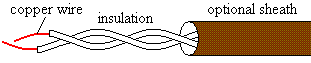
- Two twisted insulated copper wires.
- Can't be longer than 100 metres.
- Can be shielded (STP - external metal sheath protects wire from electromagnetic interference) or unshielded (UTP).
- Can be stranded (generally flexible but suffers from attenuation) or solid (breaks more readily, but suffers less from attenuation).
|
 |
Six standard categories (plus a seventh, proposed standard) of TP. All are used to transmit data except Category 1 (used for voice, some limited data transfer).
Cable Grade Category |
Bandwidth (Mbps) |
Can sustain rates up to (MHz) |
Network types |
1 |
1 |
|
Intercoms and doorbells, telephone networks before 1983 |
2 |
4 |
2 |
Early token ring networks and ISDN |
3 |
10 |
16 |
Telephone networks from 1983 onwards |
4 |
20 |
20 |
16 Mpbs token rings and ISDN, but now rarely used. |
5 |
100 |
100 |
The following networks: 10BaseT, 100BaseTX, some FDDI, some cash machine networks. |
5e |
1000 (=1 Gbps) |
100 |
High speed nets such as Gigabit Ethernet |
6 |
10 Gbps |
250 |
Networks of up to 10 Gbps. Also best choice for upgraded category 5 networks. |
6e |
10 Gbps |
550 |
Networks of speeds 10 Gbps and upwards |
7 |
10 Gbps |
600 |
(Proposed standard) |
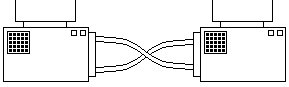
Crossover cable
Used to connect two computers directly (no intervening hub) so that each pin connects to the other pin (e.g. pin 3 to pin 4 on each computer).
|
 |
Coaxial cable ("coax")
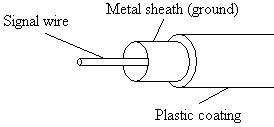
| Signal carried by metal wire enclosed within a metal sheath (solid or braided) that acts as the earth. There are three categories of coax, each denoted by RG (Radio Grade).
|
 |