| Experimental |  |
Proposed | |
Draft | |
Standard (in use) |
Designated by the Internet Engineering Steering Group (IESG).
| Experimental | |
Proposed | |
Draft | |
Standard (in use) |
Also historic (out of date) and informational (developed by private companies etc.)
Requests for Comments (RFCs) - Official documents published on the Internet of general interest to Internet users.
Groups the layers of the OSI/RM model into four groupings:
Application layer |
Equivalent to OSI/RM layers 7 (Application) and 6 (Presentation). Also called "Process layer". Deals with the following protocols: | ||||||||||
 |
|
||||||||||
Transport layer |
Equivalent to OSI/RM layers 5 (Session) and 4 (Transport). Provides flow of data between computers, and handles TCP and UDP. | ||||||||||
|
|||||||||||
Internet layer |
Equivalent to OSI/RM layer3 (Network). Deals with the following protocols: | ||||||||||
|
|
||||||||||
Network Access layer |
Equivalent to OSI/RM layers 2 (Data Link) and 1 (Physical). Transmits packets across net. Handles all hardware details. Consists of phsycial cables, Network Interface Card (NIC) and physical device drivers. |
Packets from higher layers are enclosed within headers and trailers of lower layers (multiplexing). At the destination, these headers and trailers are stripped away (demultiplexing):
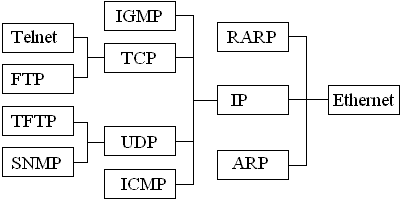
 Demultiplexing
Routing Information Protocol (RIP) - Simple routing protocol that maintains lists of "best routes" for distant computers. The list can be updated with changing network topology. Used in small and medium-sized networks.
These are software communication channels (not to be confused with peripheral ports - sockets on the back of the computer) used to transmit and receive data to/from networks. Each port has a particular number.
Internet Assigned Numbers Authority (IANA) has decreed three ranges of port numbers:
To communicate on a network, your machine must have a 32-bit IP address (if it's IPv4) and a 32-bit subnet mask. To communicate over a WAN, it must also have a default gateway address (to determine if a required destination is local or remote), which is the address of the gateway computer on the local network.
Four part address: four single byte numbers (each 0 to 255) separated by dots. In theory, this gives 256 x 256 x 256 x 256 = 4.3 billion addresses, although some byte values (e.g. 127) are reserved for special purposes.
The four bytes are subdivided into bytes for determining the network number followed by bytes for specifying the computer number on that network e.g. address 172.16.13.109. The first three bytes indicate the network for classroom 3, the last one computer 109 on that network. The more bytes used to specify the network (here 3), the fewer computers can be specified on that net (here 1 byte = max. 256 computers)
Addresses subdivided into 5 classes (A to E), depending on the value of the first byte number. Each IP address is sent with four extra bytes called a subnet mask that specifies how many bytes of the address represent the network part (255) and how many represent the host computer part (0).
Routers use these masks to determine whether a packet is to be sent to a remote network or kept on a local one. Each packet is sent with both the sender's IP address and the destination address. The router extracts the network bytes from each and compares them. In practice the subnet mask needn't match the type of network according to the first byte. This gives more flexibility as to network addressing (e.g. an address may start with 172, but start with a Class C subnet mask).
Class |
First byte |
Num. bytes specifying network |
Subnet mask |
Max. number of networks in practice |
Max. number of computers (hosts) |
Comments |
A |
0 to 127 |
1 |
255.0.0.0 |
126 |
16,777,216 (=2563) |
Limited to huge organisations (e.g. IBM, BT, Google, W3C) and organisations who "got in first" (e.g. Cisco). |
B |
128 to 191 |
2 |
255.255.0.0 |
16,384 |
65,536 (=2562) |
|
C |
192 to 223 |
3 |
255.255.255.0 |
> 2 million |
256 |
|
D |
224 to 239 |
4 |
255.255.255.255 |
None! |
All 4 fields represent network. Used for multicast (see below) |
|
E |
240 to 247 |
Reserved for future/experimental use. These addresses are currently invalid on the Internet. |
Learn to recognise the classes based on the first field: In practice, class A is specified by 1 to 126, as 0 and 127 are reserved, class C can only hold 254 hosts on the network as 0 and 255 are reserved.
Loopback address. This is always 127.0.0.1 and refers to the sending computer itself e.g. first thing to do when troubleshooting is to test connectivity of your own computer by typing ping 127.0.0.1 at the DOS prompt.
Wildcards: 255 is a "match any value" wildcard, so specifying 192.168.40.255 matches any address starting 192.168.40. (Net Directed Broadcast). The address 255.255.255.255 would match any host on the Internet, and is used to contact the DHCP server initially when a host is first connected to the net (i.e. when the new host does not yet know the server's IP address).
0 is a partially reserved value. Although IP addresses can include 0, it is illegal for all the host part or all the network part of an address to be 0, e.g. the last two bytes of an IP address on a class B network (subnet mask 255.255.0.0) can't both be 0. An exception is 0.0.0.0 which is the address used by a newly connected host before DHCP assigns it an address. During initialisaiton, the network part of the address can be 0s (e.g. 0.0.31.76 for a host on a class B network).
Nowadays, addresses are assigned in blocks using Classless Interdomain Routing (CIDR), with the format address block/prefix. The address block is a range of addresses (e.g. 43.62.90.83 - 43.62.92.89), the prefix specifies the subnet mask.
Some ranges of addresses set aside for private addresses within a network (i.e. can be reused on many networks, which saves on addresses). These can't be sent across routers.
Private IP address range |
Subnet mask |
CIDR Notation |
|
Class A |
10.0.0.0 to 10.255.255.255 |
255.0.0.0 |
10/8 |
Class B |
172.16.0.0 to 172.16.255.255 |
255.240.0.0 |
172.16/12 |
Class C |
192.168.0.0 to 192.168.255.255 |
255.255.0.0 |
192.168/16 |
To access computers on another net, the firewall on networks with private addresses must Network Address Translation (NAT).
The DHCP server on a network assigns IP addresses automatically to computers that are added afresh to that network. Before assignment, a new computer has 0.0.0.0 as its IP address (the reason that "0" is a reserved number in IP addresses). On connection to the net, a computer sends out a single packet to IP address 255.255.255.255 (broadcast address - matches anything) to request an IP address. Only the DHCP server responds, with an offer, targeting the new computer using its MAC address (inserted by the DAta Link layer, layer 2, in the packet).
This enables a one-to-one communication: The new computer reads the DHCP IP address from the offer packet. It requests an IP address. The DHCP acknowledges with an IP address and a subnet mask.
Even home PCs must use DHCP for an Internet address. BT, for instance, hands out IP addresses on a temporary basis when you dial up. It is slightly different for broadband - you lease an IP address for the duration of a session.
Even with 4 billion addresses, the Internet is rapidly running out of available addresses, so IPv4 is being replaced with IPv6. IPv6 addresses are 128 bits long, eight four-digit hex numbers separated by colons, such as
This gives 4 trillion addresses. The change-over from IPv4 to IPv6 will take place between 2005 and 2015. During this time they will co-exist. All software and hardware will work automatically with the new system (no upgrading will be necessary).
Better than IPv4:
Type these at the DOS command prompt:
where destination is an IP address, a host name (see later) or a domain address.
This "bounces" a packet across the net to a distant machine and returns it (like an echo), to test whether a route exists to that machine. Ping was named after the sound produced by a submaring echo detection system - not (as stated in the CIW manual) after "Packet Internet Groper". You can ping an IP address:
ping 191.63.63.104
You can ping website names:
ping www.mysite.com
This gives the IP address for the distant server. If any ping request fails with a "Timed out" message, it is a security measure designed to stop ping attacks overwhelming a system ("ping floods" or Denial Of Service attacks). It also stops a "ping of death" attack - a packet containing 128 bytes but masquerading as a standard 32-byte packet. The firewall blocks pings, therefore resulting in a time out.
Traces the route to a destination system, determining which routers packets are sent through:
tracert 191.63.63.104
Also works with host names. Traces the route between your computer and a remote host and indicates the intervening hosts. Also indicates the number of hops to the destination system. Useful for working out why some computers are running slowly (try comparing tracert results for the slow computer with ones in adjacent rooms).
Displays the routes present in a routing table and lets you configure them. Specify the name of the router whose routing table you want to examine e.g. route admin.
Gives information about services present on the system and the ports they are using, and whether any other systems are making network requests to your system. nbstat is a similar command for Windows systems only.
Displays the IP configuration on Windows systems including host name, IP address, subnet mask and default gateway. The Unix/Linux equivalent is ifconfig. In Windows 2000 and XP, the command winipcfg does a similar job.
This command uses the Address Resolution Protocol to show how logical 32-bit IP addresses translate to physical 48-bit Ethernet (MAC) addresses on a network.
Finds a given DNS server for any particular domaun name. Returns also the IP address. For example, entering the following at the DOS prompt:
gives:
Name:    geocities.com
Address: 66.218.77.68
Aliases: www.geocities.com
Gives statistics on traffic crossing a network including determining trends, identifying problems, and testing connections/devices/cables.
Lists all the host names and any aliases for all computers on a local network (should also include the loopback address). Each line in the file takes the form:
# Include loopback address
127.0.0.1    localhost
# Student group members
191.42.7.1   lab3_1  fred
191.42.7.2   lab3_2  sandra
191.42.7.3   lab3_3  dixon
 |
 |
 |