Network Technology Foundations
Chapter 4 - Hardware and Operating System Maintenance
I have guides to Binary numbers and Hexadecimal numbers on my main site. I have not duplicated them here to save space.
General maintenance: Clean devices such as keyboards. Plan regular maintenance checks.
Motherboard: Most important circuit board in the computer. It contains the CPU and connections to all other devices (such as memory boards and disc drives).
Interrupt Requests (IRQs): Signals from other devices that interrupt the CPU while it is running a program, to show that the devices need the CPU's attention. IRQs can be maskable (less important ones that the CPU can ignore) or unmaskable (ones that the CPU couldn't ignore or it would miss something such as a keypress).
Input/Output (I/O) addresses: Some memory addresses are connected not to memory, but to input or output devices (the devices are memory mapped). The computer reads input from these devices by reading the addresses as if they were normal memory (i.e. a device such as a disk drive stores a byte of information at an address and the CPU reads it). The CPU writes a byte of data to a device by storing it at the appropriate address for the device to read.
Direct Memory Access (DMA): A system by which devices can insert many bytes of data directly into a computer's memory by using the address bus and data bus in the same way that the CPU would. It does this by taking control of the buses during the split microseconds that the CPU is not using it (when it is performing internal operations).
The floppy disc controller uses DMA channel 2. The hard disc controller also uses a DMA channel if available.
ASCII (American Standard Code for Information Interchange): A binary code that represents each letter of the alphabet, digit, punctuation mark and symbol (such as asterisk) as an 8 bit binary number. For instance, "A" is 01000001 (binary equivalent of 65). Also includes some control codes such as Carriage Return (the signal sent when the Enter key is pressed).
Serial vs. Parallel Communication: Serial communication involves binary digits (bits) being transmitted one at a time along a channel that can cope with one bit at a time (such as the COM port at the back of the machine). Parallel communication involves several of these one-bit-wide channels side by side, so that several bits can be transmitted at a time (such as the LPT port).
The following table shows the memory mapped addresses for the peripheral ports and their IRQ priority level. Some peripherals such as the maths coprocessor may not be present.
|
I/O address (hex) |
IRQ |
| COM1 |
03F8 - 03FF |
4 |
| COM2 |
02F8 - 02FF |
3 |
| COM3 |
03E8 - 03EF |
4 |
| COM4 |
02E8 - 02EF |
3 |
| LPT1 |
0378 - 037F |
7 |
| LPT2 |
0278 - 027F |
5 |
| System timer |
0040 - 0043 |
0 |
| Keyboard controller |
0060 - 006F |
1 |
| Real-time clock |
0070 - 0071 |
8 |
| PS/2 mouse port |
0060 - 006F |
12 |
| Floppy disk controller |
0377 - 03F0 |
6 |
| Primary IDE (Hard disc controller) |
01F0 - 01F7 |
14 |
| Secondary IDE |
0170 - 0178 |
15 |
| Math coprocessor |
00F0 - 00FF |
13 |
Integrated Device Electronics (IDE): This is the interface for the hard disc(s) of up to 504 MB. The enhanced version, EIDE, can cope with hard disc sizes up to 137.4 GB.
|
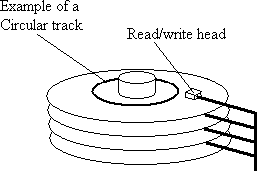
Hard discs consist of one or more circular "platters" with the data stored on concentric circular tracks (not one spiral track as for gramophone records!) One or more read/write heads are moved in and out to read the data segments as they pass underneath.
The hard disc is assigned the drive letter C:, but a physical disc can be treated as a series of independent drives (logical drives) assigned letters D: onwards (up to Z:). A hard disc that is to be used to boot up a computer (as most are) must be subdivided into a primary partition (or active partition) where all the files necessary for the operating system are held, and an extended partition (for ordinary files).
|
 |
Advanced Technology Attachment (ATA) interface. A faster version is Serial ATA (SATA), connected using a cable resembling a Category 5 Ethernet cable.
Small Computer Serial Interface (SCSI): A bus joining up to 127 devices such as computers, through a SCSI socket. Each device must have a unique Logical Unit Number, which can lead to problems when extra devices are connected. The SCSI bus must be terminated correctly at both ends.
Peripheral ports
These are sockets on the back (usually) of a computer that allow peripherals to be plugged in. Modern PCs use the PS/2 style ports. It is important to avoid conflicts between devices connected to ports from the inside of the machine and those plugged in externally.
| COM1 |
Normally used for the serial mouse (not PS/2 mouse) |
| COM2 |
Also used for serial devices. Internal modems often use COM2 by default. |
| LPT1 (Parallel port) |
IEEE 1284 is the standard. Usually used for connecting to a printer. |
| USB |
Universal Serial Bus port. It can cope with any USB device. The two standards are USB 1.0/1.1 and USB 2.0 |
| Game port |
Some computers have a port for games controllers. Also used to connect MIDI devices. |
| Firewire |
IEEE 1394 is the standard. This port is used for bluk transfers of data at high speeds (typically 400 Mbs to 1000 Mbs) |
Troubleshooting ports and cables: Make sure that the correct cables are used for each connection, that all the cables are firmly inserted and that there are no IRQ conflicts. Make sure SCSI buses are terminated at both ends.
CD-ROM and DVD
High-density storage media taking the form of silvery discs, each about five inches in diameter. The data is stored by a laser "burning" small dips in the surface to represent binary 1, or not, to represent 0. Another laser reads the surface similarly. CD-ROMs are simply audio CDs used to store computer data - they have a capacity of 700MB. DVDs have a higher density of pits, so can store 4.7GB (8.5GB for DVD+RW), and are generally used to store video and films (thanks to MPEG-2 video encoding/decoding software).
The standard interface for each is IDE/EIDE, but there are SCSI and USB versions for CD-ROM and SCSI and IEEE versions for DVDs.
| Write once only |
Write and rewrite many times |
CD-R
DVD-R |
CD-RW
DVD-RAM
DVD-RW
DVD+RW |
N.B. DVD-RAM is not a format that can be written once only, as stated in the CIW Network Technology Foundations book.
CD-ROM and DVD maintenance:
- Ensure that the recording surfaces are dust-free by wiping with a soft cloth.
- Do not scratch the recording surfaces.
- Do not write labels on the non-recording surfaces, as pressing on the disc can damage the data.
- Keep the disc within its operating temperature range. Keep it out of direct sunlight.
File System Management Tools
Formatting a disc prepares it for use by creating file sectors on the disc and the root directory from which other directories can be created. Formatting erases any data on the disc.
The disc is formatted according to one file system of the following file systems: FAT (a.k.a. FAT16), FAT32, NTFS (versions 4.0, 5.0, 5.1), Ext3 or ReiserFS. FAT (File Allocation Table) is the most popular (used by most Windows systems) although it is being superceded by NTFS.
File permissions: Files and folders (directories) have permissions to allow it to be read, written or exected. For instance, a Unix file with permissions rwxr-x--x can be read, written or executed by its creator, read and executed (but not written) by others in the same group, and executed by anyone else.
Disc defragmentation: Files stored on discs are stored as a series of interlinked sectors that may be distributed widely over the surface of the disc (with pointers linking the sectors, so the file can be read serially). Reading widely distributed files is inefficent, so disc defragmentation can be used to shuffle sectors so that files are stored as contiguous sectors.
Disc clean-up: Programs and processes often create temporary files stored on a hard disc. Although many of these are deleted, the hard disc gradually accumulates redundant files. A disc clean-up utility removes them.
Backing up and restoring data
Discs can be mislaid, stolen or damaged. Hard discs can be destroyed by fire and other disasters. Often discs fail for no apparent reason. It is therefore important to back-up data on a regular basis. After a disaster, backed up data can be restored.
Files have an archive bit (or archive flag), which is a binary indicator set to true or false (on or off). When a file is created/modified, its archive bit is set to "on" to indicate that it is eligible to be backed up.
There are different types of back-up:
|
Only back up files if archive bit is "on"? |
Y |
N |
| Clears archive bit to "off" after back-up? |
Y |
INCREMENTALBacks up all files with archive attribute "on" and sets it to "off" i.e. only backs up files modified since the last incremental back-up. |
FULLBacks up all selected files. |
| N |
DIFFERENTIAL |
COPYSame as full back-up but leaves the archive bit set. |
There is also a daily back-up which backs up only files changed within the last 24 hours.
convert driveletter /FS:NTFS
converts the logical drive whose letter is specified from FAT to NTFS.
chkdsk driveletter
checks the drive whose letter is specified for errors. Add /f at the end to repair any errors found and create a log of them.
Operating system errors
It is recommended that one regularly makes a recovery disc for a computer system while it is running correctly. If the system suffers extensive damage from something like a virus, it is possible to boot it up again from the latest recovery disc.
Operating system (OS) missing
- You may be trying to boot the computer with a floppy disc in the drive (i.e. the computer is looking for the OS on that disc). Remove the disc, switch the computer off and then switch on again. The instructions on the screen often tell you to "remove the floppy disc and press any key to continue." Don't do it! That floppy disc may have contained a boot-sector virus, which will activate if you then do a "soft" restart of the system.
- The operating system may be corrupt. Switch off the computer and then reboot from a clean system disc or, better still, the latest recovery disc you made.
Start-up failure
The OS is present but the computer won't start.
- Are all the peripherals (mouse, keyboard etc.) plugged in correctly? Is something leaning on the keyboard pressing on one of the keys?
- Again, vital files may be corrupted. Boot up from the recovery disc and follow the onscreen instructions to restore them.
System crashes in the middle of something
If the system "locks-up", the only course of action usually is to press the reset button. This is especially true when you get the "Blue Screen of Death" - a bright blue screen telling you that the system has failed completely. When you have reset the computer, it may inform you that it was not switched off correctly, and then go through a long self-check procedure.
There may also be log files that you can examine to see what was running at the time. The applications that were running may not be compatible with the operating system (e.g. applications designed for Windows 95 running on Windows XP). Also check for IRQ conflicts.
Applications won't start, or crash
- The applications may be incompatible with the OS (see above).
- There may be insufficient main memory or disc space for applications to run. This often happens when several applications are running in parallel.
- When an application crashes, examine the system log.
- There is a utility called Dr. Watson that can be left running in the background and gives a fairly detailed report on the state of the system after any application crash.
- Applications may fail because of corrupt system files, corrupt data files, or through trying to use a file already in use by another program.
- Applications may fail through hardware errors (e.g. trying to print a document in MS Word without turning on the printer.)
- An application may not have been installed properly (e.g. the current installed version conflicting with a previously installed version).
Remote Troubleshooting
It may be possible to obtain help in troubleshooting your system/applications from a remote source by allowing a remote person to take control of your system.
Telnet: Allows you to establish a connection with a remote system (often a multi-user system) and issue commands as if you were logged on directly.
Secure Shell (SSH): (a.k.a. Secure Sockets Shell) is similar to Telnet but uses encryption to give a secure connection to a remote system.
Virtual Network Computing (VNC) is similar to Telnet and SSH, but gives full GUI, i.e. the screen appears exactly as it does on the remote computer.
Remote Desktop: A utility in which a user can "lock" his/her computer and then display and control the desktop from a remote computer. When the remote session is finished, the original computer can be unlocked using the Ctrl + Alt + Delete key combination. Remote desktop also allows several users to control one computer remotely as a team, by allowing any of them to lock the computer and use it remotely before relinquishing control to another user.
Remote Assistance: A utility that allows a computer user to seek assistance from a remote user. The remote user can see and control the local user's screen, and communicate via IM. This effectively offers dual control of the local computer.




