3.0 SHADING


3.21 HAIR - first shadow layer

Skin tone is one of the easiest parts to shade. Hair on the other hand, is totally different.

First thing you do is pick a dark hair colour, use a soft edged brush and set brush opacity to 50%.

Create a new hair above hair, call this layer hair1.

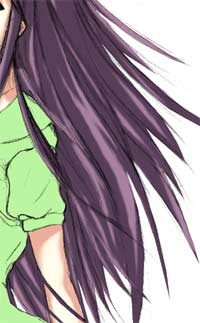
Use the brush to shade the hair and use the smudge tool (soft edged, opacity = 50 to 65%) to create hair strand effects.

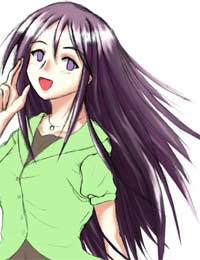
Try to copy exactly as how I shaded the hair here (I do mean EXACTLY, if not exactly then at least make it look as close looking to the pic as possible) ->

The easiest way for you to learn it is to do the colouring yourself by copying what I did. If you can shade like what I did, you will soon realise the technique of shading anime style hair.

Remember so far this is just one tone of shading so all you need to care about at this stage is the placement of shadows. Don't worry about different tones of hair shadow for now.


3.22 HAIR - second shadow layer

Create a new layer above hair1, call this new layer hair2.

Now pick an even darker hair colour. Repeat 3.21.


3.23 HAIR - highlight

Create a new layer above hair2, call this new layer hair3.

Pick a very light hair colour that is as close to white as possible.

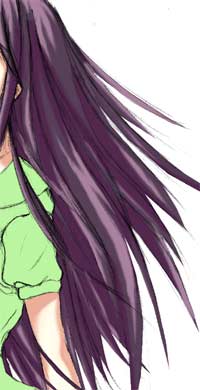
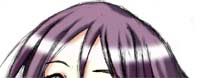
Pick a soft edged brush with opacity 50%, draw a line like the first pic ->

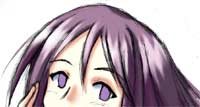
Use the smudge tool to create hair strand effect as shown in the second pic ->


3.24 HAIR - Overall shadow/highlight

So far, all the hair shadings were only used to create hair strand effects. The final part is to create the overall shading and highlight to the hair, which is quite easy.

Pick a large brush, opacity 10-20%. Pick a very dark hair colour and put dark shadow on areas where not much light can get into.

Now pick a light hair colour and lighten up areas where more light can reach onto.

This final part really needs to take the light source into consideration. Just think of where the light is coming from and the rest is easy.


NEXT: Shading (eyes)

BACK: Shading (skin tone)


  Diary | Gallery | About me | Links | Photoshop Tutorial | Home    
Hosted by www.Geocities.ws

1