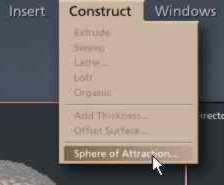
From the CONSTRUCT menu item select SPHERE OF ATTRACTION.
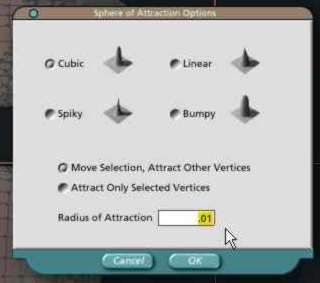
Choose the mode you wish to use for your attraction method. (cubic, linear, spiky, bumpy)
Change the radius of attraction to something more manageable in size such as .01. (this number will vary depending on what you are trying to accomplish)
Click OK.
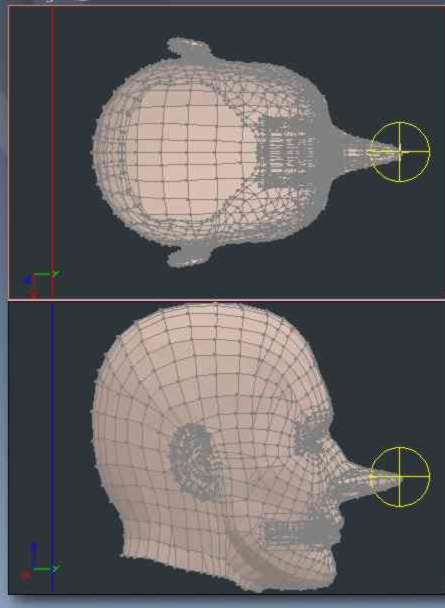
With the sphere of attraction being enabled you can now place it over the area which you wish to turn into a morph target and make adjustments. (drag vertices to meet your needs)
****NOTES****
This example is a morph target to elongate a nose. That is all it is meant to do. You DO NOT want to try to now alter the ears or cheekbones in this same morph. Results would be terrible.
*************
You do NOT have to use the sphere of attraction method to make a morph target. If you wish you can choose individual vertices, polygons, or poly-lines and drag them to meet your desired needs.
But.. DO NOT remove or add any points, polygons or lines.
Morph targeting is simply a shifting of vertices from one place to another. If you attempt to add anything more to this object file it will not be compatible with Poser when you try to use it. (e.g... If you added a few new polygons to this in Carrara then Poser would not know of a new polygon when you bring in this morph target.)
So DON'T add or subtract. JUST MOVE.
Once you have made the changes to the object exit from the vertex modeling room.
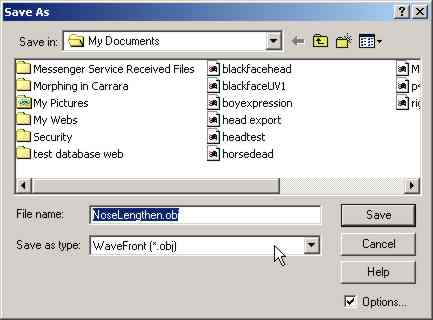
Go to FILE SAVE AS...
Important****CHANGE the file type to WAVEFRONT (obj)
Create a NEW unique name for what you have altered. In this case I am calling this file NoseLengthen.obj.
Click OK
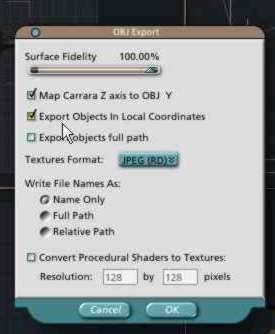
Put a click on Export Objects in Local Coordinates.
NOTE: If you don't click this you will find that your morph target within Poser will pretty much EXPLODE your object when you turn the dial.
Click OK.