Starmax Info
Home |
Processor and RAM |
Networking and Printing |
Video and Gaming |
Storage (IDE, SCSI, floppy) |
Peripherals (ADB, PS2) |
Web Links
Video and Gaming
Built-in Video
The built-in video came with a VRAM simm of 1mb or 2mb.
A 4mb vram simm will provide the highest resolutions and
color depth. Allegedly, with 4mb VRAM some 3D acceleration
is enabled, though I could never tell. The built-in ATI
chipset provides some 2D accleration at any level.
Note that the Starmax video is bandwidth-limited, meaning
that at the highest resolution you cannot get the color depth
that you would expect. So you will probably turn to a
PCI video card.
Video Cards
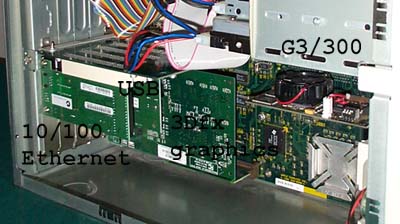
The Starmax has PCI slots of varying numbers depending on model,
but does not have an AGP slot. Thus any video cards must have
a PCI interface. Furthermore, on the five slot Starmax models,
all PCI slots are not the same. The first two slots are "direct"
slots, the other three slots are "bridged" slots. Bridged PCI
slots communicate through a bridge chip, which can sometimes
interfere with high performance cards. Thus video cards generally
need to go in slots 1 or 2, which are the two closest the logic
board. The same applies to other fast I/O cards, like SCSI RAID
or firewire cards. Slower I/O cards like USB and ethernet cards
will generally work fine in slots 3 to 5, and slower SCSI cards
(eg. 20mbs 930U ultra narrow card).
A tiny piece of software called coherency
(also available here)
is supposedly able to keep the bridged PCI slots in sync with the
unbridged ones and may allow you to use video cards in slots 3 to 5.
I did not notice any difference. Your mileage may vary.
The three main PCI video card manufacturers are ixMicro,
ATI, and 3dfx.
ixMicro is out of business, but a cheap Ultimate Rez card can be
a good option if all you need is a 2D upgrade. 3dfx is out of
business too, but was releasing native Mac video cards (Voodoo4
and Voodoo5) as well as Mac drivers for their PC Voodoo3 2000
and 3000 cards before being bought by nVidia.
ATI used to make all the OEM cards for the translucent G3 and
G4 systems. An ATI Rage128 PCI card could set you back about
$100+, and while it has decent 2D support, there are better
options for 3D (game) video. If you're looking for a serious
2D card, check out the Formac Proformance cards.
Voodoo3
ATI makes some nice cards, but despite the beta drives and lack
of Quicktime acceleration and no expectation of support, it's
still hard to beat a Voodoo3 2000 card in benefits and cost.
Both Voodoo3 versions are better at games than an ATI Rage 128, and
according to
xlr8yourmac's testing (look at Quake 2, Quake3 test, and Unreal),
the V3 3000 PCI isn't all that much faster than the V3 2000 PCI.
I haven't seen a 3000 below about $70 yet. I've seen the 2000 as
low as $40, which is an amazing value. I doubt a Starmax can take
full advantage of any 3dfx cards faster than a V3 2000 or 3000, and
with 3dfx out of business, you can expect the same support for
V3 as for V4/V5 - namely none - so why spend more? Expect
3dfx cards (3dfx Glide) to be supported by game manufacturers for
a couple years or so, and longer with OpenGL.
The 2000 has 16mb VRAM, includes decent 2D and excellent 3D
accleration (but no quicktime acceleration for video clips, which
surprisingly
may not matter as much in real life as in advertising!) and
can function as the main video. Voodoo3 cards are regular video
cards with a VGA monitor connector just like the Starmax. However,
they will not work out-of-the-box since they do not have the
Mac code on the card. (This also means Mac compatibility will
not be listed on the box.) In order to get that, you have to download
the drivers just mentioned, which contain a flash-ROM utility to
modify the card so that it has Mac code. Then you can attach
a monitor and enjoy the new video.
Voodoo3 drivers were available at the Mac3dfxgamers.com site.
When Mac3dfxgamers.com was discontinued, this page archived
the Beta12 drivers, which was the
last official release for Voodoo3. Another good source
of files is
clanmacgaming.com, which has a variety of versions.
Follow the directions
in the readme documents. Around the time 3dfx closed shop
there was an unofficial Beta13 update for V3, available
here. Check xlr8yourmac's feedback page for further info
on this version. I don't plan to install it (under the "if it's
not broke don't fix it" axiom) so I can't be of any help.
The beta13 flash ROM allegedly makes the voodoo3 cards
compatible with the extensions used for the voodoo4 and voodoo5
cards, available through clanmacgaming.com above.
There are reports that some 3dfx Voodoo3 cards made after
September 2000 had a different make of flash-ROM chip, with the
result that the old flash-ROM utility doesn't work with them.
I think that the flash-ROM utility found
here and
here
will work with the other type of flash chip, but I have not
personally used this yet. Unfortunately, if you buy a card
now you have no way of knowing which chipset was used until
you open the box.
Voodoo1
If only a gaming upgrade is sought and a second monitor is
not needed, then a regular PC voodoo1 3dfx card is nice
($30). A Diamond monster 3D works fine, and is designed to
work with a VGA plug like the Starmax has. The Diamond
card comes with a PC utility to adjust settings on the card, but
3DfxTweaker gives you access to these settings on the Mac.
Setting the swapbuffer to 0 helps immensely with FutureCop!
Note that 3DfxTweaker is not compatible with VM or RamDoubler.
Second, Techworks
has voodoo1 drivers for their Mac 3dfx card which seems to fill
the gaps with some 3dfx-savvy games. [Also note two other
files, Multi-resolutions and 3dfx 2D/3D Swap, which can be
very useful.] Finally, check out
GlideHack.
Last Updated 01/11/01
