Starmax Info
Home |
Processor and RAM |
Networking and Printing |
Video and Gaming |
Storage (IDE, SCSI, floppy) |
Peripherals (ADB, PS2) |
Web Links
CPU and Memory
The Starmax 3000 came with a 603 processor, the 4000
with a 604 processor, and the 5000 with 603 or 604
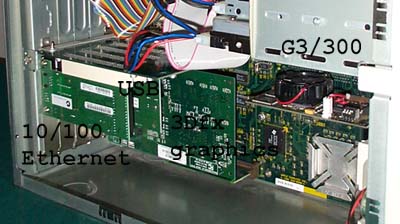
processors. All can be upgraded with a G3 card. The
relatively slow 40mhz system bus of the earlier Starmax
models will limit the fastest G3 cards to about 400mhz.
It is possible to clock-chip the Tanzania board.
Andreas Kann has some info on one approach. Follow the
links on the page, and remember the standard disclaimers
associated with clock-chipping, the main one being that I
am not responsible if you mess up your machine.
G3 Cards
I first tried a 240mhz Vimage card. Vimage no longer
sells their cards directly to individuals, so these are
hard to get now. It was nice, but I didn't like the way
the driver software caused a restart to enable the backside
cache. Seemed like sloppy programming. Also the card
could not be easily overclocked.
So I bought a NewerTech 260/130/512k card, which could
be overclocked through dip switches.
And the software
probably does the same sort of restart as the Vimage, but
it covers it up better. Anyway, my card clocked up fine
to 300/120, but was unstable at 320/128. Adds quite a
bit of zip to the finder, and makes the more demanding
CPU tasks doable. Note that the switch diagram in the
NewerTech manual appears reversed relative to the position
of the switches when the card is installed. Just pay
attention to the direction for ON and OFF. If you get
them reversed for 260mhz, you'll have a G3/160, and if
you get them reversed for 300mhz, you'll have a G3/140.
Also note that when overclocking, the backside cache is
also overclocked, and that tends to be more sensitive
to speed than the G3 chip. So you should scale the
backside cache back (increase the ratio from 2:1 to 2.5:1,
for instance) before changing the switch
settings. Overclocking also causes problems if you change the
software drivers for the G3 card, since later versions of
the drivers seem to reset the cache ratio to 2:1.
Fortunately or unfortunately, the NewerTech drivers are
not likely to be updated again now that NewerTech is
out of business.
MetaBox made inexpensive
G3 cards for the Tanzania boards. Unlike the NewerTech
cards, the MetaBox cards work only with Tanzania
boards, and not with 5400 and other L2-upgradeable Macs.
The MetaBox JoeCard T comes in 260mhz, 300mhz, 320mhz and 400mhz
models, and is available from many online vendors. The
Metabox cards are a little taller than the NewerTech and
Vimage cards, and may interfere with full-length PCI cards
in the first one or two slots. Also, the 320mhz/1mb card,
seems to forbid overclocking although the 260mhz/512k card
routinely overclocks to 300mhz or 320mhz.
Metabox is still in business but has discontinued its
line of G3/G4 upgrade cards. The scoop is that the drivers
for Metabox's cards borrowed some code from another manufacturer's
drivers. Metabox did not steal code since Metabox didn't even
write the drivers, but hired a software developer. According
to different stories, the developer was either already
hired by another manufacturer, or acquired source code
from yet another software developer. Anyway, the end of the
story is that, to avoid legal disputes, Metabox got out of
the Mac upgrade card business. Take this story for what it
is worth - another rumor on the internet.
Memory
The Starmax has three RAM slots and takes 60ns 3.3V EDO unbuffered
2k refresh dimms up to 64mb (Most Macs take 5V). (Note that
some other types of RAM will fit in the slots (beige G3 ram,
PC66 I believe) but it will NOT work.)
One RAM slot, however, only supports "single-sided"
RAM and so can handle at most one single-sided 32mb dimm, or will
read one one double-sided 64mb dimm as 32mb. Maximum possible
RAM is therefore 160mb, and there is no way around it. (For
the technical out there - the memory controller addresses 5
banks of up to 32mb each; two dimm slots handle two memory
banks each.) Let me say that again, because far too many
new Starmax owners hear the siren song of more RAM and
think that the 160mb limit only applied when there were
no larger RAM or some such. So I repeat, the
combined knowledge of Motorola and years of experience by
thousands of Starmax owners says: the Starmax will not
use more than 160mb RAM. Fortunately, this is still
enough for all but very demanding Photoshop users and all
but a handful of the latest games.
Unfortunately, it is now also about the most expensive desktop
RAM of any Mac. Going rate is about $2/Meg for the 32mb and 64mb
dimms, and there's no sign of it dropping. Only the Mac 4400,
and other clones based on the Tanzania motherboard, use this RAM.
You can check prices at RamSeeker.
At this date, I would not recommend buying 64mb dimms, nor even
many 32mb dimms unless you find a deal ($1/Meg). Three 16mb dimms
will be reasonable cost and give 48mb total RAM. One 32mb and
two 16mb would be 64mb and still a tolerable expense, but consider
that for about $80 you can get 256 Megs of PC100 or PC133 RAM for
a current G3/G4 machine. A newer machine will partly pay for
itself in less expensive RAM.
Last Updated 01/11/01
