|
To
make your drawings look nicer, you don't really need fancy special effects
and filters. A simple, yet realistic artwork would do nicely instead. To
make your artwork look realistic and 3D, you would need to create shadows
and light. This is where the burn and dodge tools come in handy. With
these tools, and other techniques I will show you in a minute, you can turn a
plain drawing into something quite interesting.
|
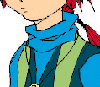
From this. . .
|
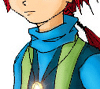
To this.
|
|
with the Burn
tool. . .

|
and the
Dodge tool

|
1.
Paint the base colours
|

|
First, let us paint our hero for the moment in basic
colours. It
helps to do things step by step. At the same time, we can choose the
colours that suit him, and determine the light source. Sometimes
when you get impatient and start filling in details like shadows and
lighting effects, you might get them confused. Don't forget to
create a new layer for each colour or section. |
2.
Make shadows.
When
light hits an object, it will create highlighted areas and dark areas.
Apply that theory to your art as well. Choose
a section, let's say, the blue sweater, highlight it click the create a
new layer button. A new layer will
appear above the highlighted layer.
|
Choose a colour slightly darker than the colour of the section you
have chosen. Think about how the shadow should fall on your drawing.
Start painting the shadows and do this with the rest of the
drawing. It will take time, but the effects will be better and you
can control the shadows better this way compared to using the burn
tool straightaway. |
 |
3.
Create lighting effects
|

|
Now
that you've completed your shadows, you can start adding light to
your image.
Create a new layer again for the section you wish to work on, and
choose a lighter colour this time. You're almost done :) All we need
to do now is add a little fancy mouse work. |
4.
Dodge and Burn!
|

|
Hehe, now the fun's
starting =) Highlight your shadow layers, and use the burn tool to
make darker shadows. Do the same
with your light layers, only use the dodge tool to make your light
lighter. After that, you can merge
down relevant layers and burn/dodge them together. To
make your drawing look more brilliant, use Colour Dodge from
your brush mode, choose a light colour, opacity and paint for a
stunning effect. |
To
make something seem brighter, darken other areas. If bright light hits a
certain area, other areas will have darker shadows. Keep in mind that
metal has a shinier surface, whereas skin and cloth are not so shiny.
Add
a few more special effects, like lighting effects, lens flare if you must
and you will have the finished
product :)
-
Back to top -
Preparing
- Painting
- Tips
-
Paper DeLights!
© 2003 Alicia C.
All rights reserved.
|


