The physical computer and its components are known as hardware. Computer hardware includes the memory that stores data and instructions; the central processing unit (CPU) that carries out instructions; the bus that connects the various computer components; the input devices, such as a keyboard or mouse, that allow the user to communicate with the computer; and the output devices, such as printers and video display monitors, that enable the computer to present information to the user. The programs that run the computer are called software. Software generally is designed to perform a particular type of task-for example, to control the arm of a robot to weld a car's body, to write a letter, to draw a graph, or to direct the general operation of the computer.
A)The Operating System...
When a computer is turned on it searches for instructions in its memory. Usually, the first set of these instructions is a special program called the Operating system, which is the software that makes the computer work. It prompts the user (or other machines) for input and commands, reports the results of these commands and other operations, stores and manages data, and controls the sequence of the software and hardware actions. When the user requests that a program run, the operating system loads the program in the computer's memory and runs the program. Popular operating systems, such as Windows 95 and the Macintosh operating system, have a graphical user interface (GUI)-that is, a display that uses tiny pictures, or icons, to represent various commands. To execute these commands, the user clicks the mouse on the icon or presses a combination of keys on the keyboard.
B)Computer Memory....
To process information electronically, data are stored in a computer in the form of binary digits, or bits, each having two possible representations (0 or 1). If a second bit is added to a single bit of information, the number of representations is doubled, resulting in four possible combinations: 00, 01, 10, or 11. A third bit added to this two-bit representation again doubles the number of combinations, resulting in eight possibilities: 000, 001, 010, 011, 100, 101, 110, or 111. Each time a bit is added, the number of possible patterns is doubled. Eight bits is called a byte; a byte has 256 possible combinations of 0s and 1s. See also Expanded Memory; Extended Memory.
A byte is a useful quantity in which to store information because it provides enough possible patterns to represent the entire alphabet, in lower and upper cases, as well as numeric digits, punctuation marks, and several character-sized graphics symbols, including non-English characters such as �.
 A byte also can be interpreted as a pattern that represents a number between 0 and 255. A kilobyte-1000 bytes-can store 1000 characters; a megabyte can store 1 million characters; a gigabyte can store 1 billion characters; and a terabyte can store 1 trillion characters.
The physical memory of a computer is either random access memory (RAM), which can be read or changed by the user or computer, or read-only memory (ROM), which can be read by the computer but not altered. One way to store memory is within the circuitry of the computer, usually in tiny computer chips that hold millions of bytes of information. The memory within these computer chips is RAM. Memory also can be stored outside the circuitry of the computer on external storage devices, such as magnetic floppy disks, which can store about 2 megabytes of information; hard drives, which can store thousands of megabytes of information; and CD-ROMs (compact discs), which can store up to 630 megabytes of information. A single CD-ROM can store nearly as much information as 700 floppy disks can. A byte also can be interpreted as a pattern that represents a number between 0 and 255. A kilobyte-1000 bytes-can store 1000 characters; a megabyte can store 1 million characters; a gigabyte can store 1 billion characters; and a terabyte can store 1 trillion characters.
The physical memory of a computer is either random access memory (RAM), which can be read or changed by the user or computer, or read-only memory (ROM), which can be read by the computer but not altered. One way to store memory is within the circuitry of the computer, usually in tiny computer chips that hold millions of bytes of information. The memory within these computer chips is RAM. Memory also can be stored outside the circuitry of the computer on external storage devices, such as magnetic floppy disks, which can store about 2 megabytes of information; hard drives, which can store thousands of megabytes of information; and CD-ROMs (compact discs), which can store up to 630 megabytes of information. A single CD-ROM can store nearly as much information as 700 floppy disks can.
C)The Bus....
The bus is usually a flat cable with numerous parallel wires. The bus enables the components in a computer, such as the CPU and memory, to communicate. Typically, several bits at a time are sent along the bus. For example, a 16-bit bus, with 16 parallel wires, allows the simultaneous transmission of 16 bits (2 bytes) of information from one device to another.
D)Input Devices....
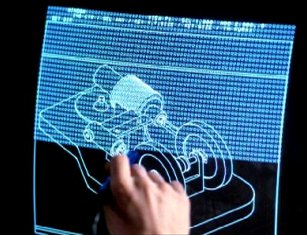 Input devices, such as a keyboard or mouse, permit the computer user to communicate with the computer. Other input devices include a joystick, a rodlike device often used by game players; a scanner, which converts images such as photographs into binary information that the computer can manipulate; a light pen, which can draw on, or select objects from, a computer's video display by pressing the pen against the display's surface; a touch panel, which senses the placement of a user's finger; and a microphone, used to gather sound information. Input devices, such as a keyboard or mouse, permit the computer user to communicate with the computer. Other input devices include a joystick, a rodlike device often used by game players; a scanner, which converts images such as photographs into binary information that the computer can manipulate; a light pen, which can draw on, or select objects from, a computer's video display by pressing the pen against the display's surface; a touch panel, which senses the placement of a user's finger; and a microphone, used to gather sound information.
E)The Central Processing Unit (CPU).....
Information from an input device or memory is communicated via the bus to the CPU, which is the part of the computer that translates commands and runs programs. The CPU is a microprocessor chip-that is, a single piece of silicon containing millions of electrical components. Information is stored in a CPU memory location called a register. Registers can be thought of as the CPU's tiny scratchpad, temporarily storing instructions or data. When a program is run, one register called the program counter keeps track of which program instruction comes next. The CPU's control unit coordinates and times the CPU's functions, and it retrieves the next instruction from memory.
In a typical sequence, the CPU locates the next instruction in the appropriate memory device. The instruction then travels along the bus from the computer's memory to the CPU, where it is stored in a special instruction register. Meanwhile, the program counter is incremented to prepare for the next instruction. The current instruction is analyzed by a decoder, which determines what the instruction will do. Any data the instruction needs are retrieved via the bus and placed in the CPU's registers. The CPU executes the instruction, and the results are stored in another register or copied to specific memory locations.
F)Output devices.....
Once the CPU has executed the program instruction, the program may request that information be communicated to an output device, such as a video display monitor or a flat liquid crystal display. Other output devices are printers, overhead projectors, videocassette recorders (VCRs), and speakers.
|