
Controlling Threads
Author - Viraj Shetty
Introduction
One of the useful features in java is the built in support for writing multi-threaded applications. A thread, sometimes referred to as a lightweight process, is an execution path in the program which has it's own local variables, program counter and lifetime. If the task which is being executed on the thread takes a long time, then there needs to be a mechanism to
- Monitor the progress of the task
- Pause the execution of the task
- Resume a paused task
- Cancel the execution of the task
This article will take a non-trivial example without using threads and re-factor the code to include monitor, pause, resume and cancel capabilities. Finally, we will re-factor the code to develop a generic thread code to handle all these capabilities. This article assumes a basic understanding of threads and knowledge of SWING programming.
The Problem
Develop an application to search for all java source files, which contains a particular string token - within a particular directory recursively. Include a swing user interface from which the user will have the capability to choose a root directory from the local machine and enter the string token to be searched. The user will have the ability to start, stop, monitor, pause or resume the Search task. The final user interface should look as follows.
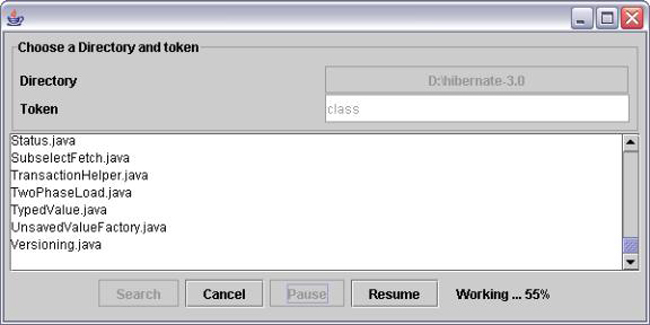
As seen in the figure, there are two fields called * Root Directory, which the user chooses from a JFileChooser * Token, which the user enters There are four buttons at the bottom, which correspond to searching, canceling, pausing and resuming the task. A status label next to the Resume button displays the percentage of work done. The output files are displayed at the center. All fields on the screen should be enabled only when required.
Note that we will solve this problem in 4 iterations and then re-factor the code to develop a generic worker thread, which handles pause, resume, stop and progress. The four iterations are as follows
- Simplest solution (No User Threads)
- Adding a Thread with stop functionality
- Determining the thread progress
- Adding the pause and resume functionality
Simplest Solution (No User Threads)
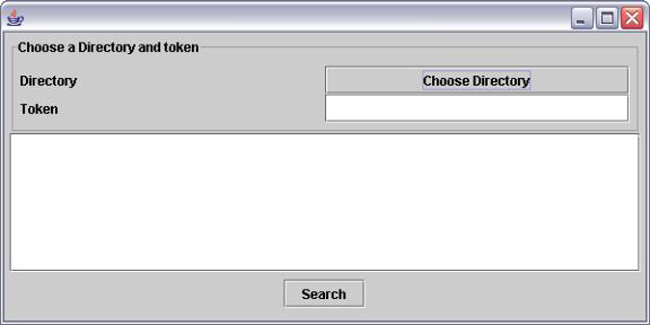
The simplest solution is to not use threads at all. There will be only one button on the screen called Search. The most common sense approach to solving this problem is to separate the display issues from the problem of finding the files. So, we will have two source files
- FileFinder.java, which returns the list of java files when the root directory and the token is provided.
- SearchForm.java, which takes care of the display using SWING
The screen will look as follows.
File Finder.java
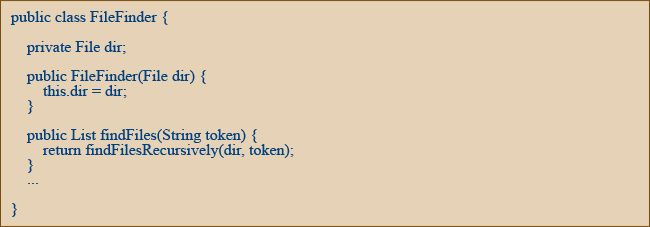
This class is responsible for finding all files under the root directory and which contains the string token. The constructor takes in the File object for the root directory. The findFiles(..) method returns the list of File objects.
The usage of the FileFinder class would look as follows
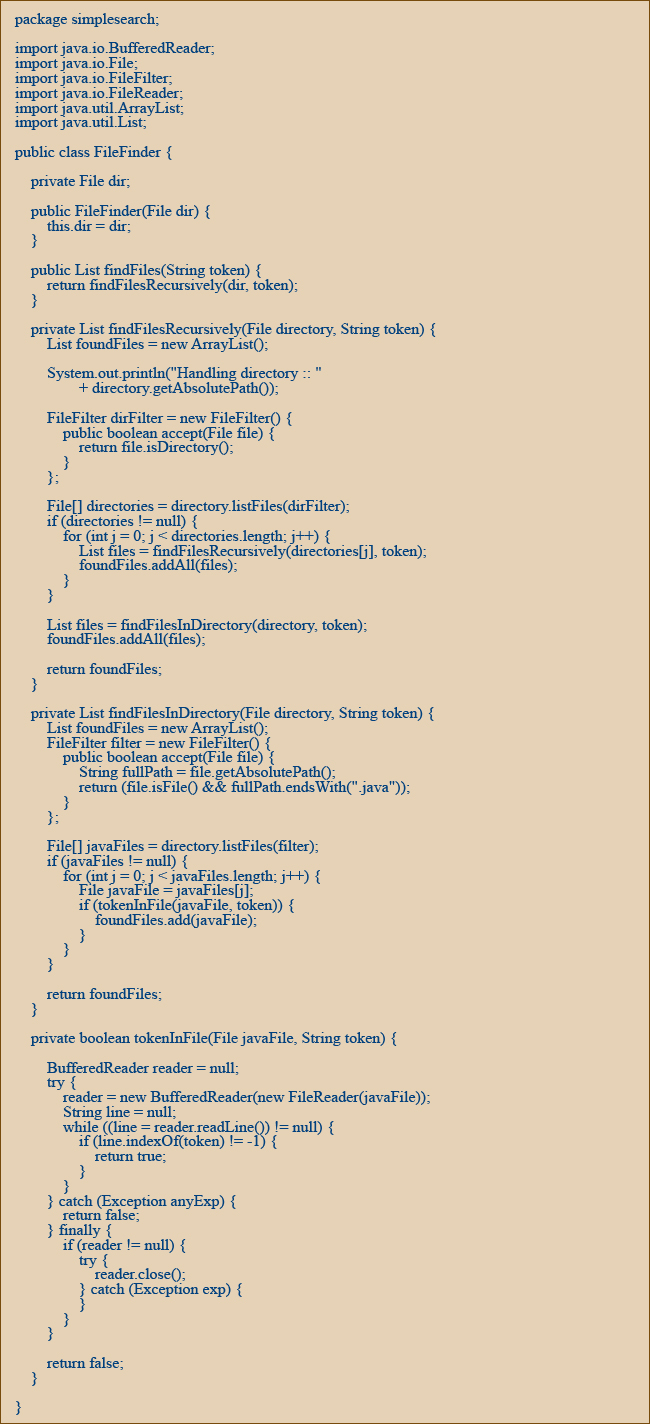
We are not going to spend time looking at the algorithm. I would encourage you to look at the complete source for each iteration before proceeding with the next iteration. Click here to see the complete source file for FileFinder.java.
SearchForm.java
SearchForm class will present a swing interface to the user and display the output when the user clicks on the search button. The constructor starts by setting the size of the window. It adds all the SWING components to the JFrame contentPane. In order to handle the button clicks, SearchForm implements an ActionListener interface. Listeners are common mechanism in SWING to handle the user actions from the screen.
The SearchForm.actionPerformed(..) method implements the functionality when either the Search or the Directory button is clicked. When the directory button is clicked, then a JFileChooser is displayed where a directory can be chosen as below

Note that the text displayed on the button changes when a directory is selected from the JfileChooser (This may not be the best implementation, but suffices)
When the Search button is clicked, the search needs to be invoked. In other words, the FileFinder object needs to be created and used as below.
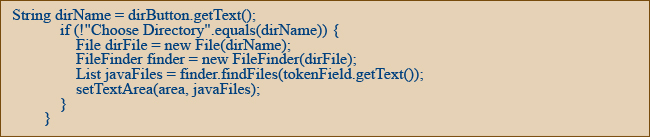
This code makes sure that a directory is chosen before the search button is clicked. It uses the FileFinder object to find the files. The setTextArea(..) method is called to populate the JTextArea with the results. A snippet of the class is shown below.
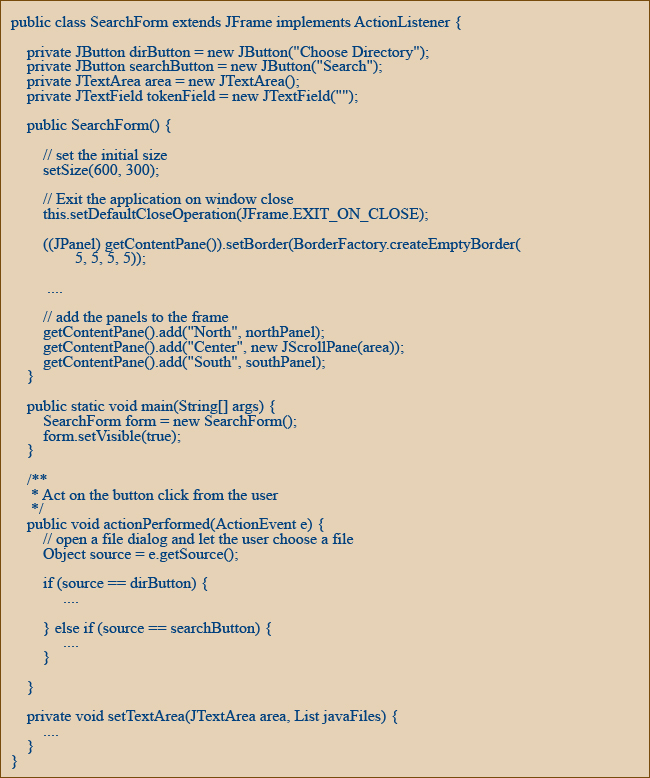
Click here to see the complete source file for SearchForm.java.
Note that by separating the two classes, the view is separated from the model. This implementation works if the response time is small and the user is willing to wait. But if the directory contains many sub-directories and many java files, the amount of time taken to respond to a search request will be too much for the user to bear. Particularly, if this functionality was embedded in an editor, then the user would not be able to edit files if the application forces the user to wait till the search is completed.
Click here to see the complete list of source files for this iteration.
Adding a Thread with stop functionality
The solution to the above problem is clearly to use threads. By executing the search functionality on a separate thread, the SWING event dispatching thread is now free to do other tasks, which the user may invoke. However, the introduction of a thread in the mix raises certain questions.
- How do we display the results from this separate thread on the SWING screen?
- Once the search button is clicked, the user can choose to click again. This can quickly lead to a problem.
- How do we cancel the thread?
- How do we know that the thread is still working?
Let's go ahead and improve our interface as follows.
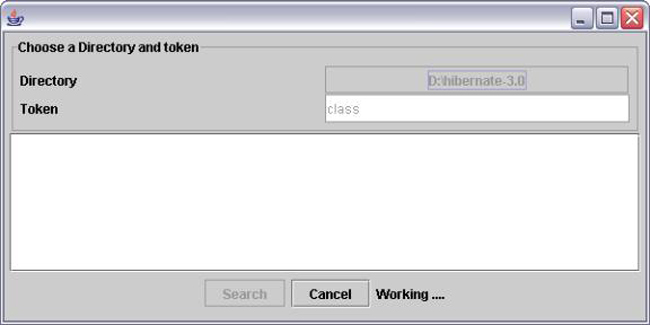
Initially the Search button, Directory button and the Token field are enabled. When the user clicks on the Search button, these fields are disabled (this prevents the user from clicking the button again). At this point the cancel button is enabled and the status field shows a "Working ..." text. The status field has been introduced to let the user know that the search is still in progress. To create a new thread for search, we need to extend the Thread class. A new class is created called the SearchThread as follows.
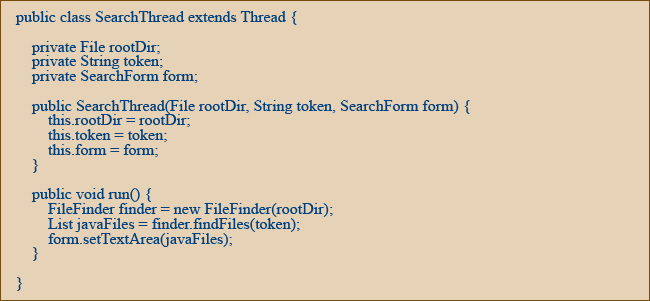
The constructor takes in the root directory, the token and the SearchForm itself (so that the output can be displayed on the screen). Note that the FileFinder class is now used from the SearchThread. The thread itself is invoked when the user clicks on the search button as follows

Note that the variable sThread is now a member variable of the class SearchForm. Once the thread is started, the SWING event dispatching thread is free to do other operations. An important operation that the user can do after starting a search is to cancel the search. Note that the search thread calls the method

to show the files on the text area in the middle of the screen.
One of the golden rules of SWING is that, all screen changes (almost) needs to be done from the SWING event dispatching thread. However, here we seem to be doing it from the search thread. Let's see the implementation of the form.setTextArea(..).
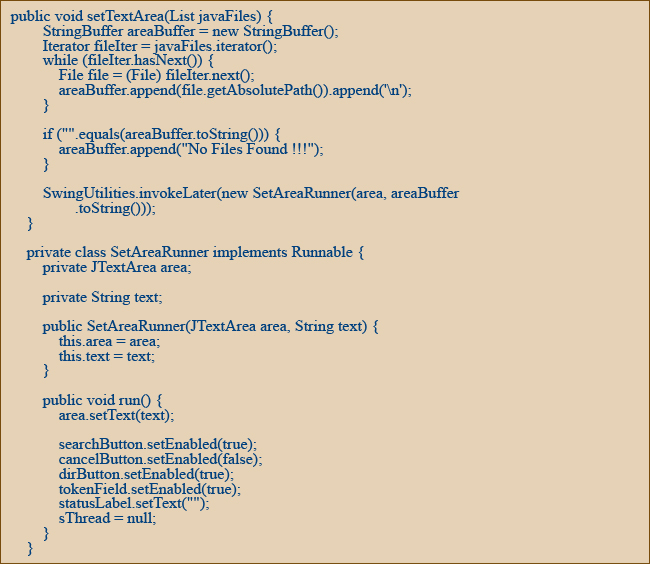
The SWING pros will immediately notice that the SwingUtilities.invokeLater solves our problem. The method setTextArea(..) first creates a string from the list of files and then uses invokeLater(..) to set the text area field on the screen. By wrapping the code in SwingUtilities.invokeLater(..) , we effectively call the code from the event dispatcher thread. The invokeLater method simply queues the Runnable object in the event dispatcher queue. The SWING event dispatcher thread detects the message and runs the code in the run() method
Now that we have effectively redrawn the screen, we need a good java implementation to cancel a thread. Java provides us with a particularly important feature to interrupt the thread. The syntax for that is

The interrupted thread needs to periodically check if the thread has been interrupted. If so, the thread needs to break out of any for(..) or while(..) loop and exit from the time consuming task. Note that, this code needs to be put in by the developer and is not automatically available.
Note that java does provide a stop() method on the thread. However, this method has been deprecated and is dangerous to use. The reason for this is that the JVM will simply throw a ThreadDeath error at the line of execution, effectively coming out of the thread. The problem here is that if the data being manipulated is critical (maybe a linked list), there is a high probability that we end up with corrupt data.
In our code, the implementation is simple. The following is done when the user clicks on the cancel button.

Note that the SearchThread class simply delegates all of the responsibility of searching to the FileFinder class. So, somehow the FileFinder class needs know that an interrupt has been sent to it. Any thread can check if it has been interrupted, by using the following

If it returns true, the thread was interrupted. So, the SearchThread would have to periodically check whether it was interrupted and if so exit. Note that there has to be a balance between liveliness of a thread and the performance degradation that may occur due to too many checks for interrupt. Too many checks would improve the liveliness of the thread, since it can respond to the interrupt faster.
In our implementation, the check is done after entering a new directory. Click here to see the complete list of source files for this iteration.
The implementation still has some glaring issues.
- he user still has to wait till the end to see if there are any results
- There is no indication of the progress of the task. The user only sees "Working ..." but does not know how much is done.
- getAllDirectories(), to find out what directories need to be searched. This will give the search thread, the scope of the task to be performed. It effectively divides the task into multiple sub tasks.
- findFilesInDirectory(), to search for a token in a specified directory.
- A time consuming Task (we will call this Work), which has no knowledge of threads or display. It's primary focus is to provide the mechanism to execute the task. It also helps in subdividing the task into multiple smaller pieces of work.
- A Thread (we will call this a WorkerThread), which has no knowledge of what work is being done and how the results are displayed on the View. It's primary focus is to control the execution of the work.
- A View (which can implement a WorkListener), which displays the UI for manipulating the Work.
Determining the thread progress
In this iteration, we will add the ability to show the progress of the search. The interface will not look much different.
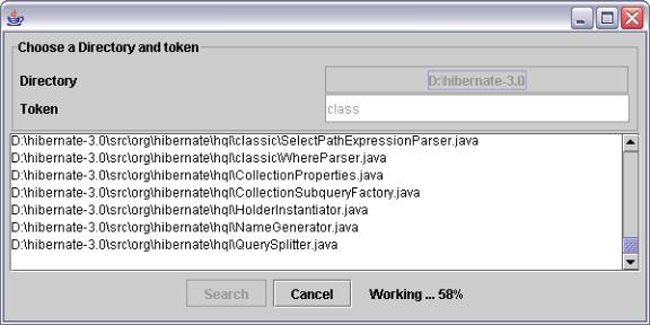
On clicking on search, the cancel button will be enabled. Also, the results will be displayed as and when it is detected (rather than at the end) and status field will show the percent complete as above.
To implement the above functionalities, we will have to refactor the FileFinder code so that search thread is aware of the percentage of the task. The current functionality does not calculate how much of the work needs to be done.
So, let us create a new class called TokenSearchWork, which will have two methods.
The outline of the TokenSearchWork class is as shown below.
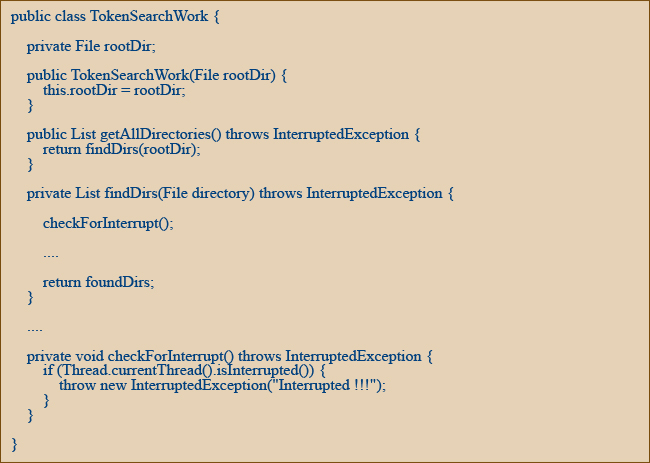
Note the use of InterruptedException. Both methods throw InterruptedException. This is useful for canceling the thread. We create a private method called checkForInterrupt(), which simply throws an InterruptedException whenever it detects that an interrupt has occurred. This simplifies the cancel implementation to a certain extent. This exception will be caught by the search thread and handled correctly.
The run method of SearchThread will now change to use the new TokenSearchWork class as follows.
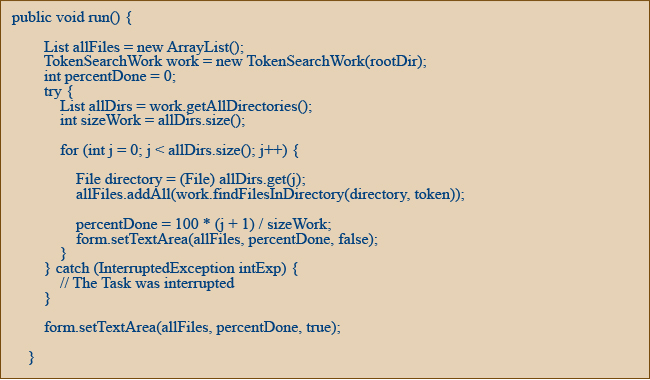
The run() method first constructs the TokenSearchWork class. It then calls getAllDirectories() method to get all the directories recursively. After that, for each directory, the thread would search for the token in files inside by calling findFilesInDirectory(..). By doing this, the Search thread is always aware of what percentage of the work has been done. Also, InterruptedException is caught but nothing is done (we can at least log it). However, it helps to exit from the for(..) loop.
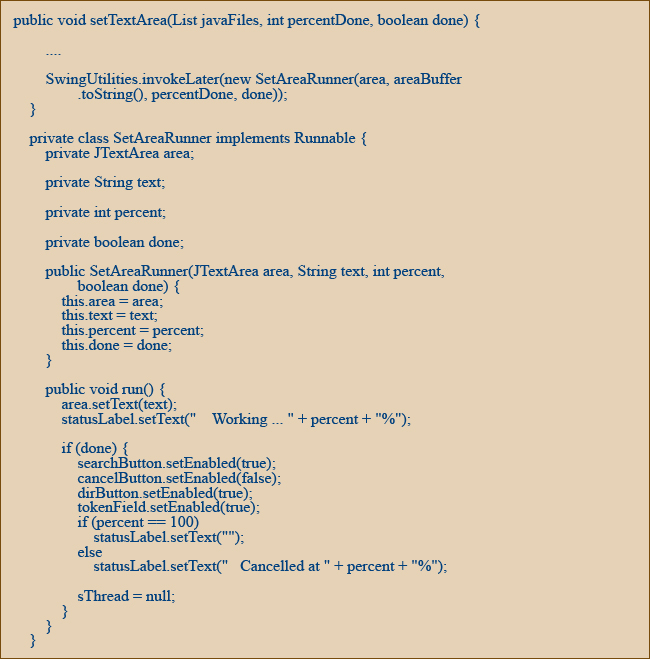
Note the change in parameters of the form.setTextArea() to accommodate the percentage done and the cancellation. Two new parameters have been introduced. Percentage done and boolean to see if the task is done.
SearchForm handles this change as follows.
Click here to see the complete list of source files for this iteration.
The functionality in this iteration is good enough for most scenarios. However, there may be several occasions where we may need two more functionalities: pause() and resume(). Just like stop(), java provides these methods on the Thread class. However, the functionalities have been deprecated and is dangerous to use. So, if we need these functionalities, we will have to create our own pause() and resume().
Pause and Resume the Thread
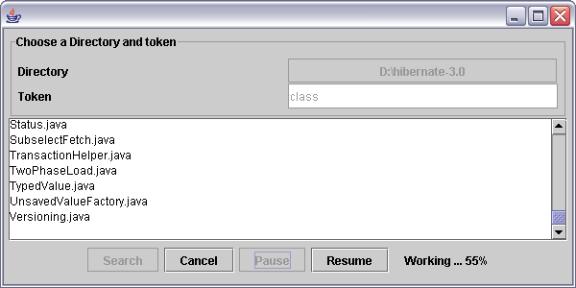
In this iteration, we will implement the pause and resume functionality. Two new buttons are added as follows. The screen would look like below when the pause button is clicked.
To implement the pause and resume functionality, we should somehow be able to make the thread "sleep" when the pause button is clicked. Also, we should be able to "wakeup" the SearchThread by clicking on the resume button. The best way to do this in java is to use the wait(..) and notify(...) method. We will introduce a new member variable called 'request' in SearchThread. This variable will have one of the 3 values.

Two new methods for pause and resume will have to be added to the SearchThread as follows. Note the use of the synchronized keyword.

The above two methods will set the request member variable appropriately. In addition, the resumeWork() also calls the notify(..) method to wake up the SearchThread which is waiting.
So, how does the search thread go to "sleep" when the pauseWork(..) is called on the search thread.
To make the thread go to sleep, and a new method called waitIfPauseRequest.

As seen above, the thread will invoke the wait(..) method when the request variable is set to PAUSE. Until the request is set to RESUME, the thread will sleep. The only exception is when the thread is interrupted. In such a case, an InterruptedException is thrown by the wait(..) method. This will happen when the user clicks on the cancel button and the result would be to exit from the thread. The functionality is exactly what we need.
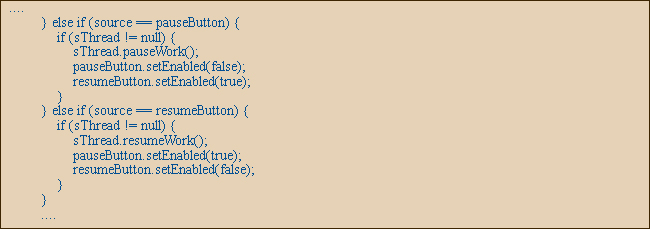
The front end will simply call these methods when the user clicks on the pause or resume button as follows. Note that the buttons are appropriately enabled/disabled.
Click here to see the complete list of source files for this iteration.
We have created a user-friendly search functionality with ability to start, monitor, pause, resume and stop. However, from the perspective of implementation, the SearchThread is very coupled with the front end and the actual search task. Looking at it closely, we see that every time consuming task, which can measure it's progress (search being one example), should be able to use the same threading functionality available in the SearchThread. So, would it be possible to create a generic version of the thread which can be used by any View and any long running task? The answer to this is yes, provided the work class following some simple rules.
Generalize the Stop, Monitor, Pause and Resume
In this iteration, we will tackle the issue of creating a generic worker thread, which automatically takes care of pause, resume, progress and cancel. There are no changes to the View in this section.
If we take a look at the SearchThread code, you will see that this class has the knowledge of the SearchForm as well as the TokenSearchWork (the task). We would now proceed to refactor the code so that a generic version of the thread would suffice in most cases to get the stop, monitor, pause and resume functionality that's needed.
First, let's try to make the search thread independent of the TokenSearchWork class. In java, interfaces are a good way to conceptualize an idea. So, conceptually speaking, an asynchronous activity has three parts to it.
First, let's try to make the search thread independent of the TokenSearchWork class. In java, interfaces are a good way to conceptualize an idea. So, conceptually speaking, an asynchronous activity has three parts to it.