

Do You Yearn To Express Yourself Artistically?
Do you have a deep burning desire to put graphics on your page? Do you secretly yearn to fill your pages with classy images like this one? Are there bears in the forest?

YES!!!!
Web browsers are picky - they will only display certain kinds of graphics: gifs (pronounced like "gift" without the "t") (not "jif" like the peanut butter); jpegs (or jpgs for the PC crowd) (pronounced "jaypeg"); and a new and not very commonly found format, png (pronounced "ping"). Got that? Of course you do!
Are you prepared to face this challenge?
As a matter of fact, I made the "HTML Wizard" graphic at the top of the page with ClarisWorks 4.0. Really.

We are interrupting the regularly scheduled program with this important announcement:
This Just In: For those of you who are cheap tightwads, we have just received late word that there is a FREE graphics program available at MacUser Downloads. The name of this program is The Cheaper Image. Free certainly IS cheaper than Not Free!
Reliable sources tell us that this program is not available any place else in the entire known universe other than MacUser Downloads!
The Cheaper Image can use Photoshop plug-ins, which is good. With Photoshop plug-ins YOU can do nifty stuff like:

This effect made with (Photoshop plug-in) Eye Candy 3.0
Photoshop plug-ins are available for downloading at fine web locations everywhere. Some are shareware, some are commercial products ya gotta pay for up front.
And now, back to your regularly scheduled progam:
I
have not played with Cheaper Image very much, so I have no idea if it really is a turkey (after all, it IS free, and a lot of times you get what you pay for...). The author (whose last name is Throckmorton (that's promising) has a big old Read-Me, in which he promises that you can do things like "take a scan of a picture of your dear little brother and make him look like The Amazing Bat Child of Kentucky." (that's promising too...)
In any case, Cheaper Image just makes images that are PICTS, so that means you'll need to get GifConverter which (surprise!) converts images to gifs.
LOOK! You
can get GifConverter at
Shareware.com RIGHT NOW!
But What Do I Do If I Am An Artistic Klutz?
(and there are all kinds of other places to look too, but alas, many enterprising
websters have gotten a little TOO enterprising, ended up in copyright trouble and had to close down their sites.......)
That's
how I got this hot image:
But enough about my taste in men.
I just usually throw everything together in one folder and the heck with it. Others need a more organized approach, which is probably encouraged by their therapists.
If you are interested in the above approach (being hopelessly over-organized) click here,
and you will find your self plunked into a web tutorial. The graphics in it are stored in a media directory (folder) inside the main directory (folder). When the pages are opened in your browser, you can look at the document source for each page to see how the tags are done.
Homeboy was made bite-sized like this:
The 60 height and 60 width above refers to the number of pixels taken up in each direction.
(Keep in mind that you could also make old Homeboy life-sized by using HUGE NUMBERS instead of a measly little 60 x 60 pixel area, but that really is a perverse thought which should probably be left well enough alone....)
One of the most important things to remember is that you have to keep the width
and height porportional. Otherwise, you're gonna end up with something
that looks like well-baked roadkill:
Would I lie to you?
No, indeed. A transparent gif is merely a graphic, albeit a very clever one. A transparent
gif allows the background to show through in the location of your choice on the graphic. Here is (yet another!) fabulous example:
Transparent: Not Transparent:
Amazing, isn't it?
SHAZAM!
It's gone!
You can just go steal good stuff off of someone else's page. Shocking, yes, but it happens all the time.In fact, just like GRSites.com has the amazing archive of backgrounds and other goodies, some web sites have archives
of web-friendly graphics, FREE for the taking. Since the stuff is free, it's not really stealing, but let's not get hung up on semantics. It's more fun to feel wicked.
Let's
Go Shopping!
Here is a list of some places to start:
Graphic Larceny ExplainedOn
a Mac, you can just click on a graphic, keep holding down the mouse button, and drag it right off of the page onto your desktop, and it is saved there. On a PC, all you have to do is click on the graphic, hold down the mousebutton and select "save this image" from the pop-up
menu, and save it to where ever your little heart desires.
(I am somewhat almost tentatively positive that it is probably not copyrighted...don't you think?)
 OK - I've Got The Goods, Now WhatTo get a graphic to show up on your web page, you must either have it in the same directory (folder) on your computer (or server) as your html page, or tell the browser where to find it.
Here
is the code which caused that hunka hunka burnin' love to show up on the page above:
OK - I've Got The Goods, Now WhatTo get a graphic to show up on your web page, you must either have it in the same directory (folder) on your computer (or server) as your html page, or tell the browser where to find it.
Here
is the code which caused that hunka hunka burnin' love to show up on the page above:
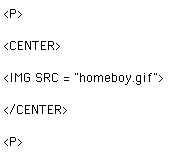 Some people (you know, the ones with the therapists) keep all of their graphics etc in a separate folder inside their main web page folder, and call the secondary folder something pretentious like "media." In that case, they would have to tell their browser how to find the picture, and the code would be like this:
 Easy-Greasy Re-SizeIf you would like an image to appear smaller (or larger) than it really is, you don't have to spend a bunch of time trying to re-size it with a graphics
program. There is a simple HTML code to let you do that:
Easy-Greasy Re-SizeIf you would like an image to appear smaller (or larger) than it really is, you don't have to spend a bunch of time trying to re-size it with a graphics
program. There is a simple HTML code to let you do that:
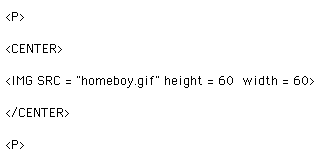 Now, obviously, some graphics will respond better than others to being resized. Just like the people who go to Weight Watchers.
 or this:
instead of
Really.
The Somewhat-Invisible Man -- or -- Life as a Transparent GifContrary to rumors floating around the Internet, a transparent gif is not some sort of diaphanous silken lingerie item from Victoria's Secret.

 I could tell you (and you might even believe it) that you can make a gif
transparent by very carefully tracing it onto a piece of SaranWrap, and then taping it over your computer monitor screen. That would probably work. But then you'd have to mail pieces of decorated SaranWrap to everyone who wants to see your web site - that probably wouldn't work. (You know how SaranWrap gets when you try to fold it....)The solution? A very nifty and easyFREEware program called (imaginatively) Transparency.
The quickest way to find Transparency?
You guessed it:
After you have downloaded Transparency, you will find that it also is very easy to use. Just drag the gif file of your choice over the Transparency icon, and viola! the image opens up. Click your mouse on the color that you want to disappear, and
Do a "save-as" on the file, and you will become the proud owner of your
very own semi-invisible man, or dog, or horse, or coffee cup, or watermelon,
or diaphanous silken lingerie, or..............
I could tell you (and you might even believe it) that you can make a gif
transparent by very carefully tracing it onto a piece of SaranWrap, and then taping it over your computer monitor screen. That would probably work. But then you'd have to mail pieces of decorated SaranWrap to everyone who wants to see your web site - that probably wouldn't work. (You know how SaranWrap gets when you try to fold it....)The solution? A very nifty and easyFREEware program called (imaginatively) Transparency.
The quickest way to find Transparency?
You guessed it:
After you have downloaded Transparency, you will find that it also is very easy to use. Just drag the gif file of your choice over the Transparency icon, and viola! the image opens up. Click your mouse on the color that you want to disappear, and
Do a "save-as" on the file, and you will become the proud owner of your
very own semi-invisible man, or dog, or horse, or coffee cup, or watermelon,
or diaphanous silken lingerie, or..............
Back to
HTML Wizard
web page Back to HTML Basics
web page Use
C
O L O
R on web
pages
Make animated gifs
on the Mac.Put
midi music
on web pagesLearn about
HTML tags
on web pages
