Punch the button....
Animations are Cool

I reallllly wish that I could take credit for having created the lovely leviathan above, but alas, I cannot. This is yet another example of the cultural treasures that await us on the Net.

Making such splendor (or shall we spell it like the British?) SPLENDOUR is easily within your reach!

Getting Started

If you haven't yet read the graphics page, it might be a good idea to start there, unless of course you are 13 years old and already know everything. In that case, what are you doing reading this anyway? Are you sick?

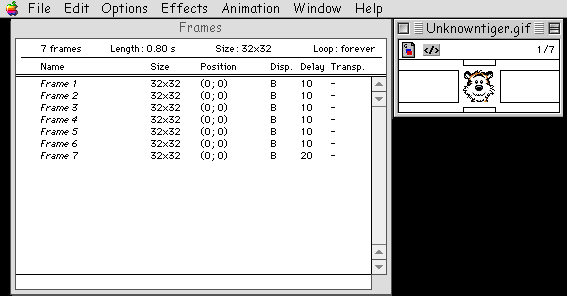
Here's an example of an animated gif that I just made of an unknown and unnamed tiger, who just so happened to be roaming the neighborhood in the form of an icon on my desktop.

Before: After:

Wow! How Did I Do That?

To make an animated gif requires special software. Darn.

OK - So Now What?

So, now you jam on outta here and get GifBuilder, an easy FREEware program written for Macs and distributed far and wide as a gift to the world by Yves Piguet. What a guy! Yves is such a good guy that even though GifBuilder is free, he has included a nifty "read me" and tutorial, so that you can get the most out of the program. You can get the fabulous GifBuilder at GifBuilder Download Site #1 or to GifBuilder Download Site #2

Yves' own personal download page is no longer online. Bummer.

I personally like GifBuilder because it is EXCELLENT and it is FREE! Free is not always good - you know the saying about "you get what you pay for." In this case, free is a Really SUPER Good Deal.

Other animation programs are available at (ta DA!) (where else?) Shareware.com! . The animation download page is right HERE: the Mac Gif/Animations page.

There are PC animation programs out there too. Take a look. . at the PC downloads page at Shareware.com!

Using GifBuilder: You Don't Really Have To Be Smarter Than The Average Bear

You will need a series of illustrations, each one slightly different than the previous one. So, first I captured the tiger, and made him sit still enough to get a copy of him in his beautiful and natural state.

Then, I started out with that original illustration. Instead of making a brand new one the same size, I did a "save as' on the original, and then made a slight alternation, did another "save as, and so forth.


Even if you think that you are sooooooo cool that you don't have to do "save as" and can make another illustration exactly the same size and with your artistic elements arranged precisely, just being a hair off will result in a jerky (read "sloppy yukky and really irritating") animation. Then everyone will think you're a dweeb.

See?

Here are the pieces of the animation:

This Looks Pretty Scary - What Do I Do Now?

If you're that nervous, try professional help. A combination of drugs and electro-shock therapy has helped millions.

If you think that you can handle this challenge, open GifBuilder.

When you first open GifBuilder , it looks like nothing has happened. This is where the insecure people get blown away. DON'T PANIC!!!!. Remember that with this program, windows do not automatically open, you have to go to the top menu bar to select what you want. Keep repeating to yourself "everything is going to be OK..."

Go to "Window" in the top menu bar, and choose "Frames Window." Drag your illustrations one by one into the frame window in the sequence that you want them to appear in the animation. Whew! That WAS hard wasn't it?

Choose "Preview Window" so you can see your animation. Go to "Animation" in the top menu bar, choose "Start" and let 'er rip!

Pay attention to the Options - you can vary the speed of the animation, create special effects and all kinds of stuff, so that you can fuss with the animation until you get it just the way you want. You might even try reading the directions.


(Kinda reminds you of the truck driver in Thelma and Louise, doesn't it?)

But Wait! There's More!

One nifty bonus of GifBuilder is that you can use it to reduce the file size of any graphic file that you have made, even if you don't want it animated. GifBuilder strips out unneeded elements from your graphic, and can in some cases reduce your file size tremendously.

After you are done with any kind of artwork, and have saved it as a gif, drag it onto the GifBuilder icon, do a "save as" and (poof!) nine times out of ten you will discover that in doing so you will have reduced the size of your file, sometimes by as much as 50% or more, without the help of either Fergie, Jenny Craig or Monica Lewinsky!

You can also accomplish weight reduction of gifs by using graphics programs that offer the option of "optimizing" your graphic when you save it. If it asks, just say "Yes." It will be gentle.

Reducing the file size allows your graphics to load more quickly, and gets rid of unslightly cellulite to boot.

Back to
HTML Wizard
web page
Back to HTML Basics
web page
Use
C O L O R on web pages
Put
midi music
on web pages
Use cool
graphics
on web pages.
Learn about
HTML tags
on web pages

Hosted by www.Geocities.ws

1