
In The Beginning
Once Upon A Time, Long Long Ago, let's say about 1995, people thought that they could put any old darn color they wanted on their web pages, and it would look terrific! Not only that, they thought that all computers were created equal, and would display the colors in an identical fashion. All seemed well in the peaceable kingdom.
In the Garden of Eden
Poetic names were invented for HTML font and background colors, lovely names like "moccasin" or "gainsboro" and "peru," each with a corresponding "hex number" (more on that below.) Some color names sounded so good that you thought you might be able make a whole meal out of them: "bisque," "honeydew," "salmon," and "tomato," with either "papayawhip" or "lemonchiffon" for dessert. You could serve all of this upon "oldlace" and "linen" on your "burlywood" dining set, while gazing out the window at "mistyroses" and the "greenlawn."
Ahhhh...paradise...
And Then....
And then, people got a shock. (gasp!) They discovered surprises like the beautiful rich hunter green that they had selected for their background color on their Mac looked like charcoal yuk on their friend's PC. Not only that, but when competing brands of Internet browsers were invented, sometimes they disagreed with each other too. What a total bummer!
After The Fall
Having been cast out of the Garden, some enterprising and unsung heroes went to work, creating color charts for the use of all of us. These color charts show the sacred WEB 216 - the colors that are, shall we say "True Blue", no matter what kind of a lame excuse for a computer that you might happen to have. (Unless of course, you have your monitor set for 16 colors, in which case EVERYTHING is going to look like....well.....Hell.)

Hope Springs Eternal in the Human Heart
We're saved! Now how do we find the fabulous WEB 216 so we can decide what colors we want and not risk ridicule and derision by having a page that is less than aesthetically pleasing????
Just Bonk the Striped Button To Find Enlightenment!
The top line in each little box is the "hexidecimal" or "hex color" code that you should enter in your color tag.
Pop quiz: which one is "papayawhip?" Answer: who would know?
Actually, the real answer to this burning question, along with other interesting revelations (like what-the-heck color is "peru") can be found at the very very bottom of this page.
On To the Nitty Gritty
Just for fun, punch the "On" button.
(I bet you already figured out what the "Off" button does)
Now, Where Were We....
Here's how to set up your background and font colors:
This graphic shows that the background color for the whole page will be white. ("FFFFFF") (The background color will show until the background graphic loads.)
The background graphic is a gif called "FineSpeckled.gif."
The text color will be very dark green. ("003300") It's hard to see, but it's there...
Links (before you click them) are kinda dark green ("006600"), a link where you have already visited (vlink) is lighter green ("32CD32"), and an active link (alink)(that means you are clicking your mouse on it right now) is golden yellow. ("FFFF00")
"What an attractive combination!" you exclaim.
For your exquisite good taste and ability to suck up really well, you get another gold star.
![]()
If you want another way to find hex color numbers, go to Colorcube! a nifty Javascript written by some enterprising individuals, Scott Yanoff and Willem Jonkman. Guaranteed not to induce seizures in susceptible individuals.
Do I Really Have to Use Hex Color Codes?
Stop whining! I thought you got that out of your system already! No, you don't have to use hex colors if you don't want to! Feel better now?
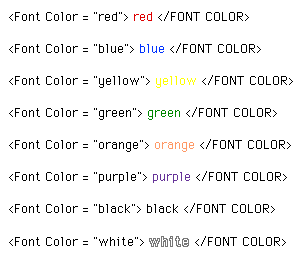
If you are a fan of primary colors (and some people are), or just want to use some simple basic tags for fonts or backgrounds without looking up hex color numbers, you can use simple color tags such as these:
![]()
and this is what you'll get:
red
blue
yellow
green
orange
purple
black
white
(black is under there someplace...)
And now! The moment you have been waiting for....Presenting
gainsboro honeydew papayawhip tomato bisque mistyrose moccasin burlywood lemonchiffon salmon peru skyblueYou thought I was making this stuff up, didn't you?
These and other lovely color samples can be found at the HTML Compendium Colours Listing. However, unless you are really serious about knowing more about HTML than is really good for you, don't bother looking. (The place gives me a headache.)
You are Now a Certified Colorizing Genius! Let's rock and roll!

Back toHTML Wizard |
Back to HTML Basics |
Use coolgraphics on web pages. |
Make animated gifson the Mac. |
Putmidi musicon web pages |
Learn abouttagson web pages |