LAB TITLE: Knoppix Overview, Demonstration, and Distribution
PURPOSE: Provide an overview and first hands-on on Knoppix
TOOLS EMPLOYED: Knoppix Live CD Distribution and an Intel-based PC
ESTIMATED TIME: 3 hrs
GENERAL PROCEDURE:
- From the general class presentation, I got a better understanding on the definition of Live CD and its general requirements.
- I made some research in the Internet about Live CDs and Knoppix. This allowed me to have better vision on Live CDs’ transcendence on the IT world.
- I learned how to verify from the computer’s BIOS that it fulfilled Knoppix’s requirements and that it is configured to boot from the CD unit.
- During the practical section of the class, I had an opportunity to use the Knoppix GUI, the different tools, and integrated programs for this particular version.
- I learned some basic UNIX commands that provided general information about the IP configuration and the system’s hostname.
- During the conclusions and lessons learned review, we had an opportunity to summarize the lessons learned and share our own vision about this first experience.
NARRATIVE:
This lab was an introduction about a variation of Linux that is surprisingly small and functional, Knoppix. This system was created by Klaus Knopper and has inspired many other Live CD projects. What I found more interesting in this lab is that one can boot the PC and turn it into a graphical user interface without even needing the hard drive!! The PC detects the bootable CD and loads everything by just using the RAM memory. As IT specialist, it was impressive to see the nice performance of the operating system, without using any writable device.
As you can see in the following figure, the graphical interface is as friendly as any Linux GUI. It also includes anything a desktop user may need on a daily basis, including Open Office. Furthermore, I think is remarkable the fact that there are many different distribution projects. They are based on different IT profiles and needs such as security, troubleshooting, networking, and administration distributions.
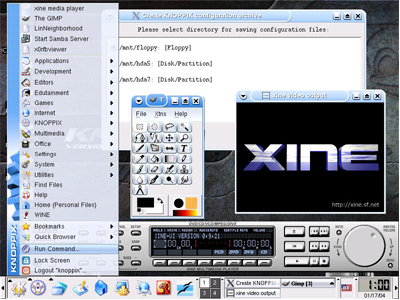
The idea of not being able to write anywhere was confusing for me at the beginning; however, it is possible to use a any read-write device for saving documents or even programs’ preferences.
I definitely believe this is definitely a tool that I will be using for my technical support activities at work.
The following link provides additional information about Knoppix.
http://www.osnews.com/story.php?news_id=2305
|