


[ home | about | about me | my BII project
1 || my
BII project 2 |contact | email | guestbook| links ]

|
|
|
|
||
|
|
||||
|
[ home | about | about me | my BII project
1 || my
BII project 2 |contact | email | guestbook| links ] |
|||||
|
|
||||

|
Networking |
|||
| Networking Issues | |||
|
What does Intelligent Network has? 1. Availability - maximizes employee productivity with 24/7
reliability.
High Availability: - Some solutions Layer2: IEEE802.1w - Rapid ST Layer2: STP Root Guard Layer2: STP BPDU Guard Layer3: Hot Spare Routing Protocol Layer3: Load Balancing Other: Intelligent Network STP Enhancement - UDLD
Scalability: - some solutions Layer 2: VLAN Trunking ProtocolLayer 2: Ether channel(FEC, GEC) Other: Storm Control
Security: - some solutions Data Plane - 802.1x802.1x enhancement Private VLAN Port security VLAN Access Control Lists Routed Access Control Lists TACACS+ and RADIUS MAC Address Notification
QoS What is QoS?
Congestion Some Solutions to Prevent Congestion 1. WRED - random2 . WRR
Network Management 1. build and manage your switching infrastructure via a standard web browser and a single IP address. 2. easily add additional switches as your LAN grows. 3. troubleshoot and perform changed from anywhere on your network. 4. perform easy software upgrade. Layer 3: Dual Path Over-subscription
Some Network Design Consideration 1. QoS
3 types of VLANs usages
| |||
| Voice over IP | |||
|
H.323 The H.323 standard provides a foundation for audio, video, and data communications across IP-based networks, including the Internet. H.323 is an umbrella recommendation from the International Telecommunications Union (ITU) that sets standards for multimedia communications over Local Area Networks (LANs) that do not provide a guaranteed Quality of Service (QoS). These networks dominate today’s corporate desktops and include packet-switched TCP/IP and IPX over Ethernet, Fast Ethernet and Token Ring network technologies. Therefore, the H.323 standards are important building blocks for a broad new range of collaborative, LAN-based applications for multimedia communications. It includes parts of H.225.0 - RAS, Q.931, H.245 RTP/RTCP and audio/video codecs, such as the audio codecs (G.711, G.723.1, G.728, etc.) and video codecs (H.261, H.263) that compress and decompress media streams. Media streams are transported on RTP/RTCP. RTP carries the actual media and RTCP carries status and control information. The signalling is transported reliably over TCP. The following protocols deal with signalling: RAS manages registration, admission, status.
How Voice over IP Processes a Telephone Call The general flow of a two-party voice call using Voice over IP is as follows: 1. The user picks up the handset; this signals an off-hook condition to the signaling application part of Voice over IP. 2. The session application part of Voice over IP issues a dial tone and waits for the user to dial a telephone number. 3. The user dials the telephone number; those numbers are accumulated and stored by the session application. 4. After enough digits are accumulated to match a configured destination pattern, the telephone number is mapped to an IP host via the dial plan mapper. The IP host has a direct connection to either the destination telephone number or a PBX that is responsible for completing the call to the configured destination pattern. 5. The session application then runs the H.323 session protocol to establish a transmission and a reception channel for each direction over the IP network. If the call is being handled by a PBX, the PBX forwards the call to the destination telephone. If RSVP has been configured, the RSVP reservations are put into effect to achieve the desired quality of service over the IP network. 6. The CODECs are enabled for both ends of the connection and the conversation proceeds using RTP/UDP/IP as the protocol stack. 7. Any call-progress indications (or other signals that can be carried in-band) are cut through the voice path as soon as end-to-end audio channel is established. Signaling that can be detected by the voice ports (for example, in-band DTMF digits after the call setup is complete) is also trapped by the session application at either end of the connection and carried over the IP network encapsulated in RTCP using the RTCP APP extension mechanism. 8. When either end of the call hangs up, the RSVP reservations are torn down (if RSVP is used) and the session ends. Each end becomes idle, waiting for the next off-hook condition to trigger another call setup.
| |||
| Cabling | |||
|
Comparsion between 4 different types of cables 1. UTP (Unshielded Twisted Pair) 2. STP (Shielded Twisted Pair ) 3. FTP(Foil twisted pair ) 4. Coaxial Cable
Choosing the correct cable
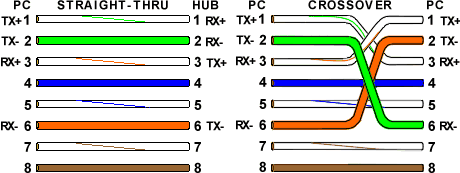
COLOUR CODE FOR UTP CABLES T568A W-G G W-O BL W-BL O W-BR BR
Legend of colour code abbreviation W - white colour O - orange colour G - green colour BL - blue colour BR - brown colour
STRAIGHT VS CROSSOVER VS ROLLOVER CABLES example: PC (layer 5-7) to Switch/Hub (layer 2) example: PC (layer 5-7) to PC (layer 5-7) example: Cisco router (console) to PC (layer 5-7)
BACKBONE CABLING The term backbone is used in place of the outdated terms vertical or riser. Blackbone cabling is used to provide connections between Entrance Facilities, Equipment rooms and Telecommunication Closets within a building and in campus environments where the cable runs between buildings. The function of the backbone cabling is to provide interconnections
between Entrance Facilities, Equipment rooms and Telecommunication
Closets in the telecommunications cabling system structure. Backbone
cabling consists of the backbone cables, intermediate and main cross-connects,
mechanical terminations, and patch cords or jumpers used for backbone-to-backbone
cross-connection. Backbone cabling also includes cabling between buildings.
Choosing Media for backbone cabling Factors to consider when making a choice include: When possible, service requirements should be grouped into categories such as voice, display terminal, LAN, and other digital connections. Within each group, individual backbone cabling types should be identified and required quantities projected. Where uncertainty exists, worst-case scenarios should be used. The greater the uncertainty, the more flexible the backbone cabling system should be.
| |||
| Wireless | |||
|
1. WWAN WWAN involves the cellular technology.
2. WLAN An example of application is the wireless network to connect a PC or laptop for Internet or LAN access without the used of cables. The standard is IEEE 802.11 consisting of 802.11a, 802.11b, 802.11g and other extensions. The 802.11b is the first completed standard that operates on Radio Frequency 2.4GHz unlicensed band with up to 11Mbps. The 802.11a is newly completed and operates on 5GHz. The advantage of 802.11a over 802.11b is it supports hugh bandwidth of up to 54Mbps and thus is suitable for transmitting imaging, voice and video. Its RF band is also less crowded with more usable channels. However, 802.11b has longer coverage implying with lower cost. The new 802.11g aims to bridge the gap between 802.11a and 802.11b by providing higher data rate than 802.11b and operates on the 2.4GHz band.
3. WPAN An example is a PDA communicating with a laptop. The standard used is 802.15 that includes the Bluetooth which has characteristic of low cost, lower power consumption and with much shorter range. The Bluetooth standard defines the physical and data link layer of the wireless network as well as the protocol to discover data services and other devices. Bluetooth operates on 2.4GHz with a range coverage of about 10m. The power consumption required and the cost of Bluetooth chip are much loswer than that of 802.11 thus it is suitable for lower powered consumer devices such as PDAs and mobile phones.
| |||
| Labelling | |||
|
What To Label Basically everything related to the structured cabling system (SCS) should be administered and thus labelled properly. This includes: Connecting Hardwares in the work areas, telecommunications closets, equipment rooms, and entrance facilities;
| |||
| TCP/IP Protocols | |||
| TCP/IP Technology TCP IP IP addresses are globally unique, 32-bit numbers assigned by the Network Information Center. Globally unique addresses permit IP networks anywhere in the world to communicate with each other. An IP address is divided into three parts. The first part designates the network address, the second part designates the subnet address, and the third part designates the host address. IP addressing supports three different network classes. Class A networks are intended mainly for use with a few very large networks, because they provide only 8 bits for the network address field. Class B networks allocate 16 bits, and Class C networks allocate 24 bits for the network address field. Class C networks only provide 8 bits for the host field, however, so the number of hosts per network may be a limiting factor. In all three cases, the leftmost bit(s) indicate the network class. IP addresses are written in dotted decimal format; for example, 34.0.0.1. Figure 2 shows the address formats for Class A, B, and C IP networks. IP networks also can be divided into smaller units called subnetworks or "subnets." Subnets provide extra flexibility for the network administrator. For example, assume that a network has been assigned a Class A address and all the nodes on the network use a Class A address. Further assume that the dotted decimal representation of this network's address is 34.0.0.0. (All zeros in the host field of an address specify the entire network.) The administrator can subdivide the network using subnetting. This is done by "borrowing" bits from the host portion of the address and using them as a subnet field. Traditionally, all subnets of the same network number used the same subnet mask. In other words, a network manager would choose an eight-bit mask for all subnets in the network. This strategy is easy to manage for both network administrators and routing protocols. However, this practice wastes address space in some networks. Some subnets have many hosts and some have only a few, but each consumes an entire subnet number. Serial lines are the most extreme example, because each has only two hosts that can be connected via a serial line subnet. As IP subnets have grown, administrators have looked for ways to use their address space more efficiently. One of the techniques that has resulted is called Variable Length Subnet Masks (VLSM). With VLSM, a network administrator can use a long mask on networks with few hosts and a short mask on subnets with many hosts. However, this technique is more complex than making them all one size, and addresses must be assigned carefully. On some media, such as IEEE 802 LANs, IP addresses are dynamically discovered through the use of two other members of the Internet protocol suite: Address Resolution Protocol (ARP) and Reverse Address Resolution Protocol (RARP). ARP uses broadcast messages to determine the hardware (MAC layer) address corresponding to a particular network-layer address. ARP is sufficiently generic to allow use of IP with virtually any type of underlying media access mechanism. RARP uses broadcast messages to determine the network-layer address associated with a particular hardware address. RARP is especially important to diskless nodes, for which network-layer addresses usually are unknown at boot time. Routing in IP Environments Routing protocols used with IP are dynamic in nature. Dynamic routing requires the software in the routing devices to calculate routes. Dynamic routing algorithms adapt to changes in the network and automatically select the best routes. In contrast with dynamic routing, static routing calls for routes to be established by the network administrator. Static routes do not change until the network administrator changes them. IP routing specifies that IP datagrams travel through an internetwork one router hop at a time. The entire route is not known at the outset of the journey. Instead, at each stop, the next router hop is determined by matching the destination address within the datagram with an entry in the current node's routing table. Each node's involvement in the routing process consists only of forwarding packets based on internal information. IP does not provide for error reporting back to the source when routing anomalies occur. This task is left to another Internet protocol: the Internet Control Message Protocol (ICMP.) ICMP performs a number of tasks within an IP internetwork. In addition to the principal reason for which it was created (reporting routing failures back to the source), ICMP provides a method for testing node reachability across an internet (the ICMP Echo and Reply messages), a method for increasing routing efficiency (the ICMP Redirect message), a method for informing sources that a datagram has exceeded its allocated time to exist within an internet (the ICMP Time Exceeded message), and other helpful messages. All in all, ICMP is an integral part of any IP implementation, particularly those that run in routers. Interior Routing Protocols RIP RIP works well in small environments but has serious limitations when used in larger internetworks. For example, RIP limits the number of router hops between any two hosts in an internet to 16. RIP is also slow to converge, meaning that it takes a relatively long time for network changes to become known to all routers. Finally, RIP determines the best path through an internet by looking only at the number of hops between the two end nodes. This technique ignores differences in line speed, line utilization, and all other metrics, many of which can be important factors in choosing the best path between two nodes. For this reason, many companies with large internets are migrating away from RIP to more sophisticated routing protocols. IGRP Cisco has recently enhanced IGRP to handle the increasingly large, mission-critical networks being designed today. This new version of IGRP is called Enhanced IGRP. Enhanced IGRP combines the ease of use of traditional distance vector routing protocols with the fast rerouting capabilities of the newer link state routing protocols. Enhanced IGRP consumes significantly less bandwidth than IGRP because it is able to limit the exchange of routing information to include only the changed information. In addition, Enhanced IGRP is capable of handling AppleTalk and Novell IPX routing information, as well as IP routing information. OSPF OSPF is an intradomain, link state, hierarchical routing protocol. OSPF supports hierarchical routing within an autonomous system. Autonomous systems can be divided into routing areas. A routing area is typically a collection of one or more subnets that are closely related. All areas must connect to the backbone area. OSPF provides fast rerouting and supports variable length subnet masks. Integrated IS-IS Integrated IS-IS is an implementation of IS-IS for more than just OSI protocols. Today, Integrated IS-IS supports both OSI and IP protocols. Like all integrated routing protocols, Integrated IS-IS calls for all routers to run a single routing algorithm. Link state advertisements sent by routers running Integrated IS-IS include all destinations running either IP or OSI network-layer protocols. Protocols such as ARP and ICMP for IP and End System-to-Intermediate System (ES-IS) for OSI must still be supported by routers running Integrated IS-IS. Exterior Routing Protocols EGP Although EGP is a dynamic routing protocol, it uses a very simple design. It does not use metrics and therefore cannot make true intelligent routing decisions. EGP routing updates contain network reachability information. In other words, they specify that certain networks are reachable through certain routers. Because of its limitations with regard to today's complex internetworks, EGP is being phased out in favor of routing protocols such as BGP. BGP BGP was co-authored by a Cisco founder, and Cisco continues to be very involved in BGP development. The latest revision of BGP, BGP4, was designed to handle the scaling problems of the growing Internet. | |||