Disabling Windows Scripting Host (WSH) is to prevent Visual Basic script viruses like VBS_LoveLetter from running, so that they cannot activate, spread or cause damage to files. A typical PC does not need Windows Scripting Host (WSH) to function normally. You can always change your mind later and reinstall WSH by repeating these steps and re-selecting "Window Scripting Host". Windows 98
WSH is installed by default when you install Windows 98 or Internet Explorer 5. To prevent scripts (or .VBS files) from running:
- First open the Control Panel by selecting 'Start', 'Settings' and then 'Control Panel'.
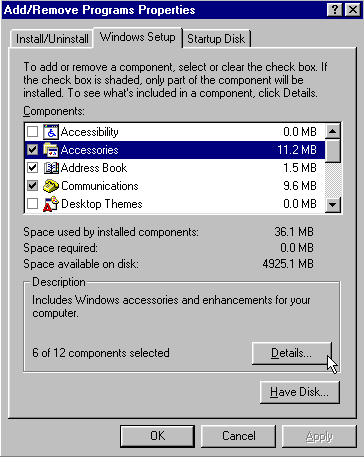
- Then double click on 'Add/Remove Programs'.
- Then select the 'Windows Setup' tab.
- Highlight (click once) the 'Accessories'
- Click 'Details'.
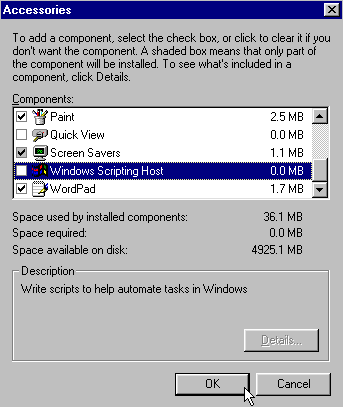
- Then uncheck 'Windows Scripting Host'
- Click 'OK' and you're done.
Windows 95
Windows 95 systems do not come with the Windows Scripting Host. However, the WSH is installed automatically when you install Internet Explorer 5 or above. To disable scripts (with the extension, .VBS) from running on Windows 95 systems:
- First Start 'Windows Explorer' (To do this, select 'Start', 'Programs' and then 'Windows Explorer'.
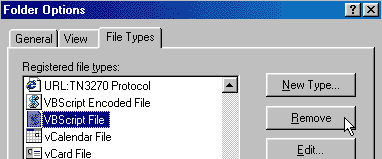
- Select 'View' then select 'Option'.
- Select the 'File Types' tab.
- Search and hi-light "VBScript Script File".
- Click 'Remove' and then confirm the removal by selecting 'Yes'.
 |

 Windows Scripting Host