Security Advice for Outlook Express The first rule of thumb is Do NOT open any attachments -- PERIOD. Even if you know the person sending you the attachment do not open since you really have no idea if the person sending you the attachment has scanned it with an updated virus scanner. The message preview pane in Outlook Express is nice and useful, but it comes with the risk of catching a worm or virus by just previewing a message (such as the Kak worm). So the first thing to do is turn off the 'Preview Pane'. This will also prevent you from accidentally viewing a message because when you delete one message the next message in line will appear in the preview window and if there is a malicious script embedded in the e-mail you will have no way to stop it.
- Open Outlook Express.
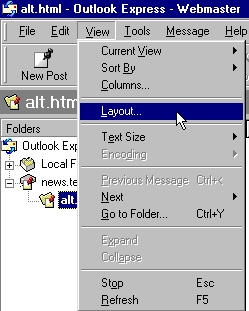
- Then click 'View' then 'Layout'.
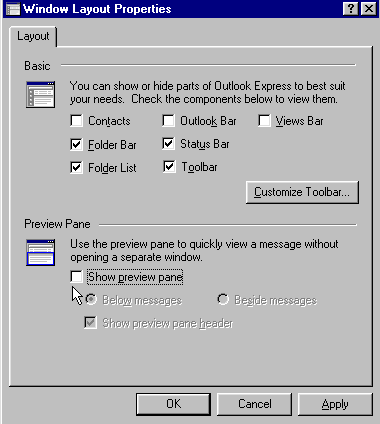
- Then uncheck 'Show preview pane'.
- Then click 'Apply'.
Avoid the action of the malicious scripts through e-mail and news groups messages. Sometimes there are bomb type posts on news groups or malicious e-mail messages that opens hundreds of copies of Outlook Express or Internet Explorer and locks up your system. This security settings will help you to avoid the malicious scripts running without your consent.
- Open Outlook Express
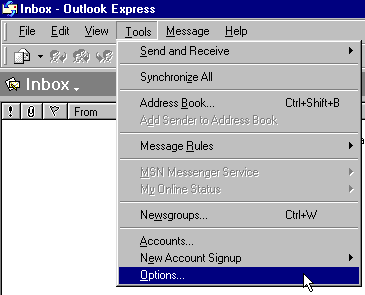
- Then click 'Tools' menu click on 'Options'.
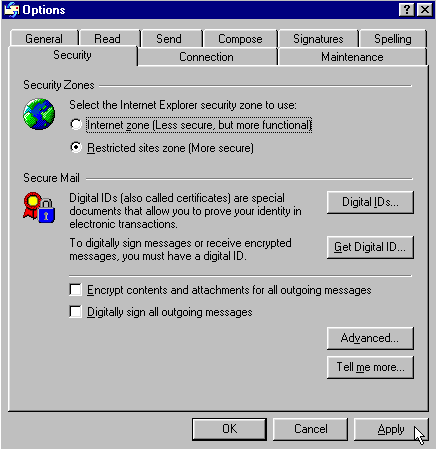
- Then click on the 'Security' tab.
- Select "Restricted site zone" and click 'Apply'.
Require a Prompt Before Opening Mail Attachments Outlook Express users should save files attachments to the local hard drive and then scan them with an up to date anti virus product (instead of double-clicking over the incoming e-mail file attachments). The prompt should look something like this: 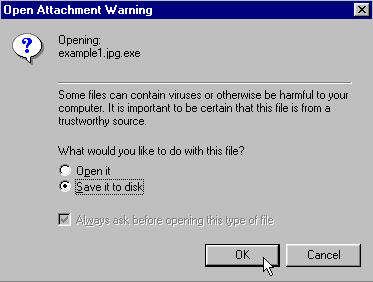
If your Outlook Express does not automatically prompts you to save files, please click on the .zip file below, and save it to your local hard drive, then open the .zip then double-click on the reg file to run. (Note: you can extract the .reg file to a folder so scan for viruses or change extension to .txt to read in notepad then change back to .reg) Warn for Mail Attachments Now move onto Internet Explorer were we will disable 'Scripting' for IE and Outlook Express. |

 Outlook Express