|
|
Service Menu
Under Service the options listed are Complete test
Settings and Program settings
Complete test Settings:
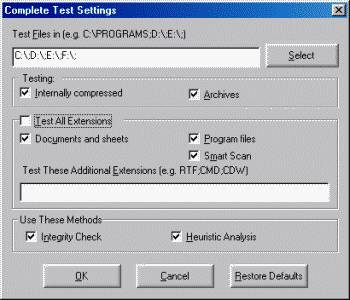
This option allows us to select the locations to be tested,
the file extensions to be tested, and the methods to be used
while testing. The default settings are as shown in the
screenshot which should be adequate. However you can check the option test all extensions if you wish.
If this is enabled AVG will check even the data files .
Complete Test Settings
Program settings:
This option enables you to decide for how many days the test results should be kept or how many previous test results should be kept. You can also activate and deactivate a boot up scanner and also activate and deactivate a memory test at program startup.
Update:
Using this option one can update their installation of AVG.Inorder to
update create a folder as described above earlier say D:\AVG_Updates. First find out the version of AVG that you have by clicking on Info .
It will display Program Version: 6.0.755.The last three digits will be different.
Go to the website .
On the homepage click on downloads on the menu bar and select updates. On the page that is displayed scroll down and click on AVG Version 6 updates. On the next page there will be a menu displayed some where in the middle of the page asking you to select which version you need. Select AVG Free Version .On the download page select the smallest download appropriate to the version that you have. For example in this case if the downloads available are as follows
| u618xnf0.bin |
6.0.731 |
456657 |
| u618xge8.bin |
6.0.640 |
3161147 |
| u618x6ts.bin |
6.0.516 |
3932871 |
| d6032pgl.bin |
6.0.515 |
1547353 |
| d6032lhj.bin |
6.0.0 |
3775889 |
|
|
 |
Selecting The Suitable Update to Download
Obviously if you have version 6.0.755 the smallest appropriate download is u618xnf0.bin
which is only 457 KB in size . In case you have an older version you must first upgrade it to
6.0.516 by downloading the appropriate update and updating it. Later on download the new update.
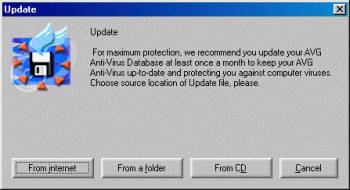
Once the download has been Completed, select Update and from the screen that appears (As shown in the Screenshot Above)select from a folder and browse to the folder in which you have downloaded the updates.
AVG will detect the update and update itself. This method is very useful where you have more than one system to update
and also in case where the OS crashes and you have to reinstall the OS.
Help Menu
Finally under the Help Menu we have Program Info, Virus Info, Technical Support and Help.
|