
Photoshop 6.0 Tips & Tricks, History & Actions
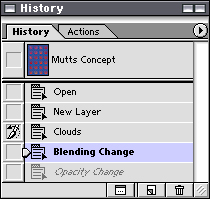
History Palette
The History Palette allows you to see a step-by-step progress of how you have altered your work from the time it has been opened. You can go back to a previous state if changes are not desirable. Qualities from an earlier states can be called forth as well with this palette.
In the example, the user has undone an Opacity Change, and the most current step is a Blending Change. The user is now using the History Brush to bring back qualities from a Clouds Filter that was applied just before the Blending Change
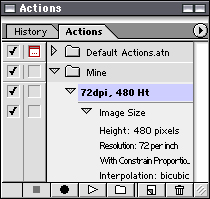
Actions Palette
The Actions Palette allows the user to automate some tasks that may be repetitive. Some default actions exist and the user can create actions too.
The example shown willl open any size image, adjust the size of the image so that it is 480 pixels tall, change the resolution to 72dpi so that its size and resolution are easy to see and work with on a computer screen.