
Photoshop 6.0 Tips & Tricks, Color
Color choices are diverse in Photoshop. You may select from print colors (Cyan, Magenta, Yellow, and Black), screen colors (Red, Green, Blue), Grayscale, Web Colors and may other options. THese options are chosen based on the final output version of the work being produced.
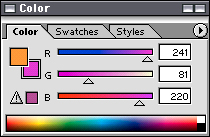
Color
Color can be selected generally or specifically. Using sliders or entering numerical values in a color field (here RGB; red, green and blue for the colors used to make white light or on a video monitor) do define a color or value. The triangle with an exclamation point lets the user know the color selected is considered out-of-gamut, meaning it is too intense and will not print on paper accurately. CMYK, print colors, cannot always reproduce RGB colors. Neon, fluorescent and high intensity colors are considered out-of-gamut
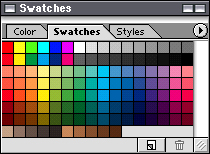
Swatches
A second option is to click on a color in the swatch palette. colors can be stored here and selected later instead of having to memorize numerical values. You can create a color scheme exclusive to a project so that it is available every time you work on it.