Visitors
4. Type ABCtemp to rename the
folder, then either hit Enter or click on a
white background area (Figure 4).
Now move your mouse cursor onto the yellow icon of the folder
ABCtemp.
Double click the icon. It will appear as in Figure 5.
Hint: You might prefer to a different
name. To rename the folder a again, highlight (the blue bar) the folder and
press F2. Type in the name that u desire and press Enter to finish. In future,
you will download many different category of files. Therefore you might want to
sort those files in different folders such as Internet Folder, Utilities Folder,
Homework Folder... It saves you time to access to the files later.
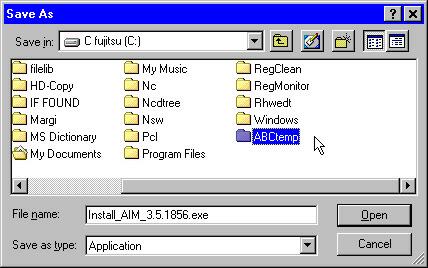 Figure 4
5. Click Save to start downloading.
 Figure 5
6. Wait for the file being downloaded into your computer. Normally, It takes about 3-5 minutes to download 1 megabyte at 56Kbps connection speed. In the Figure 6, it tells you:
- how far the downloading process has been done: 8%, 160KB of 1.91MB.
- time remains: 10 min 0 sec.
- the file name: Install_AIM_3.5.1856.exe
- and where the file is saved: C:\ABCtemp\
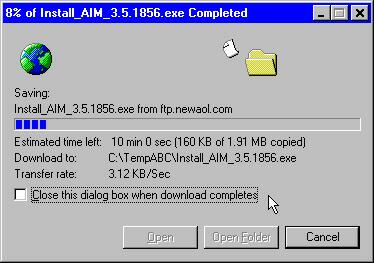 Figure 6
- If you are using Netscape Navigator browser (or Microsoft Internet Explorer browser with version earlier than 4.01), you will see a different download window from the Figure 6. See next steps.