|
 |
|
|
|
|
|
|
Website Navigation The UniverSynergy Arts website of Golden Altai is fairly large, including many pages. But there are lots of ways to find your desired paths through — and here is an explanation of some approaches. Hovering over (i.e., putting your mouse on top of) any link throughout the website should indicate where clicking it will take you. Usually, the image link or text link will change colors when you hover. Most web browsers will show you the webpage or bookmark destination. On the left side of every regular page of the website is a column of "floating" top-level buttons: "UniverSynergy Arts Home Page", "Educational Directions", etc. These can be clicked to go straight to that particular department, where you will find many interesting things. Most of the top-level buttons, when clicked, will also "open" up into a second level of buttons, which display the sub-departments for that main department. The Site Map page shows the titles of all website pages within their respective page hierarchies. One can always go straight there from other pages by clicking the bottom-most left-side button that says "Site Map". The page titles on the Site Map page are clickable to their respective pages. There are also some titles of textual sections within various pages, which are also clickable. "Previous" and "Next" Webpage Buttons
Likewise, the "Previous" buttons towards the bottom left of each page will traverse through the website "backwards". In general, the "Next" and "Previous" buttons follow the same route order as listed on the Site Map page. "Previous" and "Next" via Keyboard
One can switch to the webpages for a different language, by clicking one of the language names along the top row of every page. Throughout the website text, there are embedded links that are underlined like this and show up in different color (though the colors depend on the particular department themes). These link to locations discussed in the text. Many pages have paths to indicate special destinations that you can get to by clicking on the paths. These will typically have larger images like the following miniature path images:
Bottom UniverSynergy Arts Clickable Links Every regular webpage has, at the bottom, links for the main UniverSynergy Arts departments. Bottom Direction/Theme Clickable Links For special themes such as UniverSynergy Arts Directions, there are links at the bottom of every regular webpage, below the main for the sub-departments within that Direction. Where do you want to go now?
|
|









 There
is an interesting way that a person can traverse through the entire
website: Clicking the "Next" buttons towards the bottom
right of each page will visit every regular webpage for that
particular language. (Each language's pages traverse only through the
pages in that language.)
There
is an interesting way that a person can traverse through the entire
website: Clicking the "Next" buttons towards the bottom
right of each page will visit every regular webpage for that
particular language. (Each language's pages traverse only through the
pages in that language.)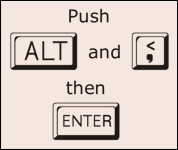
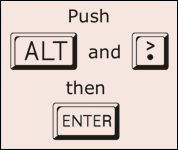 Like the "Next" and "Previous" buttons that you click
with your mouse, there are methods available to traverse the entire website by using only keyboard
keys.
Like the "Next" and "Previous" buttons that you click
with your mouse, there are methods available to traverse the entire website by using only keyboard
keys.