|
Function
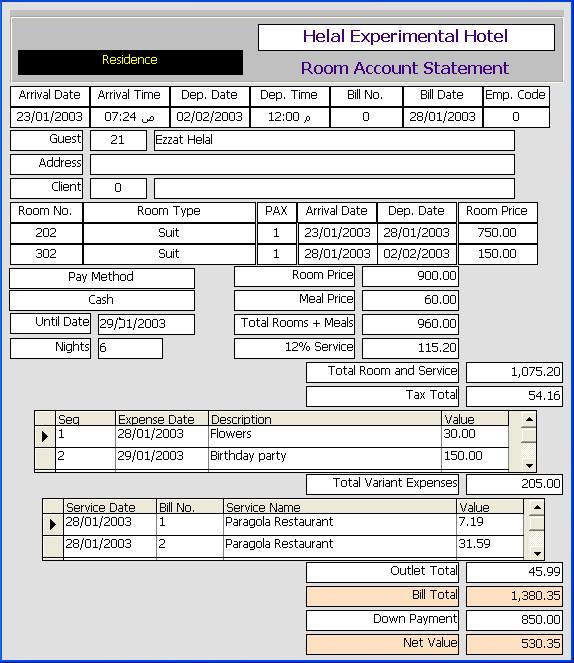
This form shows the guest bill as of to date for resident or day use guests. The use can change the until date to show the bill values between the arrival date and any date up to the departure date.
Openning Form
This form is opened from the front office main interface by clicking on the Room Bill Button after selecting a room of status day use or check in.
Data Fields
This form includes data for identifying guest like guest name, guest address, and client name. It also include the residence data like arrival and departure date, bill date and bill number (the bill number is zero and bill date is non sence if the guest is not checked out).
The form also includes room(s) data, a row for each room, showing room number, residence type, room type, pax, arrival and departure dates, and residence price.
It also shows the total residence cost including total room prices, total meals prices, total rooms and meals, service value, and total of residence and service. It also shows the pay method (Cash, check/credir card/ client account. client account no service).
The field until date is a date between arrival and departure date that determine the number of nights considered in the computation. This field is primary set to today date and users can change it to any date between the arrival and departure dates.
The total taxes field shows the computed total taxes with no details. Taxes are added after check out.
The details of variant expenses are shown as grid with each row represent an expense. The Total expenses field shows the total of variant expenses.
The details of outlet services are shown as grid with each row represent an outlet order. The outlet total field shows the total of all outlet orders.
Total Bill Field shows the total of residence, taxes, variant expenses and outlet orders.
At the end, the total of guest down payment is shown and the net pay.
Function Buttons
No function buttons exist on this form
Function Keys/Short cuts
|
Function
|
Key
|
|
Exit - Close the form
|
Alt-Q
|
|
Set focus to until date field to change it. exiting from the field by pressing (tab) key trigers the program to recompute the bill according to the new date.
|
F4
|
|