|
Function:
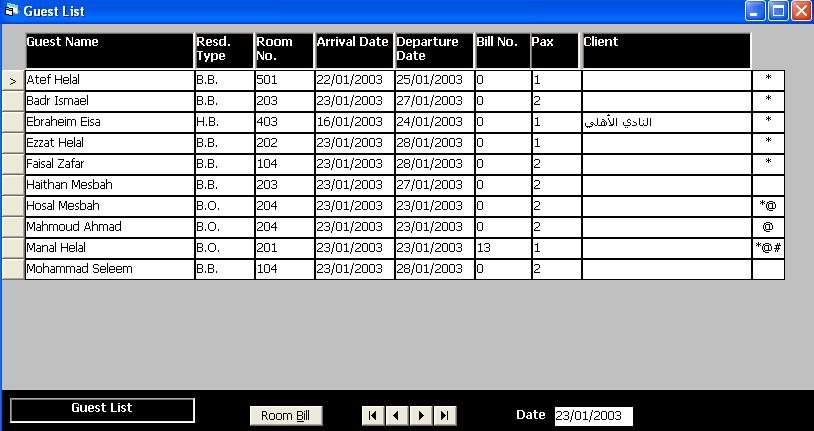
This form displays Guest List in a specified date. It allow users to reprint the room bill for checked out guests or preview the bill for resident guests.
Opening Page:
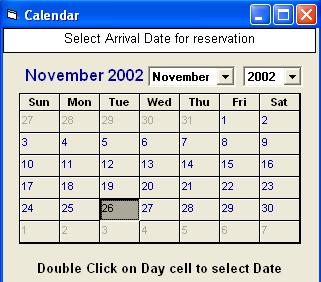
This form is opened from the main front office interface by clicking on the Guest List button. If a date cell is selected, the list will be displayed at the selected date, otherwise a calendar is opened to select a date by double click on the day.
Data Fields:
The data fields presented on a grid, each row represent a guest. The columns represent the data fields of a guest which include: Guest Name sorted, Residence type, Room Number, Arrival and Departure Dates, Bill Number, Pax in Room, client name, and a fields shows the residence status in symbols (Symbol [#] represent check out status, The symbol [@] represent Day Use, and the symbol [*] represent the proncipal guest for whom the bill is issued).
Function Buttons:
The form includes buttons to browes the guests' records (first, last, next, and previous). It also include a button to display room bill for resident guests or reprint the room bill for checked out guests.
Function/Short cut Keys:
|
Function
|
Key
|
|
Move between fields
|
tab
|
|
Set Focus to Remarks grid
|
F4
|
|
Close
|
Alt+Q
|
|
Reprint or view bill
|
Alt+B
|
|
Last Record
|
End
|
|
First Record
|
Home
|
|
Next Record
|
Down Arrow Or Page Down
|
|
Previous Record
|
Up Arrow Or Page Up
|
|