|
Function:
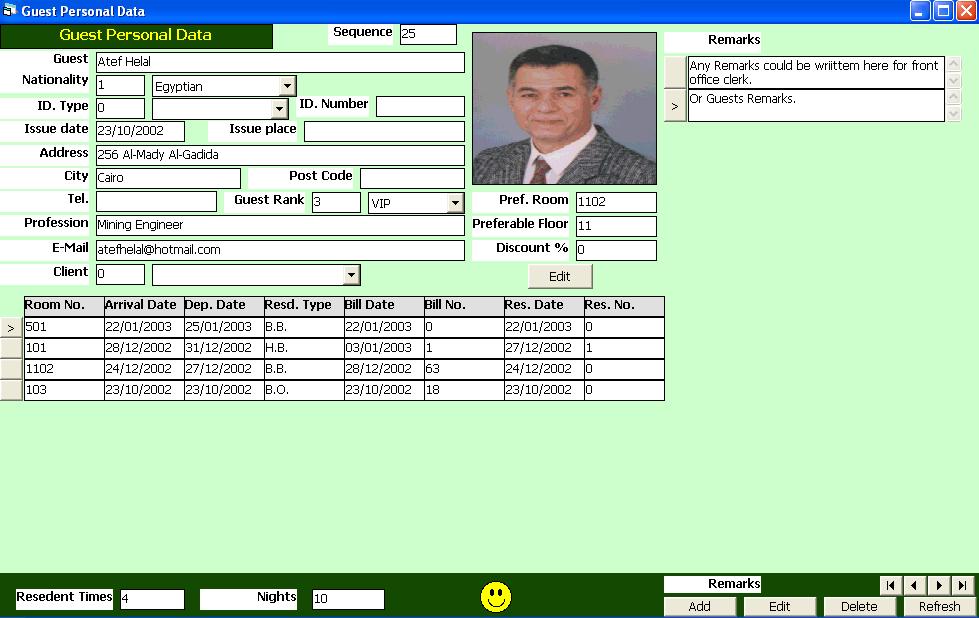
This form displays the personal data of a selected guest and allow user to update them. It also show a picture of the guest, his remarks, and his residence history. The user may change picture, or add remarks.
Opening Page:
This form is opened from the main front office interface by clicking on the Guest History button, then select the guest name from the guest list and then click again on guest history button. A short cut for guest history button is Alt+H.
Data Fields:
The guest personal data include: Guest Internal sequence number, guest name, Nationality, ID. Card Type, ID. Number, ID. Date and place of issue, Guest Address, City, Post Code, Governorate (Or State), Guest Rank, Guest E-Mail, Guest Proffission, Guest Client (Or Agent), Guest Preferable Room, Pereferable Floor, Guest Discount Ratio. On the left, the form shows remarks written by guest or by hotel for update or adding new remarks. On the bottom of the form, a residence history is shown. Each line of the residence history shows the room no., arrival and departure dates, Residence type, Bill No. and Date, Reservation Number and Date. The form also shows the total number of check in and the total nights of the guest up to date.
Function Buttons:
The form includes the following function to update the guest personal data:
Edit Allowing users to change the personal guest data. After changing data fields, the user click on update to accept changes and save data, or click on Cancel to cancel changes. To change or add a picture, click with the right mouse button on the picture field to open a dialoge box to select a picture from any directory of the computer.
In addition to above function the form includes buttons to update and add remarks.
Add to add new remark.
Edit to edit The current remark.
Delete to delete the current remark.
In the edit and add mode to functions are available, the first is (Update) to accept the changes and save them, the second is (Cancel) to cancel changes.
The form also includes buttom to browes the remarks records (first, last, next, and previous).
Function/Short cut Keys:
Basic Data Commands
|
Function
|
Key
|
|
Move between fields
|
tab
|
|
Set Focus to Remarks grid
|
F4
|
|
Close
|
Alt+Q
|
|
Edit Personal Data
|
Ctrl+E
|
|
Update
|
F2 Or Alt+U
|
|
Cancel
|
Esc Or Ctrl+C
|
Function/Short cut Keys:
Remarks Commands
|
Function
|
Key
|
|
Move between fields
|
tab
|
|
Add
|
Alt-A
|
|
Edit
|
Alt-E
|
|
Delete
|
Alt-D
|
|
Update
|
F2 Or Alt-U
|
|
Cancel
|
Esc Or Alt-C
|
|
Last Record
|
End
|
|
First Record
|
Home
|
|
Next Record
|
Down Arrow Or Page Down
|
|
Previous Record
|
Up Arrow Or Page Up
|
|