|
Function:
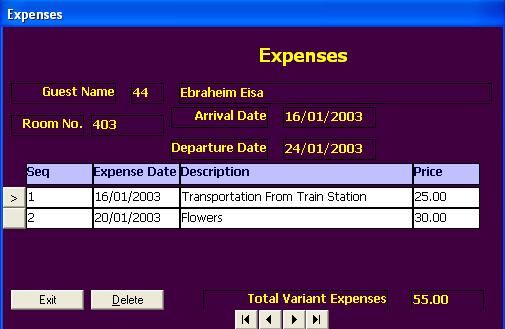
In this form, the user add variant expenses to guest account. These expenses is different from outlets' services added to guest account through outlet module. Variant expenses include all services and costs that are not part of the outlets like secretarial work, transportations, ... etc. No Taxes added to this costs, but just item name and price.
Opening Page:
This form is opened from Room Occupancy Form by clicking on the Expenses button for a room of status check in.
Data Fields:
The form includes four read only fields: the room no., arrival date, departure date, and guest name. The user can not change these fields. Other data items are entered and updated by user. they are displayed in a grid. Each row of the grid represent an expense item that has the following fields:
Sequense: Generated by the the program for each expense item.
Expense Date: The date of expense item. It must be between arrival and departure dates.
Expense Description: A text field that describe the expense item.
Expense Price: The total price of the expense item that will be added to room bill on check out.
The form also include a field to display the total expenses added during the guest residence. This field is computed by the program when the user adds new expense item or change the price of an old expense item.
Function Buttons:
The form includes the following functions:
Exit To close the form.
Delete to delete current expense record.
In addition to above functional buttoms the form also include buttons to browes the expenses' records: The first, last, next, and previous. The add function is performed automatically when exiting from the last expense record. Edit is performed on the current record by typing on the old value and exit from the record.
Function/Short cut Keys:
|
Function
|
Key
|
|
Move between fields
|
tab
|
|
Delete
|
Alt-D
|
|
Set Focus to Exception grid.
|
F4
|
|
Close
|
Alt+Q
|
|
Last Record
|
End
|
|
First Record
|
Home
|
|
Next Record
|
Down Arrow Or Page Down
|
|
Previous Record
|
Up Arrow Or Page Up
|
|