|
Function:
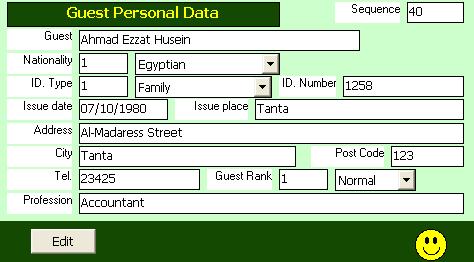
Enter/Update Guest Personal Data.
Opening Page:
This form is opened when the guest name is entered or selected in Room Occupancy Form. It also opened when the room occupancy form is open for old reservation or old check in.
Data Fields:
This form include the following data fields:
Guest Seq. Is an internal sequence number for guest. The user can not change it.
Guest Name: Is the name of the guest. User may change the guest name in this form and not in room occupancy form or in room Guest form. Changes in the guest name in these forms means a new guest replaces the old one. User may modify guest name also in Guest History Form.
Nationality: It selected from the nationality table defined in basic data module. The nationality of the guest affects the room price.
Identity Card Data: It includes the card type which is selected from the list (Family, personal, passport, military, or National Number), Card Number, Date of issue, and place of issue: Entered by user.
Address: Permenant Address of the guest.
City: The city od residence of the guest.
Post Code: The post code of the guest permenant address.
Telephone: Telephone number of the guest.
Guest Rank: Selected from the list provided (Normal, regular, or VIP).
Proffession: The proffession of the guest.
All the above data fields are optional except the guest name and nationality. Other data fields about guest are found in Guest History Form.
Function Buttons:
The form include only the Edit function to change the data fields of the current guest. Clicking on the edit button lets user able to change the data fields and shows Cancel and Update buttons to Cancel or accept the changes.
Function/Short cut Keys:
|
Function
|
Key
|
|
Move between fields
|
tab
|
|
Update
|
Alt-U
|
|
Transfere focus between open forms
|
F5
|
|
Cancel
|
Esc Or Alt-C
|
|
Edit Record
|
Alt-E
|
|
For Combo Box, select previous or next item
|
Down Arrow/Up Arrow
|
|
Open Combo Box
|
Alt-Down Arrow
|
|