There are two ways to get anywhere in There; teleport or travel.
Because There has such a huge landscape, most folks want to hop in a vehicle and explore. There isn't like other games, tho. The distances are real, and it takes real time to travel from one island to the next.
Traveling and exploring are tremendous fun, but if you want to go to your friends when they IM you, you'd better hope they can wait an hour for you to arrive via hoverboat.
Nope. Better to teleport, but a lot of the map is closed off to free members.
There Map
"Map?," you say. "What map?"
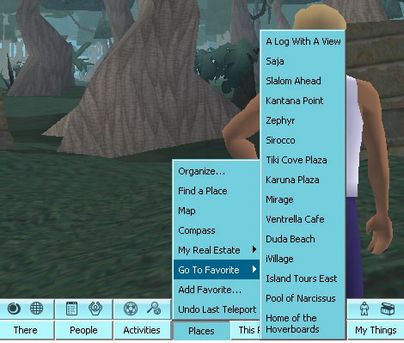
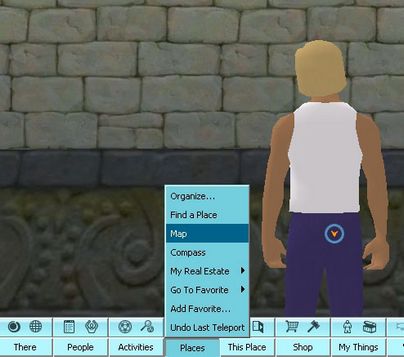
The map at the bottom of your screen, silly. Go to Places then select Map as shown below.
Below is an overview of the There map.
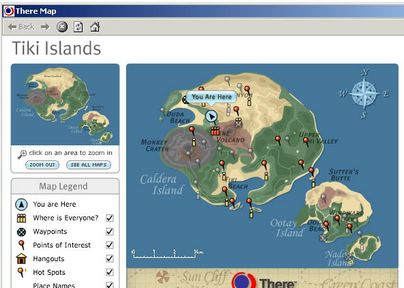
Let's take a closer look below. You can see a blue tag that says You Are Here. Assuming you are a free member and don't have the explorer pack, you can refer to this page as a compass. Your arrow is pointing roughly North by Northwest. That's the direction you are facing. The red pushpins are areas that you can teleport to, and the lowercase i icons you see represent people in the area. Yellow i icons are a few people, red i icons are a lot of people.
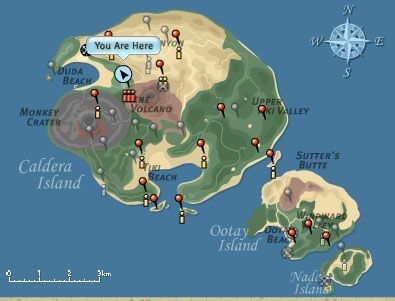
You can use the map to either teleport to areas, or you can refer to it as you drive or fly to find your direction and the names of nearby landmarks. Just mouse over an area to find its name.
Favorites
Another way to get around is by using the Favorites under Places. All members, whether free or paid, have some Favorites that are already there when they sign up. Paid members can add places they want to save, but free members cannot. However, both free and paid members will sometimes get some new ones as they gain more experience in There.
The Favorites menu is below. To go someplace, just click the name and go there.