My Pages
- About Me
- Art Work
- My Other Pages
- Projects
Other Pages
- Cisco Home
Return to home
Projects 2
Projects 3
Projects 4
Projects 5
Projects 6
Projects 7
Projects 8
Projects 9
This page was designed to be seen at a 1024x768 resolution. This page will not appear correctly at other resolutions.
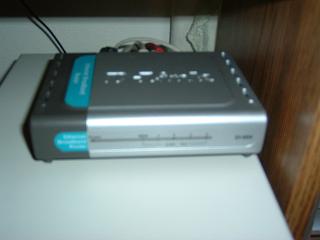
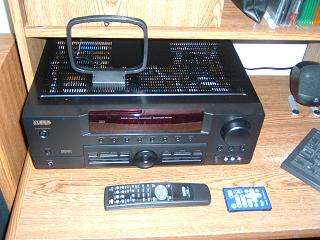
Below my routers is my new KLH Audio Systems home theater receiver. I have that wired to, what else ofcourse, my computer. It wasn't all that hard acually. There are two outs on the Newq, a rear out and a front out. I had an adapter, it is a Y spliter, you plug the double male mini jack cable from the computer to the Y split adapter. The two plug ins on the other side of the Y spliter are sterio audio connectors. Just plug those into the two CD ins and your set. Just hook up the speakers and plug in the power. That little thing sitting on top is an AM radio antenna. Now you may ask, "Why don't you have both rear and front channels going in to the receiver?" My answer is I also have a 2.1 speaker system. It wouldn't hook up to a receiver. I am using that as my front channel. I don't want to just have them sit in a closet and waste the $50 I spent on them when they are still good speakers. On my receiver I acually have a "4.1" type set up. The speakers are arranged by rear right, rear left, front right, front left, and a sub woofer at my center channel. The reason for what was I havn't bought a coaxial connector for the sub yet, so I could only hook it up as anouther speaker. I'll switch the sub to the sub woofer out once I buy a connector. The receiver has 500 watts of power, has a number of Dolby Digital decoding options, and all the little bells and whitles I could ask for. A very nice piece of electronics.
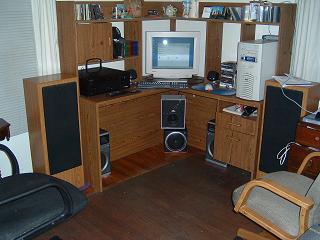
Here is how I acually have every thing set up for that computer. Click on the image. The yellow circles point out speaker locations, gold lines point out what speakers are connected to the Newq, and maroon lines point out which speakers go to the receiver. My space is very limited, I am in a very small room. Putting speakers futher to the sides or behind me wasn't an option. The speakers going to the Newq are acually my 2.1 speakers. As I said before that is my front channel and they work very well. I just wanted to show how I have things set up. There really isn't much I can say with out getting into all that audio jargon. The reason I won't go into all that is due to the fact that this web page was ment to be based around computers and their applications. Audio applications sounds like anouther web page I might have to take up sometime. With all that said, I'm pushing about 575 watts of total system power. It does sound nice and I hope it points out multimedia is anouther market I could excel in. Belive it or not, all of this would NOT cost you an arm and a leg if done correctly.