Samples  
 
 
These are some of the projects I have enjoyed designing using Print Artist 3.0. I will continue to add more, so please come back again. The graphics might take a minute to load. Please be patient.


Page 1: ** New **
Cards with 'shadow effect'
** New **
Cards using PCX graphics
Basic Thank You card
and Note paper

Page 2: ** New **
"Frame It"
"Simply Classic" A Set of Flowered Notecards
Page 3:
Previously displayed holiday items
Christmas Bookmarks
Download Template File
Assorted Gift Tags
Download Template File
Additional Gift Tags
Page 4:
Miscellaneous
Previously displayed
Valentine's Day Swap '97
** New **
Pet Swap '97
A sample of combining
PA graphic with a gif graphic
Page 5:
* New *Hints and misc. tech info
Print Artist Clipart Editor
PACE
Creating Startup Disks Vector & Rastor graphics


These greeting cards display the use of a 'shadow effect' on the graphics.
To create a 'shadow', duplicate the original graphic.
Change the coloring to your choice by using the 'Customize' feature on the drop down 'Color' selections.
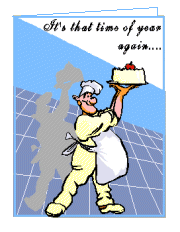

Birthday
In Example 1, the graphic, Chef w/Cake, was duplicated. The colors were changed to Grey 5. The 'shape', Receding Wave, was also used to give additional effect, and is rotated 10 degrees. Position the 'shadow' appropriately. Select both graphics and 'Group' for easy positioning and sizing on your layout.
Thanks
In Example 2, the graphic, Tea & Fruit, was duplicated. The colors were changed to Grey 5. The 'shape', Convex Up, was also used to give additional effect. Position the 'shadow' appropriately. Select both graphics and 'Group' for easy positioning and sizing on your layout.
A file in PA sign format with more samples and explanations is available for downloading.
This is a layout that I contributed to the Craftbook Swap in January '98. Click here.


Back to Top
of Page


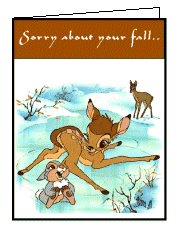
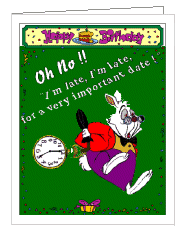
These greeting cards are examples of using PCX files in a PA layout.

Bambi front
Front:
Bambi is a PCX graphic. The text at the top is placed in a 'fill' of a color that compliments the graphic. A black 'frame' is maximized around the outside of the card for a finishing touch.
Rabbit front
Front:
The white rabbit is a PCX graphic.
The border is a third party gfx graphic.  


Back to Top
of Page


Remember your 'Thank You's' and keep in touch with notes
 
Create your basic 'Thank You' using the greeting card layout in PA.
This example is simple but elegant.

Thank You
Or keep in touch using 1/2 page note paper created using the sign layout in PA
2 notepapers can be made with one 8 1/2" X 11" sheet of paper using the landscape display.
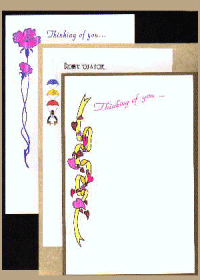
Notes
 
 
Back to Top
of Page


TurnPage
 
 
Please visit my main web page at:
http://www.geocities.com/Heartland/Plains/9644


Book
Please Sign My Guestbook

Guestbook by GuestWorld
View My Guestbook


Mailbox
You may send me an E-Mail


Page designed by


Thank you for being visitor # 
since June 11, 1998


This page hosted by Get your own Free Home Page


Hosted by www.Geocities.ws

1