|
Main page My Q3 maps Radeon 8500 stuff PCmods kit review Video cooling mod |
|
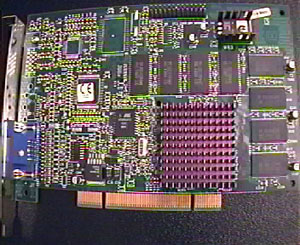
Well, I was going to put some introdution of sorts here, but i figured we could skip all the BS and cut straight to it lol. You dont need no stinkin' intro, right? Course not :P Today, I'm going to show you how to void your video card's warranty (and that's always fun, lol) by ripping the crappy stock heatsink off and replacing it with something better. Wait, isn't THIS an introduction? Oh well. The victim: |
|
|
My trusty 3DFX VooDoo3 2000 PCI. The stock heatsink works, sure, but thats all it does. Lets rip this sucker apart. Again, performing the mods depicted here WILL void whatever warranty you have. Also, I cannot be held responsible if you're a moron and ruin your card, so please use some common sense here folks. To get the stock heatsink off, I used a flathead screwdriver (I put masking tape on the blade so it wouldn't damage or scratch the PCB), and a can of compressed air (you can find these at any Wal-Mart or similar store). Hold the can upside down and spray on the back of the vid-card, right over the GPU. The compressed liquid thats in the can o' air will come out (this stuff is cold; don't touch it) and chill the GPU, heatsink, and the epoxy thats holding the heatsink on. This makes it a little easier to pop the heatsink off. After its chilled, just put the screwdriver between the PCB and the heatsink, and gently twist the screwdriver. The heatsink should pop right off. I've also heard that you can put the card in the freezer for a few minutes (put it in a plastic bag first) or warm it up by playing a graphic-intensive game for 30 minutes or so. All this does (using whatever meathod you want) is get the epoxy brittle or soft, which makes ripping the stock heatsink off a little easier. |
|
|
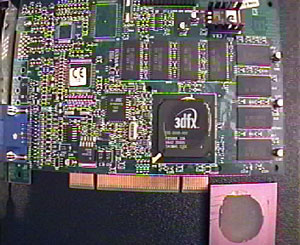
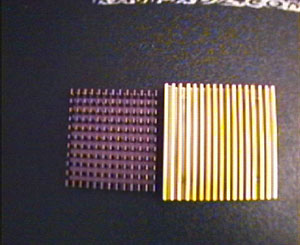
As you can see, there is some epoxy left on the GPU. Get a razor (no, not the kind you shave with), and scrape the stuff off. I also scraped the epoxy off of the stock heatsink, as I will use it in the future. You'll also notice some gouges in the bottom of the heatsink; I didnt do that today, I did it awhile ago. But anyhow...its time to get out your replacement heatsink. I found an old 486 HSF that'll do nicely. |
|
|
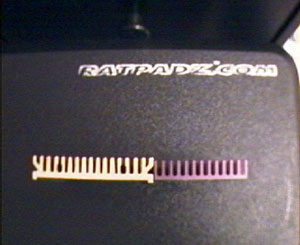
As you can see, its a little bit bigger, taller, and has more fins (also, the base is twice as thick). Its not a killer heatsink, but remember what this is going on. Now befor you glue the new heatsink on, you need to prep the surfaces for optimal heat transfer (oo, don't I sound smart? not really, lol...moving on). The heatsink I planned to glue on had some grooves in the base from the machining process (not to mention it wasn't flat), so I choose to lap both the stock and replacement heatsinks. (for those of you not in the know, lapping means "to dress, smooth, or polish (such as a metal surface) to a high degree of refinement or accuracy"*). Notice that there are little ridges that run down the two sides of the 486 heatsink. These had to be removed befor I could lap it. I used my Dremel tool with a cheap cut-off disc and kinda ground the ridges off (always wear eye protection when using a Dremel; those discs have a habit of breaking off and flying everywhere). The process of lapping a heatsink is simple enough, but somewhat time-consuming (depending on the finish you want). All you'll need is an assortment of wet-dry sandpaper (available from any auto-parts store for around $3), a flat surface to sand on (the bathroom counter or a glass table will work), and some masking tape to tape the sandpaper down. I have 220, 320, 400, 600, 800, 1500, and 2000 grit sandpapers (I'm in the process of painting my case, thats why I've got so many). Start out with the 320 or 220 grit. Tape the corners of the sandpaper to the counter, and put a little water on the paper. Get the bottom of your heatsink wet as well, and start sanding in a circular or figure '8' motion. Its also a good idea to rotate the heatsink 90 degrees every now and then. If the bottom of the heatsink wears evenly, good, you'll be done in no time. Otherwise, be prepared to sand for awhile lol. You could try even rougher papers if the heatsink isnt very flat, but I was stuck with 220, so thats what I used. Once the ENTIRE bottom of the heatsink is sanded (any grooves from the machining process should be gone, and you should be left with little swirls or fine lines now), move on to 400 and 600 grit papers. After sanding them for about 5 minutes each, you should be left with a flat and smooth surface. You can stop there if you want, or you can go for that mirror finish. Start with fine grit sandpapers (1000, 1500 and 2000 work good), and DRY sand the heatsink. You dont want to put much presure on the heatsink; you're just polishing all the fine lines out at this point. Here's what it should look like when it's done. Notice the edges are worn further than the rest of the heatsink; they wear down faster than the rest of the surface. Keep this in mind later on. |

|
|
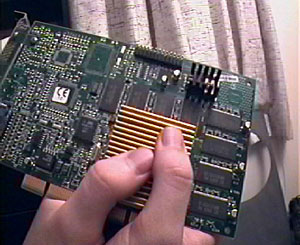
It's not the best finish, but you can see its highly polished (and flat) now. Now that the heatsink is done, you have to do something about the GPU! Get a credit card or something flat, and put the edge of it on top of the GPU. Hold it up to a light; this should show you quickly whether or not your GPU is flat. Mine was concave ("hollowed or rounded inward like the inside of a bowl"*), and needed to be sanded to flatten it out. You'll need something flat to put the sandpaper on, and the stock heatsink (which I lapped already) will work perfactly. Just wrap some 220 grit sandpaper around the heatsink (or whatever you are using, it just has to be small and FLAT), and dry sand the GPU in a circular motion. Blow the sandpaper and GPU off every once in awhile, and check every now and then (using the edge of a credit card like befor) to see if the GPU is flat or not. You'll want to stop sanding if you see that the GPU is flat, if you hit copper (which you shouldn't), or if the GPU starts to form a convex shape ("curved or rounded like the exterior of a sphere or circle"*). Remember the edges of the surface you're sanding tend to wear down faster than the middle; thats why you check often. Now that the surface of the replacement heatsink and GPU are flat, its time to test-fit your heatsink to get an idea of where it will go. It's OK if you can't get it perfectly centered on the GPU; as long as the heatsink covers the entire GPU surface, it'll be fine. Now go ahead and mix up your epoxy. I used Arctic Alumina thermal epoxy and diluted it with some Arctic Alumina thermal paste (the epoxy is permanent unless its diluted with thermal paste). I used 33% epoxy part 'A', 33% epoxy part 'B', and 33% Arctic Alumina thermal paste (or a 1:1:1 ratio). The epoxy will 'gel up' in 4-5 minutes, so don't slack off! But don't go so fast that you slop epoxy everywhere either lol. Cover the entire GPU in a thin layer of epoxy then set your heatsink on. You'll want to clamp it down with something so the heatsink and GPU make good contact (the instructions say you can put weight on the heatsink, but this tends to move the heatsink around). I just held the heatsink down with my hands for 15-20 minutes, like so: |
|
|
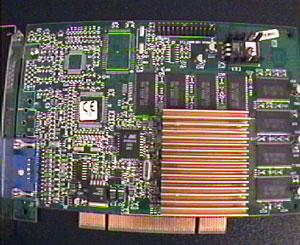
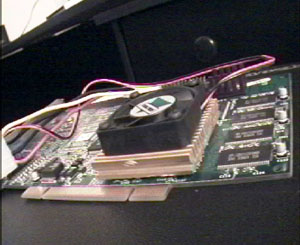
After 30 minutes or so, the epoxy should be cured enough to use the card, but you could let it sit overnight if you want to play it safe. Here are a couple of pics showing the finished product: |
|
|
And thats it! This mod applies to any vid-card that has a crappy epoxied-on HSF (like on my Radeon 8500 lol). Yes, the card worked fine afterwards. You can also stick the old heatsink on the back of the vid-card, over the GPU using thermal tape for even better cooling (i did this befor modding my V3 at got it up to 175 stable). Hope you enjoyed reading this article, and learned something useful. *definitions are from Webster.com |
|
Questions? Comments? E-mail me! |
![[H]ard|OCP](../images/hocp_logo.gif)


